
- Google Colab 教程
- Google Colab - 首頁
- Google Colab - 簡介
- 什麼是 Google Colab?
- 你的第一個 Colab 筆記本
- 程式碼文件化
- Google Colab - 儲存你的工作
- Google Colab - 共享筆記本
- 呼叫系統命令
- 執行外部 Python 檔案
- Google Colab - 圖形輸出
- Google Colab - 程式碼編輯幫助
- Google Colab - 魔法指令
- Google Colab - 新增表單
- Google Colab - 安裝機器學習庫
- Google Colab - 使用免費 GPU
- Google Colab - 總結
- Google Colab 有用資源
- Google Colab - 快速指南
- Google Colab - 有用資源
- Google Colab - 討論
Google Colab - 魔法指令
魔法指令是一組系統命令,提供了一種簡化的擴充套件命令語言。
魔法指令分為兩種型別:
行魔法指令
單元格魔法指令
顧名思義,行魔法指令包含一行命令,而單元格魔法指令則覆蓋整個程式碼單元的內容。
對於行魔法指令,命令字首為單個 % 字元;對於單元格魔法指令,命令字首為兩個 % 字元 (%%)。
讓我們透過一些示例來闡述這兩者。
行魔法指令
在你的程式碼單元格中輸入以下程式碼:
%ldir
你將看到你的本地目錄的內容,類似於以下內容:
drwxr-xr-x 3 root 4096 Jun 20 10:05 drive/
drwxr-xr-x 1 root 4096 May 31 16:17 sample_data/
嘗試以下命令:
%history
這將顯示你之前執行過的所有命令的歷史記錄。
單元格魔法指令
在你的程式碼單元格中輸入以下程式碼:
%%html
<marquee style='width: 50%; color: Green;'>Welcome to Tutorialspoint!</marquee>
現在,如果你執行程式碼,你將看到螢幕上滾動顯示歡迎訊息,如下所示:

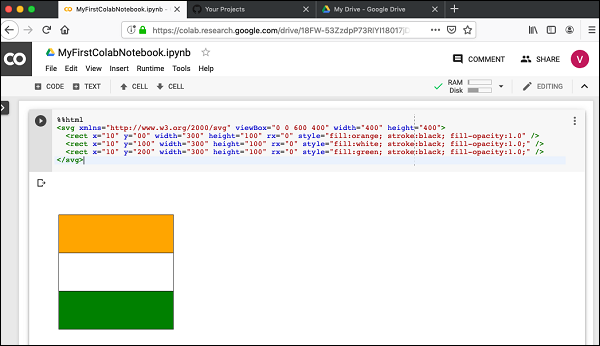
以下程式碼會將 SVG 新增到你的文件中。
%%html
<svg xmlns="https://www.w3.org/2000/svg" viewBox="0 0 600 400" width="400" height="400">
   <rect x="10" y="00" width="300" height="100" rx="0" style="fill:orange; stroke:black; fill-opacity:1.0" />
   <rect x="10" y="100" width="300" height="100" rx="0" style="fill:white; stroke:black; fill-opacity:1.0;" />
   <rect x="10" y="200" width="300" height="100" rx="0" style="fill:green; stroke:black; fill-opacity:1.0;" />
</svg>
如果你執行程式碼,你將看到以下輸出:
魔法指令列表
要獲取支援的魔法指令的完整列表,請執行以下命令:
%lsmagic
你將看到以下輸出:
Available line magics:
%alias %alias_magic %autocall %automagic %autosave %bookmark %cat %cd %clear
%colors %config %connect_info %cp %debug %dhist %dirs %doctest_mode %ed %edit
%env %gui %hist %history %killbgscripts %ldir %less %lf %lk %ll %load %load_ext
%loadpy %logoff %logon %logstart %logstate %logstop %ls %lsmagic %lx %macro
%magic %man %matplotlib %mkdir %more %mv %notebook %page %pastebin %pdb %pdef
%pdoc %pfile %pinfo %pinfo2 %pip %popd %pprint %precision %profile %prun
%psearch %psource %pushd %pwd %pycat %pylab %qtconsole %quickref %recall
%rehashx %reload_ext %rep %rerun %reset %reset_selective %rm %rmdir %run %save
%sc %set_env %shell %store %sx %system %tb %tensorflow_version %time %timeit
%unalias %unload_ext %who %who_ls %whos %xdel %xmode

Available cell magics:
%%! %%HTML %%SVG %%bash %%bigquery %%capture %%debug %%file %%html %%javascript
%%js %%latex %%perl %%prun %%pypy %%python %%python2 %%python3 %%ruby %%script
%%sh %%shell %%svg %%sx %%system %%time %%timeit %%writefile

Automagic is ON, % prefix IS NOT needed for line magics.
接下來,你將學習 Colab 中另一個強大的功能,即在執行時設定程式變數。
廣告