
- Angular 6 教程
- Angular 6 - 首頁
- Angular 6 - 概述
- Angular 6 - 環境搭建
- Angular 6 - 專案設定
- Angular 6 - 元件
- Angular 6 - 模組
- Angular 6 - 資料繫結
- Angular 6 - 事件繫結
- Angular 6 - 模板
- Angular 6 - 指令
- Angular 6 - 管道
- Angular 6 - 路由
- Angular 6 - 服務
- Angular 6 - Http 服務
- Angular 6 - Http 客戶端
- Angular 6 - 表單
- Angular 6 - 動畫
- Angular 6 - 材料設計
- Angular 6 - CLI
- Angular 6 有用資源
- Angular 6 - 快速指南
- Angular 6 - 有用資源
- Angular 6 - 討論
Angular 6 - 指令
Angular 中的指令是一個js類,宣告為@directive。Angular 中有 3 種指令。指令列出如下:
元件指令
這些構成了主類,包含了元件如何在執行時被處理、例項化和使用。
結構指令
結構指令主要用於操作 DOM 元素。結構指令在指令前有一個 * 號。例如,*ngIf 和 *ngFor。
屬性指令
屬性指令用於更改 DOM 元素的外觀和行為。您可以建立自己的指令,如下所示。
如何建立自定義指令?
在本節中,我們將討論在元件中使用的自定義指令。自定義指令是我們建立的,不是標準指令。
讓我們看看如何建立自定義指令。我們將使用命令列建立指令。使用命令列建立指令的命令是:
ng g directive nameofthedirective
e.g
ng g directive changeText
這是它在命令列中的顯示方式
C:\projectA6\Angular6App>ng g directive changeText
CREATE src/app/change-text.directive.spec.ts (241 bytes)
CREATE src/app/change-text.directive.ts (149 bytes)
UPDATE src/app/app.module.ts (486 bytes)
以上檔案,即 change-text.directive.spec.ts 和 change-text.directive.ts 被建立,並且 app.module.ts 檔案被更新。
app.module.ts
import { BrowserModule } from '@angular/platform-browser';
import { NgModule } from '@angular/core';
import { AppComponent } from './app.component';
import { NewCmpComponent } from './new-cmp/new-cmp.component';
import { ChangeTextDirective } from './change-text.directive';
@NgModule({
   declarations: [
      AppComponent,
      NewCmpComponent,
      ChangeTextDirective
   ],
   imports: [
      BrowserModule
   ],
   providers: [],
   bootstrap: [AppComponent]
})
export class AppModule { }
ChangeTextDirective 類包含在上述檔案中的宣告中。該類也從下面給出的檔案中匯入。
change-text.directive
import { Directive } from '@angular/core';
@Directive({
   selector: '[appChangeText]'
})
export class ChangeTextDirective {
   constructor() { }
}
以上檔案包含一個指令,並且它還有一個選擇器屬性。我們在選擇器中定義的內容必須與我們在檢視中分配自定義指令的位置相匹配。
在 app.component.html 檢視中,讓我們新增如下指令:
<div style = "text-align:center">
   <span appChangeText >Welcome to {{title}}.</span>
</div>
我們將如下修改 change-text.directive.ts 檔案:
change-text.directive.ts
import { Directive, ElementRef} from '@angular/core';
@Directive({
   selector: '[appChangeText]'
})
export class ChangeTextDirective {
   constructor(Element: ElementRef) {
      console.log(Element);
      Element.nativeElement.innerText = "Text is changed by changeText Directive. ";
   }
}
在上述檔案中,有一個名為 ChangeTextDirective 的類和一個建構函式,它接收型別為 ElementRef 的元素,這是必需的。該元素包含應用 Change Text 指令的所有詳細資訊。
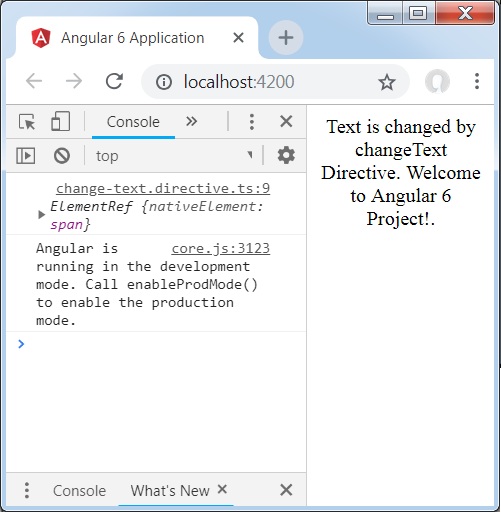
我們添加了 console.log 元素。可以在瀏覽器控制檯中看到其輸出。元素的文字也如上所示更改。
現在,瀏覽器將顯示以下內容。
廣告