
- SwiftUI 教程
- SwiftUI - 首頁
- SwiftUI - 概述
- SwiftUI vs UIKit
- SwiftUI 環境
- SwiftUI - 環境設定
- SwiftUI - 基本元件
- SwiftUI - 建立第一個應用程式
- SwiftUI 檢視
- SwiftUI - 檢視
- SwiftUI - 自定義文字檢視
- SwiftUI - 自定義影像檢視
- SwiftUI - 堆疊
- SwiftUI 繪製形狀
- SwiftUI - 形狀
- SwiftUI - 繪製直線
- SwiftUI - 繪製矩形
- SwiftUI - 繪製圓角矩形
- SwiftUI - 繪製三角形
- SwiftUI - 繪製圓形
- SwiftUI - 繪製五角星
- SwiftUI - 繪製多邊形
- SwiftUI - 繪製餅圖
- SwiftUI - 使用內建形狀
- SwiftUI - 文字
- SwiftUI - 文字檢視
- SwiftUI - 文字輸入和輸出
- SwiftUI - 顏色
- SwiftUI - 顏色
- SwiftUI - 顏色選擇器
- SwiftUI - 漸變
- SwiftUI - 調整顏色
- SwiftUI - 特效
- SwiftUI - 特效
- SwiftUI - 混合特效
- SwiftUI - 模糊特效
- SwiftUI - 陰影特效
- SwiftUI - 懸停特效
- SwiftUI - 動畫
- SwiftUI - 動畫
- SwiftUI - 建立動畫
- SwiftUI - 建立顯式動畫
- SwiftUI - 多個動畫
- SwiftUI - 轉場動畫
- SwiftUI - 非對稱轉場動畫
- SwiftUI - 自定義轉場動畫
- SwiftUI - 圖片
- SwiftUI - 影像
- SwiftUI - 圖片作為背景
- SwiftUI - 旋轉影像
- SwiftUI - 媒體
- SwiftUI - 檢視佈局
- SwiftUI - 檢視佈局
- SwiftUI - 檢視大小
- SwiftUI - 檢視間距
- SwiftUI - 檢視填充
- SwiftUI - 列表和表格
- SwiftUI - 列表
- SwiftUI - 靜態列表
- SwiftUI - 動態列表
- SwiftUI - 自定義列表
- SwiftUI - 表格
- SwiftUI - 表單
- SwiftUI - 表單
- SwiftUI - 將表單分成多個部分
- SwiftUI 有用資源
- SwiftUI - 有用資源
- SwiftUI - 討論
SwiftUI - 繪製五角星
五角星是一種形狀,類似於宇宙中的星星。它是一個封閉的形狀,透過連線正多邊形的非相鄰頂點建立。在 SwiftUI 中,五角星形狀用於評分系統中表示評分,在書籤系統中標記收藏項,也可以用於指示各種狀態或成就。
它也用於導航等。它還有助於為 Apple 的應用程式建立引人入勝且具有吸引力的使用者介面。
在 SwiftUI 中繪製五角星形狀
SwiftUI 沒有提供任何直接建立五角星形狀的內建方法,因此我們將在此討論如何藉助 path(in:) 和 addLine(to:) 方法建立自定義五角星形狀。此處,path(in:) 方法用於計算五角星的點,而 addLine(to:) 方法用於透過繪製線將它們連線起來。
語法
以下是語法:
addLine(to end: CGPoint)
引數
end:此引數表示線段端點在使用者空間座標中的位置。
按照以下步驟在 SwiftUI 中繪製五角星:
在 SwiftUI 中繪製五角星的步驟
步驟 1:定義五角星的形狀
建立一個符合 Shape 協議的五角星形狀結構體。在這個結構體中,我們實現 path(in:) 和 addLine(to:) 方法來查詢點並連線它們。
struct MyStar: Shape {
   func path(in rect: CGRect) -> Path {
      let Scenter = CGPoint(x: rect.width / 2, y: rect.height / 2)
      let StarVertices = 5
      let SinnerRadius = rect.width / 5
      let SouterRadius = rect.width / 2

      var path = Path()

      let AIncrement = .pi * 2 / CGFloat(StarVertices)
      let halfAngleIncrement = AIncrement / 2

      for p in 0..<StarVertices {
         let angle = CGFloat(p) * AIncrement
         let outerPoint = CGPoint(
            x: Scenter.x + cos(angle) * SouterRadius, y: Scenter.y + sin(angle) * SouterRadius)
         let innerPoint = CGPoint(
            x: Scenter.x + cos(angle + halfAngleIncrement) * SinnerRadius,
            y: Scenter.y + sin(angle + halfAngleIncrement) * SinnerRadius)

         if p == 0 {
            path.move(to: outerPoint)
         } else {
            path.addLine(to: outerPoint)
         }

         path.addLine(to: innerPoint)
      }

      path.closeSubpath()

      return path
   }
}
步驟 2:在檢視中指定五角星形狀
現在將五角星形狀結構體插入 ContentView 以在螢幕上顯示該形狀。
struct ContentView: View {
   var body: some View {
      VStack {
         MyStar()
      }
   }
}
步驟 3:自定義五角星形狀
我們可以藉助 SwiftUI 提供的各種修飾符(例如 fill()、frame()、background() 等)來自定義五角星形狀。
struct ContentView: View {
   var body: some View {
      VStack {
         MyStar()
           .fill(Color.pink)
           .frame(width: 150, height: 150)
           .background(Color.yellow)
           .clipShape(Circle())
      }
   }
}
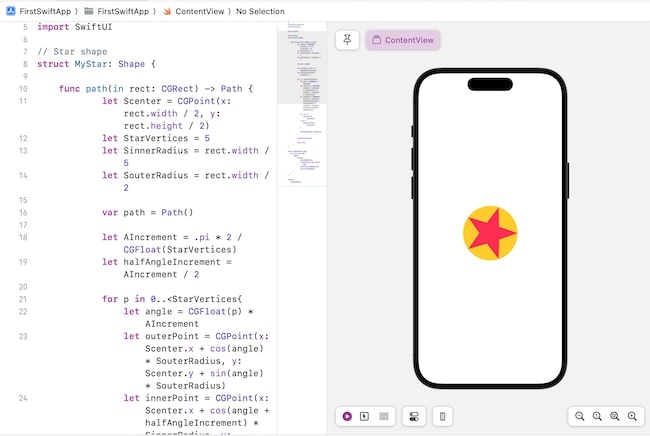
示例 1
以下 SwiftUI 程式用於繪製具有圓形背景的五角星形狀。
import SwiftUI

// Star shape
struct MyStar: Shape {

  func path(in rect: CGRect) -> Path {
    let Scenter = CGPoint(x: rect.width / 2, y: rect.height / 2)
    let StarVertices = 5
    let SinnerRadius = rect.width / 5
    let SouterRadius = rect.width / 2

    var path = Path()

    let AIncrement = .pi * 2 / CGFloat(StarVertices)
    let halfAngleIncrement = AIncrement / 2

    for p in 0..<StarVertices {
      let angle = CGFloat(p) * AIncrement
      let outerPoint = CGPoint(
        x: Scenter.x + cos(angle) * SouterRadius, y: Scenter.y + sin(angle) * SouterRadius)
      let innerPoint = CGPoint(
        x: Scenter.x + cos(angle + halfAngleIncrement) * SinnerRadius,
        y: Scenter.y + sin(angle + halfAngleIncrement) * SinnerRadius)

      if p == 0 {
         path.move(to: outerPoint)
      } else {
         path.addLine(to: outerPoint)
      }
       path.addLine(to: innerPoint)
    }
    path.closeSubpath()
    return path
  }
}
struct ContentView: View {
   var body: some View {
      VStack {
         MyStar()
            .fill(Color.pink)
            .frame(width: 150, height: 150)
            .background(Color.yellow)
            .clipShape(Circle())
      }
   }
}

#Preview {
   ContentView()
}
輸出
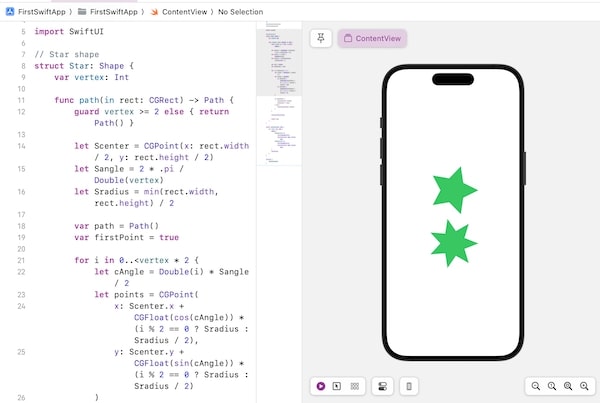
示例 2
以下 SwiftUI 程式用於繪製具有不同頂點數的多個五角星形狀。
import SwiftUI

// Star shape
struct Star: Shape {
   var vertex: Int

   func path(in rect: CGRect) -> Path {
      guard vertex >= 2 else { return Path() }

      let Scenter = CGPoint(x: rect.width / 2, y: rect.height / 2)
      let Sangle = 2 * .pi / Double(vertex)
      let Sradius = min(rect.width, rect.height) / 2

      var path = Path()
      var firstPoint = true

      for i in 0..<vertex * 2 {
         let cAngle = Double(i) * Sangle / 2
         let points = CGPoint(
            x: Scenter.x + CGFloat(cos(cAngle)) * (i % 2 == 0 ? Sradius : Sradius / 2),
            y: Scenter.y + CGFloat(sin(cAngle)) * (i % 2 == 0 ? Sradius : Sradius / 2)
         )

         if firstPoint {
            path.move(to: points)
            firstPoint = false
         } else {
            path.addLine(to: points)
         }
      }

      path.closeSubpath()

      return path
   }
}

struct ContentView: View {
   var body: some View {
      VStack {
         Star(vertex: 5)
            .fill(Color.green)
            .frame(width: 150, height: 150)
         Star(vertex: 7)
            .fill(Color.green)
            .frame(width: 150, height: 150)
      }.padding()
   }
}
#Preview {
   ContentView()
}
輸出
廣告