
- Struts 2 教程
- Struts 2 - 首頁
- Struts 2 - 基本MVC架構
- Struts 2 - 概述
- Struts 2 - 環境搭建
- Struts 2 - 架構
- Struts 2 - 示例
- Struts 2 - 配置
- Struts 2 - Action
- Struts 2 - 攔截器
- Struts 2 - 結果型別
- Struts 2 - 值棧/OGNL
- Struts 2 - 檔案上傳
- Struts 2 - 資料庫訪問
- Struts 2 - 傳送郵件
- Struts 2 - 驗證
- Struts 2 - 國際化
- Struts 2 - 型別轉換
- Struts 2 - 主題/模板
- Struts 2 - 異常處理
- Struts 2 - 註解
- Struts 2 整合
- Struts 2 - Spring
- Struts 2 - Tiles
- Struts 2 - Hibernate
- Struts 2 有用資源
- Struts 2 - 問答
- Struts 2 - 快速指南
- Struts 2 - 有用資源
- Struts 2 - 討論
Struts 2 - 驗證框架
本章我們將深入探討Struts驗證框架。在Struts核心,我們有一個驗證框架,它幫助應用程式在執行action方法之前執行規則進行驗證。
客戶端驗證通常使用Javascript實現。但是,不應該只依賴客戶端驗證。最佳實踐建議應該在應用程式框架的各個級別引入驗證。現在讓我們看看在Struts專案中新增驗證的兩種方法。
這裡,我們將以一個員工為例,其姓名和年齡應使用一個簡單的頁面捕獲,我們將進行這兩個驗證,以確保使用者始終輸入姓名和年齡,年齡應在28到65之間。
讓我們從示例的主JSP頁面開始。
建立主頁面
讓我們編寫主頁面JSP檔案index.jsp,它將用於收集上面提到的與員工相關的資訊。
<%@ page language = "java" contentType = "text/html; charset = ISO-8859-1"
   pageEncoding = "ISO-8859-1"%>
<%@ taglib prefix = "s" uri = "/struts-tags"%>
<!DOCTYPE html PUBLIC "-//W3C//DTD HTML 4.01 Transitional//EN"
   "http://www.w3.org/TR/html4/loose.dtd">

<html>
   <head>
      <title>Employee Form</title>
   </head>

   <body>
      <s:form action = "empinfo" method = "post">
         <s:textfield name = "name" label = "Name" size = "20" />
         <s:textfield name = "age" label = "Age" size = "20" />
         <s:submit name = "submit" label = "Submit" align="center" />
      </s:form>
   </body>
</html>
index.jsp使用了Struts標籤,我們還沒有介紹,但我們將在相關的標籤章節中學習它們。但現在,只需假設s:textfield標籤列印一個輸入欄位,s:submit列印一個提交按鈕。我們為每個標籤使用了label屬性,它為每個標籤建立標籤。
建立檢視
我們將使用JSP檔案success.jsp,如果定義的action返回SUCCESS,則將呼叫該檔案。
<%@ page language = "java" contentType = "text/html; charset = ISO-8859-1"
   pageEncoding = "ISO-8859-1"%>
<%@ taglib prefix = "s" uri = "/struts-tags"%>
<!DOCTYPE html PUBLIC "-//W3C//DTD HTML 4.01 Transitional//EN"
   "http://www.w3.org/TR/html4/loose.dtd">

<html>
   <head>
      <title>Success</title>
   </head>

   <body>
      Employee Information is captured successfully.
   </body>
</html>
建立Action
因此,讓我們定義一個小的action類Employee,然後新增一個名為validate()的方法,如下所示,在Employee.java檔案中。確保你的action類擴充套件了ActionSupport類,否則你的validate方法將不會執行。
package com.tutorialspoint.struts2;

import com.opensymphony.xwork2.ActionSupport;

public class Employee extends ActionSupport {
   private String name;
   private int age;

   public String execute() {
       return SUCCESS;
   }

   public String getName() {
       return name;
   }

   public void setName(String name) {
       this.name = name;
   }

   public int getAge() {
       return age;
   }

   public void setAge(int age) {
       this.age = age;
   }

   public void validate() {
      if (name == null || name.trim().equals("")) {
         addFieldError("name","The name is required");
      }

      if (age < 28 || age > 65) {
         addFieldError("age","Age must be in between 28 and 65");
      }
   }
}
如上例所示,驗證方法檢查“姓名”欄位是否有值。如果沒有提供值,我們將為“姓名”欄位新增一個欄位錯誤,並顯示自定義錯誤訊息。其次,我們檢查“年齡”欄位的輸入值是否在28到65之間,如果不滿足此條件,我們將在驗證欄位上方新增錯誤。
配置檔案
最後,讓我們使用struts.xml配置檔案將所有內容放在一起,如下所示:
<?xml version = "1.0" Encoding = "UTF-8"?>
<!DOCTYPE struts PUBLIC
   "-//Apache Software Foundation//DTD Struts Configuration 2.0//EN"
   "http://struts.apache.org/dtds/struts-2.0.dtd">

<struts>
   <constant name = "struts.devMode" value = "true" />
   <package name = "helloworld" extends = "struts-default">

      <action name = "empinfo"
         class = "com.tutorialspoint.struts2.Employee"
         method = "execute">
         <result name = "input">/index.jsp</result>
         <result name = "success">/success.jsp</result>
      </action>

   </package>
</struts>
以下是web.xml檔案的內容:
<?xml version = "1.0" Encoding = "UTF-8"?>
<web-app xmlns:xsi = "http://www.w3.org/2001/XMLSchema-instance"
   xmlns = "http://java.sun.com/xml/ns/javaee"
   xmlns:web = "http://java.sun.com/xml/ns/javaee/web-app_2_5.xsd"
   xsi:schemaLocation = "http://java.sun.com/xml/ns/javaee
   http://java.sun.com/xml/ns/javaee/web-app_3_0.xsd"
   id = "WebApp_ID" version = "3.0">

   <display-name>Struts 2</display-name>

   <welcome-file-list>
      <welcome-file>index.jsp</welcome-file>
   </welcome-file-list>

   <filter>
      <filter-name>struts2</filter-name>
      <filter-class>
         org.apache.struts2.dispatcher.FilterDispatcher
      </filter-class>
   </filter>

   <filter-mapping>
      <filter-name>struts2</filter-name>
      <url-pattern>/*</url-pattern>
   </filter-mapping>
</web-app>
現在,右鍵單擊專案名稱,然後單擊匯出 > WAR檔案以建立WAR檔案。然後將此WAR部署到Tomcat的webapps目錄中。最後,啟動Tomcat伺服器並嘗試訪問URL https://:8080/HelloWorldStruts2/index.jsp。這將產生以下螢幕:

現在不要輸入任何必需資訊,只需單擊提交按鈕。你將看到以下結果:
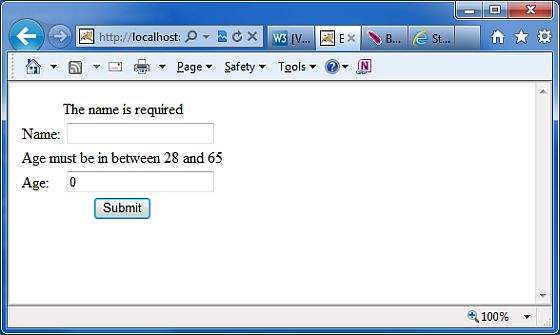
輸入所需資訊,但輸入錯誤的欄位,例如姓名為“test”年齡為30,最後單擊提交按鈕。你將看到以下結果:

此驗證如何工作?
當用戶按下提交按鈕時,Struts 2將自動執行validate方法,如果方法內列出的任何“if”語句為真,Struts 2將呼叫其addFieldError方法。如果添加了任何錯誤,則Struts 2將不會繼續呼叫execute方法。相反,Struts 2框架將返回input作為呼叫action的結果。
因此,當驗證失敗且Struts 2返回input時,Struts 2框架將重新顯示index.jsp檔案。由於我們使用了Struts 2表單標籤,Struts 2將自動在表單欄位上方新增錯誤訊息。
這些錯誤訊息是我們addFieldError方法呼叫中指定的錯誤訊息。addFieldError方法接受兩個引數。第一個是表單欄位名稱,錯誤適用於該名稱,第二個是在該表單欄位上方顯示的錯誤訊息。
addFieldError("name","The name is required");
為了處理input的返回值,我們需要在struts.xml中的action節點中新增以下結果。
<result name = "input">/index.jsp</result>
基於XML的驗證
進行驗證的第二種方法是將xml檔案放在action類旁邊。Struts 2基於XML的驗證提供了更多驗證選項,例如電子郵件驗證、整數範圍驗證、表單驗證欄位、表示式驗證、正則表示式驗證、必需驗證、requiredstring驗證、stringlength驗證等。
xml檔案需要命名為'[action-class]'-validation.xml。因此,在本例中,我們建立一個名為Employee-validation.xml的檔案,其內容如下:
<!DOCTYPE validators PUBLIC
   "-//OpenSymphony Group//XWork Validator 1.0.2//EN"
   "http://www.opensymphony.com/xwork/xwork-validator-1.0.2.dtd">

<validators>
   <field name = "name">
      <field-validator type = "required">
         <message>
            The name is required.
         </message>
      </field-validator>
   </field>

   <field name = "age">
     <field-validator type = "int">
         <param name = "min">29</param>
         <param name = "max">64</param>
         <message>
            Age must be in between 28 and 65
         </message>
      </field-validator>
   </field>
</validators>
上面的XML檔案應理想情況下與類檔案一起儲存在你的CLASSPATH中。讓我們將我們的Employee action類設定為如下所示,沒有validate()方法:
package com.tutorialspoint.struts2;

import com.opensymphony.xwork2.ActionSupport;

public class Employee extends ActionSupport{
   private String name;
   private int age;

   public String execute() {
       return SUCCESS;
   }

   public String getName() {
       return name;
   }

   public void setName(String name) {
       this.name = name;
   }

   public int getAge() {
       return age;
   }

   public void setAge(int age) {
       this.age = age;
   }
}
其餘設定與之前的示例相同,現在如果你執行應用程式,它將產生與我們在前一個示例中獲得的相同結果。
使用xml檔案儲存配置的優點是可以將驗證與應用程式程式碼分離。你可以讓開發人員編寫程式碼,讓業務分析師建立驗證xml檔案。需要注意的另一件事是預設情況下可用的驗證器型別。
Struts預設提供了許多其他驗證器。常見的驗證器包括日期驗證器、正則表示式驗證器和字串長度驗證器。請檢視以下連結瞭解更多詳情 Struts - 基於XML的驗證器。