
- Struts 2 教程
- Struts2 - 首頁
- Struts2 - 基本MVC架構
- Struts2 - 概述
- Struts2 - 環境搭建
- Struts2 - 架構
- Struts2 - 例子
- Struts2 - 配置
- Struts2 - Action
- Struts2 - 攔截器
- Struts2 - 結果型別
- Struts2 - 值棧/OGNL
- Struts2 - 檔案上傳
- Struts 2 - 資料庫訪問
- Struts2 - 傳送郵件
- Struts2 - 驗證
- Struts2 - 本地化
- Struts2 - 型別轉換
- Struts2 - 主題/模板
- Struts2 - 異常處理
- Struts2 - 註解
- Struts 2 標籤
- Struts2 - 控制標籤
- Struts2 - 資料標籤
- Struts2 - 表單標籤
- Struts2 - Ajax標籤
- Struts 2 整合
- Struts2 - Spring
- Struts2 - Tiles
- Struts2 - Hibernate
- Struts 2 有用資源
- Struts2 - 問答
- Struts2 - 快速指南
- Struts2 - 有用資源
- Struts2 - 討論
Struts 2 - 資料庫訪問
本章將透過簡單的步驟教你如何使用Struts 2訪問資料庫。Struts是一個MVC框架,而不是資料庫框架,但它為JPA/Hibernate整合提供了良好的支援。我們將在後面的章節中介紹Hibernate整合,但在本章中,我們將使用普通的JDBC來訪問資料庫。
本章的第一步是設定和準備我們的資料庫。我在這裡使用MySQL作為資料庫示例。我的機器上已經安裝了MySQL,並且我建立了一個名為“struts_tutorial”的新資料庫。我建立了一個名為login的表並用一些值填充它。以下是用於建立和填充表的指令碼。
我的MySQL資料庫使用預設使用者名稱“root”和密碼“root123”。
CREATE TABLE `struts_tutorial`.`login` (
   `user` VARCHAR( 10 ) NOT NULL ,
   `password` VARCHAR( 10 ) NOT NULL ,
   `name` VARCHAR( 20 ) NOT NULL ,
   PRIMARY KEY ( `user` )
) ENGINE = InnoDB;

INSERT INTO `struts_tutorial`.`login` (`user`, `password`, `name`)
VALUES ('scott', 'navy', 'Scott Burgemott');
下一步是下載MySQL Connector jar檔案,並將此檔案放入專案的WEB-INF\lib資料夾中。完成此操作後,我們就可以建立Action類了。
建立Action
Action類具有與資料庫表中的列相對應的屬性。我們有user、password和name作為String屬性。在action方法中,我們使用user和password引數來檢查使用者是否存在,如果存在,則在下一個螢幕中顯示使用者名稱。
如果使用者輸入的資訊錯誤,我們將他們再次傳送到登入螢幕。
以下是LoginAction.java檔案的內容:
package com.tutorialspoint.struts2;

import java.sql.Connection;
import java.sql.DriverManager;
import java.sql.PreparedStatement;
import java.sql.ResultSet;

import com.opensymphony.xwork2.ActionSupport;

public class LoginAction extends ActionSupport {

   private String user;
   private String password;
   private String name;

   public String execute() {
      String ret = ERROR;
      Connection conn = null;

      try {
         String URL = "jdbc:mysql:///struts_tutorial";
         Class.forName("com.mysql.jdbc.Driver");
         conn = DriverManager.getConnection(URL, "root", "root123");
         String sql = "SELECT name FROM login WHERE";
         sql+=" user = ? AND password = ?";
         PreparedStatement ps = conn.prepareStatement(sql);
         ps.setString(1, user);
         ps.setString(2, password);
         ResultSet rs = ps.executeQuery();

         while (rs.next()) {
            name = rs.getString(1);
            ret = SUCCESS;
         }
      } catch (Exception e) {
         ret = ERROR;
      } finally {
         if (conn != null) {
            try {
               conn.close();
            } catch (Exception e) {
            }
         }
      }
      return ret;
   }

   public String getUser() {
      return user;
   }

   public void setUser(String user) {
      this.user = user;
   }

   public String getPassword() {
      return password;
   }

   public void setPassword(String password) {
      this.password = password;
   }

   public String getName() {
      return name;
   }

   public void setName(String name) {
      this.name = name;
   }
}
建立主頁
現在,讓我們建立一個JSP檔案index.jsp來收集使用者名稱和密碼。此使用者名稱和密碼將與資料庫進行檢查。
<%@ page language = "java" contentType = "text/html; charset = ISO-8859-1"
   pageEncoding = "ISO-8859-1"%>
<%@ taglib prefix = "s" uri = "/struts-tags"%>
<!DOCTYPE html PUBLIC "-//W3C//DTD HTML 4.01 Transitional//EN"
   "http://www.w3.org/TR/html4/loose.dtd">

<html>
   <head>
      <title>Login</title>
   </head>

   <body>
      <form action = "loginaction" method = "post">
         User:<br/><input type = "text" name = "user"/><br/>
         Password:<br/><input type = "password" name = "password"/><br/>
         <input type = "submit" value = "Login"/>
      </form>
   </body>
</html>
建立檢視
現在讓我們建立success.jsp檔案,如果action返回SUCCESS,則將呼叫此檔案,但是如果action返回ERROR,我們將有另一個檢視檔案。
<%@ page contentType = "text/html; charset = UTF-8" %>
<%@ taglib prefix = "s" uri = "/struts-tags" %>

<html>
   <head>
      <title>Successful Login</title>
   </head>

   <body>
      Hello World, <s:property value = "name"/>
   </body>
</html>
如果action返回ERROR,則檢視檔案error.jsp如下所示:
<%@ page contentType = "text/html; charset = UTF-8" %>
<%@ taglib prefix = "s" uri = "/struts-tags" %>

<html>
   <head>
      <title>Invalid User Name or Password</title>
   </head>

   <body>
      Wrong user name or password provided.
   </body>
</html>
配置檔案
最後,讓我們使用struts.xml配置檔案將所有內容整合在一起,如下所示:
<?xml version = "1.0" Encoding = "UTF-8"?>
<!DOCTYPE struts PUBLIC
   "-//Apache Software Foundation//DTD Struts Configuration 2.0//EN"
   "http://struts.apache.org/dtds/struts-2.0.dtd">

<struts>
   <constant name = "struts.devMode" value = "true" />
   <package name = "helloworld" extends = "struts-default">

      <action name = "loginaction"
         class = "com.tutorialspoint.struts2.LoginAction"
         method = "execute">
         <result name = "success">/success.jsp</result>
         <result name = "error">/error.jsp</result>
      </action>

   </package>
</struts>
以下是web.xml檔案的內容:
<?xml version = "1.0" Encoding = "UTF-8"?>
<web-app xmlns:xsi = "http://www.w3.org/2001/XMLSchema-instance"
   xmlns = "http://java.sun.com/xml/ns/javaee"
   xmlns:web = "http://java.sun.com/xml/ns/javaee/web-app_2_5.xsd"
   xsi:schemaLocation = "http://java.sun.com/xml/ns/javaee
   http://java.sun.com/xml/ns/javaee/web-app_3_0.xsd"
   id = "WebApp_ID" version = "3.0">

   <display-name>Struts 2</display-name>

   <welcome-file-list>
      <welcome-file>index.jsp</welcome-file>
   </welcome-file-list>

   <filter>
      <filter-name>struts2</filter-name>
      <filter-class>
         org.apache.struts2.dispatcher.FilterDispatcher
      </filter-class>
   </filter>

   <filter-mapping>
      <filter-name>struts2</filter-name>
      <url-pattern>/*</url-pattern>
   </filter-mapping>
</web-app>
現在,右鍵單擊專案名稱,然後單擊匯出 > WAR檔案以建立WAR檔案。然後將此WAR部署到Tomcat的webapps目錄中。最後,啟動Tomcat伺服器並嘗試訪問URL https://:8080/HelloWorldStruts2/index.jsp。這將產生以下螢幕:
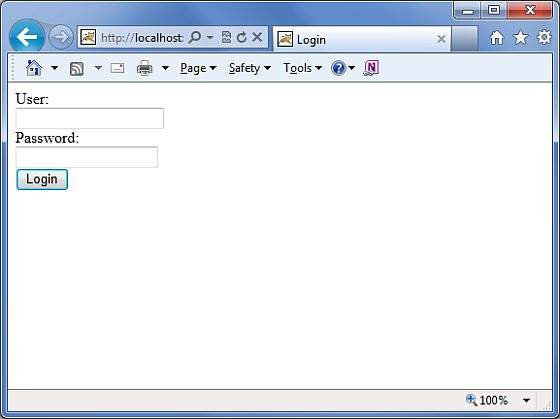
輸入錯誤的使用者名稱和密碼。你應該看到下一頁。

現在輸入scott作為使用者名稱,navy作為密碼。你應該看到下一頁。
