
- Struts 2 教程
- Struts2 - 首頁
- Struts2 - 基本 MVC 架構
- Struts2 - 概述
- Struts2 - 環境設定
- Struts2 - 架構
- Struts2 - 示例
- Struts2 - 配置
- Struts2 - Action
- Struts2 - 攔截器
- Struts2 - 結果型別
- Struts2 - 值棧/OGNL
- Struts2 - 檔案上傳
- Struts2 - 資料庫訪問
- Struts2 - 傳送郵件
- Struts2 - 驗證
- Struts2 - 本地化
- Struts2 - 型別轉換
- Struts2 - 主題/模板
- Struts2 - 異常處理
- Struts2 - 註解
- Struts 2 標籤
- Struts2 - 控制標籤
- Struts2 - 資料標籤
- Struts2 - 表單標籤
- Struts2 - Ajax 標籤
- Struts 2 整合
- Struts2 - Spring
- Struts2 - Tiles
- Struts2 - Hibernate
- Struts 2 有用資源
- Struts2 - 問題與解答
- Struts2 - 快速指南
- Struts2 - 有用資源
- Struts2 - 討論
Struts2 - 本地化與國際化 (i18n)
國際化 (i18n) 是規劃和實施產品和服務的流程,以便它們可以輕鬆地適應特定的本地語言和文化,此過程稱為本地化。國際化過程稱為翻譯或本地化啟用。
國際化縮寫為i18n,因為該詞以字母“i”開頭,以“n”結尾,並且在第一個 i 和最後一個 n 之間有 18 個字元。
Struts2 透過資源包、攔截器和標籤庫在以下位置提供本地化,即國際化 (i18n) 支援 -
UI 標籤
訊息和錯誤。
在 Action 類中。
資源包
Struts2 使用資源包為 Web 應用程式的使用者提供多種語言和區域設定選項。您無需擔心用不同的語言編寫頁面。您所要做的就是為所需的每種語言建立一個資源包。資源包將包含使用者語言的標題、訊息和其他文字。資源包是包含應用程式預設語言的鍵/值對的檔案。
資原始檔的簡單命名格式為 -
bundlename_language_country.properties
這裡,bundlename 可以是 ActionClass、Interface、SuperClass、Model、Package、全域性資源屬性。下一部分language_country表示國家/地區語言環境,例如,西班牙語(西班牙)語言環境由 es_ES 表示,英語(美國)語言環境由 en_US 等表示,其中您可以省略可選的國家/地區部分。
當您按其鍵引用訊息元素時,Struts 框架會按以下順序搜尋相應的郵件包 -
- ActionClass.properties
- Interface.properties
- SuperClass.properties
- model.properties
- package.properties
- struts.properties
- global.properties
要以多種語言開發您的應用程式,您應該維護與這些語言/區域設定相對應的多個屬性檔案,並以鍵/值對的形式定義所有內容。
例如,如果您要為美式英語(預設)、西班牙語和法語開發您的應用程式,那麼您將必須建立三個屬性檔案。這裡我將只使用global.properties檔案,您也可以使用不同的屬性檔案來隔離不同型別的訊息。
global.properties - 預設情況下將應用英語(美國)
global_fr.properties - 這將用於法語語言環境。
global_es.properties - 這將用於西班牙語語言環境。
訪問訊息
有幾種方法可以訪問訊息資源,包括 getText、text 標籤、UI 標籤的 key 屬性以及 i18n 標籤。讓我們簡要了解一下 -
要顯示i18n文字,請在 property 標籤或任何其他標籤(例如 UI 標籤)中使用對getText的呼叫,如下所示 -
<s:property value = "getText('some.key')" />
text 標籤從預設資源包(即 struts.properties)檢索訊息
<s:text name = "some.key" />
i18n 標籤將任意資源包推送到值棧上。i18n 標籤範圍內的其他標籤可以顯示來自該資源包的訊息 -
<s:i18n name = "some.package.bundle">
   <s:text name = "some.key" />
</s:i18n>
大多數 UI 標籤的key屬性可用於從資源包生成訊息 -
<s:textfield key = "some.key" name = "textfieldName"/>
本地化示例
讓我們目標是建立上一章中的index.jsp為多種語言。相同的檔案將按如下方式編寫 -
<%@ page language = "java" contentType = "text/html; charset = ISO-8859-1"
   pageEncoding = "ISO-8859-1"%>
<%@ taglib prefix = "s" uri = "/struts-tags"%>
<!DOCTYPE html PUBLIC "-//W3C//DTD HTML 4.01 Transitional//EN"
"http://www.w3.org/TR/html4/loose.dtd">

<html>
   <head>
      <title>Employee Form with Multilingual Support</title>
   </head>

   <body>
      <h1><s:text name = "global.heading"/></h1>

      <s:url id = "indexEN" namespace="/" action = "locale" >
         <s:param name = "request_locale" >en</s:param>
      </s:url>

      <s:url id = "indexES" namespace="/" action = "locale" >
         <s:param name = "request_locale" >es</s:param>
      </s:url>

      <s:url id = "indexFR" namespace="/" action = "locale" >
         <s:param name = "request_locale" >fr</s:param>
      </s:url>

      <s:a href="%{indexEN}" >English</s:a>
      <s:a href="%{indexES}" >Spanish</s:a>
      <s:a href="%{indexFR}" >France</s:a>

      <s:form action = "empinfo" method = "post" namespace = "/">
         <s:textfield name = "name" key = "global.name" size = "20" />
         <s:textfield name = "age" key = "global.age" size = "20" />
         <s:submit name = "submit" key = "global.submit" />
      </s:form>

   </body>
</html>
我們將建立success.jsp檔案,該檔案將在定義的 action 返回SUCCESS的情況下被呼叫。
<%@ page language = "java" contentType = "text/html; charset = ISO-8859-1"
	pageEncoding = "ISO-8859-1"%>
<%@ taglib prefix = "s" uri = "/struts-tags"%>
<!DOCTYPE html PUBLIC "-//W3C//DTD HTML 4.01 Transitional//EN"
   "http://www.w3.org/TR/html4/loose.dtd">

<html>
   <head>
      <title>Success</title>
   </head>

   <body>
      <s:property value = "getText('global.success')" />
   </body>
</html>
這裡我們需要建立以下兩個 action。(a)第一個 action 用於處理語言環境並顯示帶有不同語言的相同 index.jsp 檔案(b)另一個 action 用於處理提交表單本身。這兩個 action 都將返回 SUCCESS,但我們將根據返回值採取不同的操作,因為我們對這兩個 action 的目的不同
用於處理語言環境的 Action
package com.tutorialspoint.struts2;

import com.opensymphony.xwork2.ActionSupport;

public class Locale extends ActionSupport {
   public String execute() {
       return SUCCESS;
   }
}
用於提交表單的 Action
package com.tutorialspoint.struts2;

import com.opensymphony.xwork2.ActionSupport;

public class Employee extends ActionSupport{
   private String name;
   private int age;

   public String execute() {
      return SUCCESS;
   }

   public String getName() {
      return name;
   }

   public void setName(String name) {
      this.name = name;
   }

   public int getAge() {
      return age;
   }

   public void setAge(int age) {
      this.age = age;
   }
}
現在讓我們建立以下三個global.properties檔案並將它們放在CLASSPATH中 -
global.properties
global.name = Name
global.age = Age
global.submit = Submit
global.heading = Select Locale
global.success = Successfully authenticated
global_fr.properties
global.name = Nom d'utilisateur
global.age = l'âge
global.submit = Soumettre des
global.heading = Sé lectionnez Local
global.success = Authentifi	é  avec succès
global_es.properties
global.name = Nombre de usuario
global.age = Edad
global.submit = Presentar
global.heading = seleccionar la configuracion regional
global.success = Autenticado correctamente
我們將使用兩個 action 建立我們的struts.xml,如下所示 -
<?xml version = "1.0" Encoding = "UTF-8"?>
<!DOCTYPE struts PUBLIC
   "-//Apache Software Foundation//DTD Struts Configuration 2.0//EN"
   "http://struts.apache.org/dtds/struts-2.0.dtd">

<struts>
   <constant name = "struts.devMode" value = "true" />
   <constant name = "struts.custom.i18n.resources" value = "global" />
   <package name = "helloworld" extends = "struts-default" namespace="/">
      <action name = "empinfo"
         class = "com.tutorialspoint.struts2.Employee"
         method = "execute">
         <result name = "input">/index.jsp</result>
         <result name = "success">/success.jsp</result>
      </action>

      <action name = "locale"
         class = "com.tutorialspoint.struts2.Locale"
         method = "execute">
         <result name = "success">/index.jsp</result>
      </action>
   </package>

</struts>
以下是web.xml檔案的內容 -
<?xml version = "1.0" Encoding = "UTF-8"?>
<web-app xmlns:xsi = "http://www.w3.org/2001/XMLSchema-instance"
   xmlns = "http://java.sun.com/xml/ns/javaee"
   xmlns:web = "http://java.sun.com/xml/ns/javaee/web-app_2_5.xsd"
   xsi:schemaLocation = "http://java.sun.com/xml/ns/javaee
   http://java.sun.com/xml/ns/javaee/web-app_3_0.xsd"
   id = "WebApp_ID" version = "3.0">

   <display-name>Struts 2</display-name>
   <welcome-file-list>
      <welcome-file>index.jsp</welcome-file>
   </welcome-file-list>

   <filter>
      <filter-name>struts2</filter-name>
      <filter-class>
         org.apache.struts2.dispatcher.FilterDispatcher
      </filter-class>
   </filter>

   <filter-mapping>
      <filter-name>struts2</filter-name>
      <url-pattern>/*</url-pattern>
   </filter-mapping>
</web-app>
現在,右鍵單擊專案名稱並單擊匯出 > WAR 檔案以建立 WAR 檔案。然後將此 WAR 部署到 Tomcat 的 webapps 目錄中。最後,啟動 Tomcat 伺服器並嘗試訪問 URL https://:8080/HelloWorldStruts2/index.jsp。這將生成以下螢幕 -
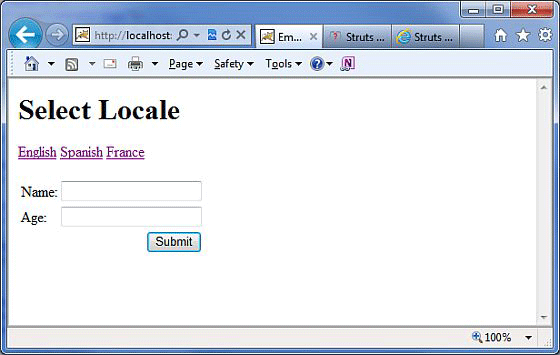
現在選擇任何一種語言,比如我們選擇西班牙語,它將顯示以下結果 -
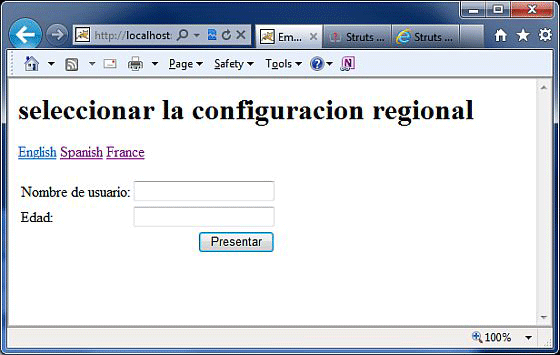
您也可以嘗試使用法語。最後,當我們處於西班牙語語言環境時,讓我們嘗試單擊提交按鈕,它將顯示以下螢幕 -
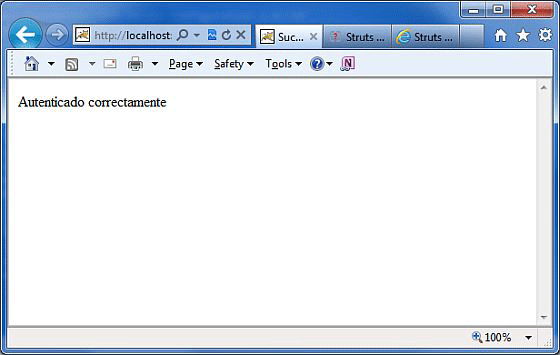
恭喜,您現在擁有了一個多語言網頁,您可以將其網站推廣到全球。