
- Struts 2 教程
- Struts2 - 首頁
- Struts2 - 基本 MVC 架構
- Struts2 - 概述
- Struts2 - 環境設定
- Struts2 - 架構
- Struts2 - 示例
- Struts2 - 配置
- Struts2 - Action
- Struts2 - 攔截器
- Struts2 - 結果型別
- Struts2 - 值棧/OGNL
- Struts2 - 檔案上傳
- Struts2 - 資料庫訪問
- Struts2 - 傳送郵件
- Struts2 - 驗證
- Struts2 - 國際化
- Struts2 - 型別轉換
- Struts2 - 主題/模板
- Struts2 - 異常處理
- Struts2 - 註解
- Struts 2 標籤
- Struts2 - 控制標籤
- Struts2 - 資料標籤
- Struts2 - 表單標籤
- Struts2 - Ajax 標籤
- Struts 2 整合
- Struts2 - Spring
- Struts2 - Tiles
- Struts2 - Hibernate
- Struts 2 有用資源
- Struts2 - 問題與解答
- Struts2 - 快速指南
- Struts2 - 有用資源
- Struts2 - 討論
Struts 2 - 主題與模板
在開始本章的實際教程之前,讓我們先了解一下 https://struts.apache.org 提供的一些定義。
| 序號 | 術語及描述 |
|---|---|
| 1 | 標籤 在 JSP、FreeMarker 或 Velocity 中執行的一小段程式碼。 |
| 2 | 模板 一段程式碼,通常用 FreeMarker 編寫,可以由某些標籤(HTML 標籤)渲染。 |
| 3 | 主題 一組打包在一起的模板,以提供通用功能。 |
我還建議您閱讀 Struts2 國際化 章節,因為我們將再次使用相同的示例來進行練習。
當您在網頁中使用 Struts 2 標籤(例如 <s:submit...>、<s:textfield...> 等)時,Struts 2 框架會生成具有預配置樣式和佈局的 HTML 程式碼。Struts 2 帶有三個內建主題:
| 序號 | 主題及描述 |
|---|---|
| 1 | SIMPLE 主題 一個最小的主題,沒有“花裡胡哨”的功能。例如,textfield 標籤渲染 HTML <input/> 標籤,沒有標籤、驗證、錯誤報告或任何其他格式或功能。 |
| 2 | XHTML 主題 這是 Struts 2 使用的預設主題,它提供了 simple 主題提供的所有基本功能,並添加了一些功能,例如 HTML 的標準雙列表格佈局、每個 HTML 的標籤、驗證和錯誤報告等。 |
| 3 | CSS_XHTML 主題 此主題提供了 simple 主題提供的所有基本功能,並添加了一些功能,例如基於 CSS 的標準雙列布局,使用 <div> 作為 HTML Struts 標籤,每個 HTML Struts 標籤的標籤,根據 CSS 樣式表放置。 |
如上所述,如果您未指定主題,則 Struts 2 預設使用 xhtml 主題。例如,此 Struts 2 select 標籤:
<s:textfield name = "name" label = "Name" />
生成以下 HTML 標記:
<tr>

   <td class="tdLabel">
      <label for = "empinfo_name" class="label">Name:</label>
   </td>
   <td>
      <input type = "text" name = "name" value = "" id = "empinfo_name"/>
   </td>

</tr>
這裡 empinfo 是在 struts.xml 檔案中定義的 Action 名稱。
選擇主題
您可以根據 Struts 2 標籤指定主題,或者可以使用以下方法之一來指定 Struts 2 應該使用哪個主題:
特定標籤上的 theme 屬性
標籤周圍的表單標籤上的 theme 屬性
名為“theme”的頁面範圍屬性
名為“theme”的請求範圍屬性
名為“theme”的會話範圍屬性
名為“theme”的應用程式範圍屬性
struts.properties 中的 struts.ui.theme 屬性(預設為 xhtml)
以下是如果您希望對不同的標籤使用不同的主題,則在標籤級別指定它們的語法:
<s:textfield name = "name" label = "Name" theme="xhtml"/>
由於在每個標籤的基礎上使用主題並不實用,因此我們只需在 struts.properties 檔案中使用以下標籤指定規則即可:
# Standard UI theme
struts.ui.theme = xhtml
# Directory where theme template resides
struts.ui.templateDir = template
# Sets the default template type. Either ftl, vm, or jsp
struts.ui.templateSuffix = ftl
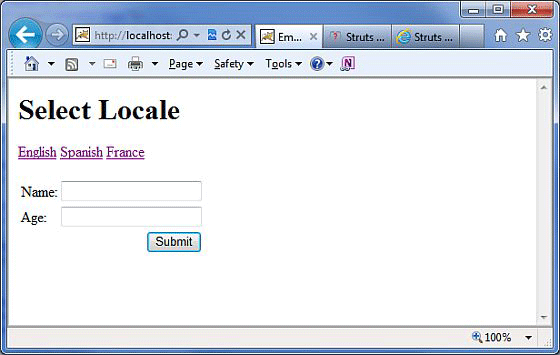
以下是我們在國際化章節中獲取的結果,我們使用了預設主題,在 struts-default.properties 檔案中設定了 struts.ui.theme = xhtml,該檔案預設包含在 struts2-core.xy.z.jar 檔案中。
主題如何工作?
對於給定的主題,每個 struts 標籤都有一個關聯的模板,例如 s:textfield → text.ftl 和 s:password → password.ftl 等。
這些模板檔案被打包在 struts2-core.xy.z.jar 檔案中。這些模板檔案為每個標籤保留了一個預定義的 HTML 佈局。
透過這種方式,Struts 2 框架使用 Sturts 標籤和關聯的模板生成最終的 HTML 標記程式碼。
Struts 2 tags + Associated template file = Final HTML markup code.
預設模板是用 FreeMarker 編寫的,它們副檔名為 .ftl。
您還可以使用 Velocity 或 JSP 設計您的模板,並相應地在 struts.properties 中使用 struts.ui.templateSuffix 和 struts.ui.templateDir 設定配置。
建立新主題
建立新主題最簡單的方法是複製任何現有的主題/模板檔案並進行必要的修改。
讓我們從在 WebContent/WEBINF/classes 中建立一個名為 template 的資料夾和一個以我們的新主題名稱命名的子資料夾開始。例如,WebContent/WEB-INF/classes/template/mytheme。
從這裡,您可以從頭開始構建模板,或者也可以從 Struts2 分發版 中複製模板,並在將來根據需要修改它們。
我們將修改現有的預設模板 xhtml 以供學習之用。現在,讓我們將內容從 struts2-core-x.y.z.jar/template/xhtml 複製到我們的主題目錄,並僅修改 WebContent/WEBINF/classes/template/mytheme/control.ftl 檔案。當我們開啟 control.ftl 時,它將包含以下幾行:
<table class="${parameters.cssClass?default('wwFormTable')?html}"<#rt/>
<#if parameters.cssStyle??> style="${parameters.cssStyle?html}"<#rt/>
</#if>
>
讓我們更改上面的 control.ftl 檔案,使其包含以下內容:
<table style = "border:1px solid black;">
如果您檢視 form.ftl,您會發現 control.ftl 在此檔案中使用,但 form.ftl 從 xhtml 主題引用此檔案。因此,讓我們將其更改如下:
<#include "/${parameters.templateDir}/xhtml/form-validate.ftl" />
<#include "/${parameters.templateDir}/simple/form-common.ftl" />
<#if (parameters.validate?default(false))>
   onreset = "${parameters.onreset?default('clearErrorMessages(this);\
   clearErrorLabels(this);')}"

<#else>
   <#if parameters.onreset??>
      onreset="${parameters.onreset?html}"
   </#if>
</#if>
#include "/${parameters.templateDir}/mytheme/control.ftl" />
我假設您對 FreeMarker 模板語言的理解可能不多,但您仍然可以透過檢視 .ftl 檔案瞭解需要做什麼。
但是,讓我們儲存上述更改,然後返回到我們的國際化示例,並建立包含以下內容的 WebContent/WEB-INF/classes/struts.properties 檔案
# Customized them
struts.ui.theme = mytheme
# Directory where theme template resides
struts.ui.templateDir = template
# Sets the template type to ftl.
struts.ui.templateSuffix = ftl
現在,在進行此更改後,右鍵單擊專案名稱,然後單擊 匯出 > WAR 檔案 以建立 WAR 檔案。然後將此 WAR 部署到 Tomcat 的 webapps 目錄中。最後,啟動 Tomcat 伺服器並嘗試訪問 URL https://:8080/HelloWorldStruts2。這將生成以下螢幕:
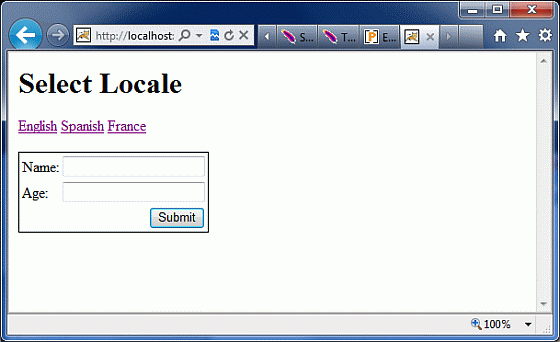
您可以看到表單元件周圍有一個邊框,這是我們在從 xhtml 主題複製主題後對其進行更改的結果。如果您在學習 FreeMarker 上投入一點精力,那麼您將能夠非常輕鬆地建立或修改您的主題。
我希望您現在對 Sturts 2 主題和模板有了一個基本的瞭解,對吧?