
 資料結構
資料結構 網路
網路 關係型資料庫管理系統
 作業系統
作業系統 Java
Java MS Excel
 iOS
iOS HTML
HTML CSS
CSS Android
 Python
 C 語言程式設計
 C++
C++ C#
C# MongoDB
 MySQL
MySQL Javascript
 PHP
PHP 物理學
物理學 化學
化學 生物學
生物學 數學
數學 英語
英語 經濟學
經濟學 心理學
心理學 社會學
社會學 服裝設計
服裝設計 法律研究
法律研究使用 Python 在統計學中展示 Nakagami 分佈
在給定的問題陳述中,我們必須建立一個演算法,以藉助 Python 及其庫來展示統計學中的 Nakagami 分佈。因此,在本文中,我們將使用 Python 的 matplotlib、numpy 和 scipy 庫來解決給定的問題。
什麼是統計學中的 Nakagami 分佈?
Nakagami 分佈基本上是一個機率分佈。它包含引數、樣本資料集和機率分佈的模型描述。此分佈主要用於通訊中,以模擬透過多個路徑到達接收器的訊號。
理解問題的邏輯
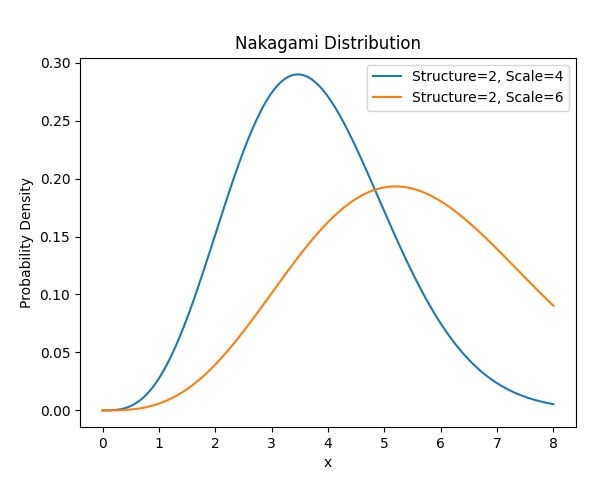
手頭的問題是使用 Python 及其庫來展示 Nakagami 分佈。因此,我們將首先匯入所有必要的庫,匯入後,我們將生成一個數據集,在此資料集上我們將建立 Nakagami 分佈。然後,我們將計算機率密度函式,然後藉助繪圖方法繪製分佈圖。
演算法
步驟 1 - 首先,我們將匯入必要的庫
from scipy.stats import nakagami
import numpy as nmp
import matplotlib.pyplot as pplt
步驟 2 - 然後我們將生成 x 的值
x = nmp.linspace(0, 8, 200)
步驟 3 - 下一步是定義 Nakagami 分佈的引數
structure1, scale1 = 2, 4
structure2, scale2 = 2, 6
步驟 4 - 宣告引數後,我們需要為每個引數計算機率密度函式(也稱為 PDF 值)。在這裡,我們將使用 Nakagami 的 pdf 函式來計算機率密度函式,並在其中傳遞引數的值。
prob_den_fun1 = nakagami.pdf(x, structure1, scale=scale1)
prob_den_fun2 = nakagami.pdf(x, structure2, scale=scale2)
步驟 5 - 現在,我們將藉助 matplotlib 庫的繪圖函式繪製機率密度函式。
pplt.plot(x, prob_den_fun1, label='Structure={}, Scale={}'.format(structure1, scale1))
pplt.plot(x, prob_den_fun2, label='Structure={}, Scale={}'.format(structure2, scale2))
步驟 6 - 繪製 PDF 後,我們將向繪圖新增標籤,並使用 matplotlib 的 legend 函式來描述圖形中的專案。
pplt.xlabel('x')
pplt.ylabel('Probability Density')
pplt.title('Nakagami Distribution')
pplt.legend()
步驟 7 - 最後,我們將使用 matplotlib 的 show 方法顯示我們建立的繪圖。
pplt.show()
示例
from scipy.stats import nakagami
import numpy as nmp
import matplotlib.pyplot as pplt

x = nmp.linspace(0, 8, 200)

structure1, scale1 = 2, 4
structure2, scale2 = 2, 6

prob_den_fun1 = nakagami.pdf(x, structure1, scale=scale1)
prob_den_fun2 = nakagami.pdf(x, structure2, scale=scale2)

pplt.plot(x, prob_den_fun1, label='Structure={}, Scale={}'.format(structure1, scale1))
pplt.plot(x, prob_den_fun2, label='Structure={}, Scale={}'.format(structure2, scale2))

pplt.xlabel('x')
pplt.ylabel('Probability Density')
pplt.title('Nakagami Distribution')
pplt.legend()
pplt.show()
輸出
結論
正如我們已經成功建立了程式碼來演示 scipy.stats、matplotlib 和 numpy 模組的使用,以使用不同引數集的機率密度函式或 PDF 來展示 Nakagami 分佈。我們提供了簡單高效的程式碼,具有 O(1) 的時間複雜度。在我們的程式碼中,我們可以根據需要調整引數並最佳化 Nakagami 分佈,並且我們可以看到它如何反映形狀和曲線。總的來說,該程式碼提供了一個簡單有效的方法來展示 Nakagami 分佈。

115 次檢視
