- MVVM 教程
- MVVM - 首頁
- MVVM – 簡介
- MVVM - 優點
- MVVM - 職責
- MVVM - 第一個應用程式
- MVVM - 連線檢視
- MVVM - 連線 ViewModel
- MVVM - WPF 資料繫結
- MVVM - WPF 資料模板
- MVVM - ViewModel 通訊
- MVVM - 層次結構與導航
- MVVM - 驗證
- MVVM - 依賴注入
- MVVM - 事件
- MVVM - 單元測試
- MVVM - 框架
- MVVM - 面試問題
- MVVM 有用資源
- MVVM - 快速指南
- MVVM - 有用資源
- MVVM - 討論
MVVM – 依賴注入
在本章中,我們將簡要討論依賴注入。我們已經介紹了資料繫結將檢視和 ViewModel 解耦,使它們能夠在彼此不知道對方通訊細節的情況下進行通訊。
現在我們需要類似的東西來解耦我們的 ViewModel 和客戶端服務。
在面向物件程式設計的早期,開發人員面臨著在應用程式中建立和檢索類例項的問題。針對此問題提出了各種解決方案。
在過去的幾年裡,依賴注入和控制反轉 (IoC) 在開發人員中越來越受歡迎,並取代了一些較舊的解決方案,例如單例模式。
依賴注入/IoC 容器
IoC 和依賴注入是兩種緊密相關的設計模式,容器基本上是一塊基礎設施程式碼,可以為您完成這兩種模式。
IoC 模式是關於委託構造的責任,而依賴注入模式是關於向已構造的物件提供依賴項。
它們都可以被視為構造的兩階段方法。當您使用容器時,容器承擔以下幾個責任:
- 在被請求時構造物件。
- 容器將確定該物件依賴於什麼。
- 構造這些依賴項。
- 將它們注入到正在構造的物件中。
- 遞迴地執行此過程。
讓我們看看如何使用依賴注入來打破 ViewModel 和客戶端服務之間的解耦。我們將使用與之相關的依賴注入來連線 AddEditCustomerViewModel 形式的儲存處理。
首先,我們需要在我們的專案中的 Services 資料夾中建立一個新的介面。如果您的專案中沒有 Services 資料夾,則首先建立它,然後在 Services 資料夾中新增以下介面。
using MVVMHierarchiesDemo.Model;

using System;
using System.Collections.Generic;
using System.Linq;
using System.Text;
using System.Threading.Tasks;

namespace MVVMHierarchiesDemo.Services {

   public interface ICustomersRepository {
      Task<List<Customer>> GetCustomersAsync();
      Task<Customer> GetCustomerAsync(Guid id);
      Task<Customer> AddCustomerAsync(Customer customer);
      Task<Customer> UpdateCustomerAsync(Customer customer);
      Task DeleteCustomerAsync(Guid customerId);
   }
}
以下是 ICustomersRepository 的實現。
using MVVMHierarchiesDemo.Model;

using System;
using System.Collections.Generic;
using System.Linq; using System.Text;
using System.Threading.Tasks;

namespace MVVMHierarchiesDemo.Services {

   public class CustomersRepository : ICustomersRepository {
      ZzaDbContext _context = new ZzaDbContext();

      public Task<List<Customer>> GetCustomersAsync() {
         return _context.Customers.ToListAsync();
      }

      public Task<Customer> GetCustomerAsync(Guid id) {
         return _context.Customers.FirstOrDefaultAsync(c => c.Id == id);
      }

      public async Task<Customer> AddCustomerAsync(Customer customer){
         _context.Customers.Add(customer);
         await _context.SaveChangesAsync();
         return customer;
      }

      public async Task<Customer> UpdateCustomerAsync(Customer customer) {

         if (!_context.Customers.Local.Any(c => c.Id == customer.Id)) {
            _context.Customers.Attach(customer);
         }

         _context.Entry(customer).State = EntityState.Modified;
         await _context.SaveChangesAsync();
         return customer;

      }

      public async Task DeleteCustomerAsync(Guid customerId) {
         var customer = _context.Customers.FirstOrDefault(c => c.Id == customerId);

         if (customer != null) {
            _context.Customers.Remove(customer);
         }

         await _context.SaveChangesAsync();
      }
   }
}
執行儲存處理的簡單方法是在 AddEditCustomerViewModel 中新增 ICustomersRepository 的新例項,並重載 AddEditCustomerViewModel 和 CustomerListViewModel 建構函式。
private ICustomersRepository _repo;

public AddEditCustomerViewModel(ICustomersRepository repo) {
   _repo = repo;
   CancelCommand = new MyIcommand(OnCancel);
   SaveCommand = new MyIcommand(OnSave, CanSave);
}
更新 OnSave 方法,如下面的程式碼所示。
private async void OnSave() {
   UpdateCustomer(Customer, _editingCustomer);

   if (EditMode)
      await _repo.UpdateCustomerAsync(_editingCustomer);
   else
      await _repo.AddCustomerAsync(_editingCustomer);
   Done();
}

private void UpdateCustomer(SimpleEditableCustomer source, Customer target) {
   target.FirstName = source.FirstName;
   target.LastName = source.LastName;
   target.Phone = source.Phone;
   target.Email = source.Email;
}
以下是完整的 AddEditCustomerViewModel。
using MVVMHierarchiesDemo.Model;
using MVVMHierarchiesDemo.Services;

using System;
using System.Collections.Generic;
using System.Linq;
using System.Text;
using System.Threading.Tasks;

namespace MVVMHierarchiesDemo.ViewModel {

   class AddEditCustomerViewModel : BindableBase {
      private ICustomersRepository _repo;

      public AddEditCustomerViewModel(ICustomersRepository repo) {
         _repo = repo;
         CancelCommand = new MyIcommand(OnCancel);
         SaveCommand = new MyIcommand(OnSave, CanSave);
      }

      private bool _EditMode;

      public bool EditMode {
         get { return _EditMode; }
         set { SetProperty(ref _EditMode, value); }
      }

      private SimpleEditableCustomer _Customer;

      public SimpleEditableCustomer Customer {
         get { return _Customer; }
         set { SetProperty(ref _Customer, value); }
      }

      private Customer _editingCustomer = null;

      public void SetCustomer(Customer cust) {
         _editingCustomer = cust;

         if (Customer != null) Customer.ErrorsChanged -= RaiseCanExecuteChanged;
         Customer = new SimpleEditableCustomer();
         Customer.ErrorsChanged += RaiseCanExecuteChanged;
         CopyCustomer(cust, Customer);
      }

      private void RaiseCanExecuteChanged(object sender, EventArgs e) {
         SaveCommand.RaiseCanExecuteChanged();
      }

      public MyIcommand CancelCommand { get; private set; }
      public MyIcommand SaveCommand { get; private set; }

      public event Action Done = delegate { };

      private void OnCancel() {
         Done();
      }

      private async void OnSave() {
         UpdateCustomer(Customer, _editingCustomer);

         if (EditMode)
            await _repo.UpdateCustomerAsync(_editingCustomer);
         else
            await _repo.AddCustomerAsync(_editingCustomer);
         Done();
      }

      private void UpdateCustomer(SimpleEditableCustomer source, Customer target) {
         target.FirstName = source.FirstName;
         target.LastName = source.LastName;
         target.Phone = source.Phone;
         target.Email = source.Email;
      }

      private bool CanSave() {
         return !Customer.HasErrors;
      }

      private void CopyCustomer(Customer source, SimpleEditableCustomer target) {
         target.Id = source.Id;

         if (EditMode) {
            target.FirstName = source.FirstName;
            target.LastName = source.LastName;
            target.Phone = source.Phone;
            target.Email = source.Email;
         }
      }
   }
}
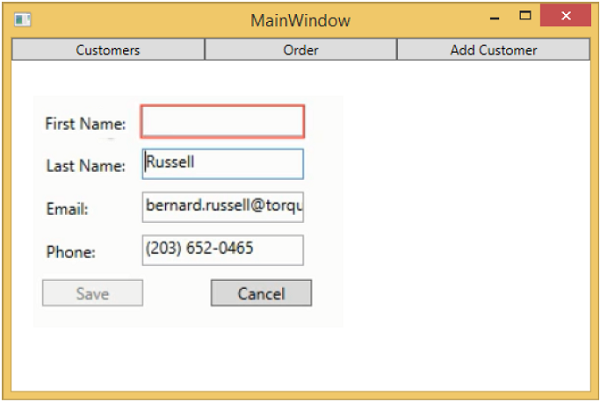
編譯並執行上述程式碼後,您將看到相同的輸出,但現在 ViewModel 的耦合度更低了。
當您按下“新增客戶”按鈕時,您將看到以下檢視。當用戶留空任何欄位時,它將突出顯示,並且儲存按鈕將被停用。