
- JOGL 圖形形狀
- JOGL - 繪圖基礎
- JOGL - 使用 GL_Lines 繪圖
- JOGL - 預定義的形狀
- JOGL 3D 圖形
- JOGL - 3D 基礎
- JOGL - 3D 三角形
- JOGL - 3D 立方體
- JOGL - 附錄
- JOGL 有用資源
- JOGL - 快速指南
- JOGL - 有用資源
- JOGL - 討論
JOGL - 使用 GL 線繪製
在上一章中,我們瞭解瞭如何使用 JOGL 繪製基本線。我們透過將預定義的欄位 Gl_lines 傳遞給 glBegin() 方法來繪製線。
本章提供示例,說明如何使用 glBegin() 方法和 GL_Lines,繪製三角形、菱形和房屋等形狀。
讓我們透過一個程式來繪製一個使用 GL_LINES 的三角形 −
import javax.media.opengl.GL2;
import javax.media.opengl.GLAutoDrawable;
import javax.media.opengl.GLCapabilities;
import javax.media.opengl.GLEventListener;
import javax.media.opengl.GLProfile;
import javax.media.opengl.awt.GLCanvas;

import javax.swing.JFrame;

public class Triangle implements GLEventListener {

   @Override
   public void display(GLAutoDrawable drawable) {
      final GL2 gl = drawable.getGL().getGL2();
      gl.glBegin (GL2.GL_LINES);

      //drawing the base
      gl.glBegin (GL2.GL_LINES);
      gl.glVertex3f(-0.50f, -0.50f, 0);
      gl.glVertex3f(0.50f, -0.50f, 0);
      gl.glEnd();

      //drawing the right edge
      gl.glBegin (GL2.GL_LINES);
      gl.glVertex3f(0f, 0.50f, 0);
      gl.glVertex3f(-0.50f, -0.50f, 0);
      gl.glEnd();

      //drawing the lft edge
      gl.glBegin (GL2.GL_LINES);
      gl.glVertex3f(0f, 0.50f, 0);
      gl.glVertex3f(0.50f, -0.50f, 0);
      gl.glEnd();
      gl.glFlush();
   }

   @Override
   public void dispose(GLAutoDrawable arg0) {
      //method body
   }

   @Override
   public void init(GLAutoDrawable arg0) {
      // method body
   }

   @Override
   public void reshape(GLAutoDrawable arg0, int arg1, int arg2, int arg3, int arg4) {
      // method body
   }

   public static void main(String[] args) {

      //getting the capabilities object of GL2 profile
      final GLProfile profile = GLProfile.get(GLProfile.GL2);
      GLCapabilities capabilities = new GLCapabilities(profile);

      // The canvas
      final GLCanvas glcanvas = new GLCanvas(capabilities);
      Triangle l = new Triangle();
      glcanvas.addGLEventListener(l);
      glcanvas.setSize(400, 400);

      //creating frame
      final JFrame frame = new JFrame ("Triangle");

      //adding canvas to frame
      frame.getContentPane().add(glcanvas);

      frame.setSize(frame.getContentPane().getPreferredSize());
      frame.setVisible(true);

   }//end of main

}//end of classimport javax.media.opengl.GL2;
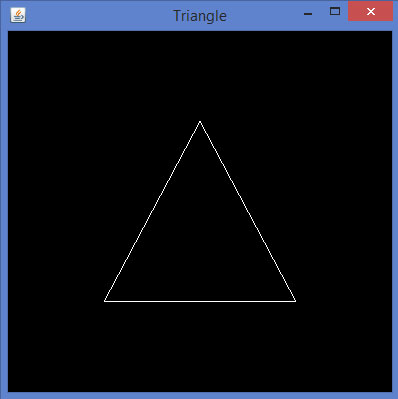
如果您編譯並執行上述程式,將會生成以下輸出。它顯示了一個使用 glBegin() 方法的 GL_LINES 繪製的三角形。
讓我們透過一個程式來繪製一個使用 GL_LINES 的菱形 −
import javax.media.opengl.GL2;
import javax.media.opengl.GLAutoDrawable;
import javax.media.opengl.GLCapabilities;
import javax.media.opengl.GLEventListener;
import javax.media.opengl.GLProfile;
import javax.media.opengl.awt.GLCanvas;

import javax.swing.JFrame;

public class Rhombus implements GLEventListener {

   @Override
   public void display( GLAutoDrawable drawable ) {
      final GL2 gl = drawable.getGL().getGL2();

      //edge1
      gl.glBegin( GL2.GL_LINES );
      gl.glVertex3f( 0.0f,0.75f,0 );
      gl.glVertex3f( -0.75f,0f,0 );
      gl.glEnd();

      //edge2
      gl.glBegin( GL2.GL_LINES );
      gl.glVertex3f( -0.75f,0f,0 );
      gl.glVertex3f( 0f,-0.75f, 0 );
      gl.glEnd();

      //edge3
      gl.glBegin( GL2.GL_LINES );
      gl.glVertex3f( 0f,-0.75f, 0 );
      gl.glVertex3f( 0.75f,0f, 0 );
      gl.glEnd();

      //edge4
      gl.glBegin( GL2.GL_LINES );
      gl.glVertex3f( 0.75f,0f, 0 );
      gl.glVertex3f( 0.0f,0.75f,0 );
      gl.glEnd();
      gl.glFlush();
   }

   @Override
   public void dispose( GLAutoDrawable arg0 ) {
      //method body
   }

   @Override
   public void init(GLAutoDrawable arg0 ) {
      // method body
   }

   @Override
   public void reshape( GLAutoDrawable arg0, int arg1, int arg2, int arg3, int arg4 ) {
      // method body
   }

   public static void main( String[] args ) {

      //getting the capabilities object of GL2 profile
      final GLProfile profile = GLProfile.get( GLProfile.GL2 );
      GLCapabilities capabilities = new GLCapabilities(profile);

      // The canvas
      final GLCanvas glcanvas = new GLCanvas( capabilities );
      Rhombus rhombus = new Rhombus();
      glcanvas.addGLEventListener( rhombus );
      glcanvas.setSize( 400, 400 );

      //creating frame
      final JFrame frame = new JFrame ( "Rhombus" );

      //adding canvas to frame
      frame.getContentPane().add( glcanvas );
      frame.setSize(frame.getContentPane().getPreferredSize() );
      frame.setVisible( true );
   }

}
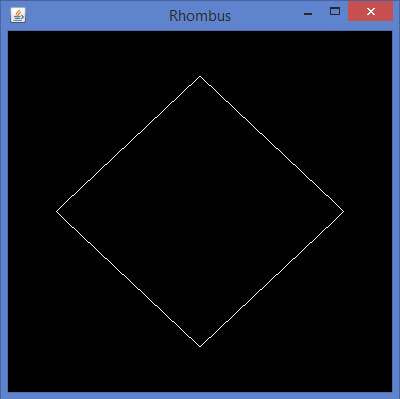
如果您編譯並執行上述程式,您會得到以下輸出。它顯示了一個使用 glBegin() 方法的 GL_LINES 生成的菱形。
讓我們透過一個程式來繪製一個使用 GL_LINES 的房屋 −
import javax.media.opengl.GL2;
import javax.media.opengl.GLAutoDrawable;
import javax.media.opengl.GLCapabilities;
import javax.media.opengl.GLEventListener;
import javax.media.opengl.GLProfile;
import javax.media.opengl.awt.GLCanvas;

import javax.swing.JFrame;

public class House implements GLEventListener {

   @Override
   public void display( GLAutoDrawable drawable ) {
      final GL2 gl = drawable.getGL().getGL2();

      //drawing top
      gl.glBegin ( GL2.GL_LINES );
      gl.glVertex3f( -0.3f, 0.3f, 0 );
      gl.glVertex3f( 0.3f,0.3f, 0 );
      gl.glEnd();

      //drawing bottom
      gl.glBegin( GL2.GL_LINES );
      gl.glVertex3f( -0.3f,-0.3f, 0 );
      gl.glVertex3f( 0.3f,-0.3f, 0 );
      gl.glEnd();

      //drawing the right edge
      gl.glBegin( GL2.GL_LINES );
      gl.glVertex3f( -0.3f,0.3f, 0 );
      gl.glVertex3f( -0.3f,-0.3f, 0 );
      gl.glEnd();

      //drawing the left edge
      gl.glBegin( GL2.GL_LINES );
      gl.glVertex3f( 0.3f,0.3f,0 );
      gl.glVertex3f( 0.3f,-0.3f,0 );
      gl.glEnd();

      //building roof
      //building lft dia
      gl.glBegin( GL2.GL_LINES );
      gl.glVertex3f( 0f,0.6f, 0 );
      gl.glVertex3f( -0.3f,0.3f, 0 );
      gl.glEnd();

      //building rt dia
      gl.glBegin( GL2.GL_LINES );
      gl.glVertex3f( 0f,0.6f, 0 );
      gl.glVertex3f( 0.3f,0.3f, 0 );
      gl.glEnd();

      //building door
      //drawing top
      gl.glBegin ( GL2.GL_LINES );
      gl.glVertex3f( -0.05f, 0.05f, 0 );
      gl.glVertex3f( 0.05f, 0.05f, 0 );
      gl.glEnd();

      //drawing the left edge
      gl.glBegin ( GL2.GL_LINES );
      gl.glVertex3f( -0.05f, 0.05f, 0 );
      gl.glVertex3f( -0.05f, -0.3f, 0 );
      gl.glEnd();

      //drawing the right edge
      gl.glBegin ( GL2.GL_LINES );
      gl.glVertex3f( 0.05f, 0.05f, 0 );
      gl.glVertex3f( 0.05f, -0.3f, 0 );
      gl.glEnd();
   }

   @Override
   public void dispose( GLAutoDrawable arg0 ) {
      //method body
   }

   @Override
   public void init( GLAutoDrawable arg0 ) {
      // method body
   }

   @Override
   public void reshape( GLAutoDrawable arg0, int arg1, int arg2, int arg3, int arg4 ) {
      // method body
   }

   public static void main( String[] args ) {

      //getting the capabilities object of GL2 profile
      final GLProfile profile = GLProfile.get( GLProfile.GL2 );
      GLCapabilities capabilities = new GLCapabilities(profile);

      // The canvas
      final GLCanvas glcanvas = new GLCanvas( capabilities );
      House house = new House();
      glcanvas.addGLEventListener( house );
      glcanvas.setSize(400, 400);

      //creating frame
      final JFrame frame = new JFrame( "House" );

      //adding canvas to frame
      frame.getContentPane().add( glcanvas );
      frame.setSize(frame.getContentPane().getPreferredSize() );
      frame.setVisible( true );

   }//end of main

}//end of class
如果您編譯並執行上述程式,您會得到以下輸出。它顯示了一個使用 GL_LINES() 方法生成的房屋示意圖。

廣告