
 資料結構
資料結構 網路
網路 RDBMS
RDBMS 作業系統
作業系統 Java
Java MS Excel
 iOS
iOS HTML
HTML CSS
CSS Android
 Python
 C 語言程式設計
 C++
C++ C#
C# MongoDB
 MySQL
MySQL Javascript
 PHP
PHP 物理學
物理學 化學
化學 生物學
生物學 數學
數學 英語
英語 經濟學
經濟學 心理學
心理學 社會學
社會學 時尚研究
時尚研究 法律研究
法律研究MATLAB 中影像的正向和逆向傅立葉變換
在數學中,傅立葉變換是一種用於將函式或訊號從時域轉換為頻域的數學工具。它廣泛應用於訊號處理、通訊、影像處理和分析等領域。
在使用 MATLAB 查詢影像的正向和逆向傅立葉變換之前,讓我們先簡要概述一下傅立葉變換及其逆變換。
正向傅立葉變換
傅立葉變換或正向傅立葉變換是一種數學運算,用於將訊號從時域轉換為頻域。
因此,正向傅立葉變換以其頻率成分來表示訊號。當我們對訊號執行正向傅立葉變換時,它會生成一個復值函式,該函式表示輸入訊號在不同頻率下的幅度和相位。
在數學上,時域訊號“x(t)”的傅立葉變換定義為:
$$\mathrm{X(\omega)=\int_{−\infty}^{\infty}x(t)e^{−j\omega t}dt}$$
其中,X(ω) 是 x(t) 的傅立葉變換。
現在,讓我們討論逆傅立葉變換。
逆傅立葉變換
逆傅立葉變換是正向傅立葉變換的反向操作。它被定義為一種數學運算,將頻域訊號轉換為時域訊號。
在訊號處理中,它主要用於從變換後的訊號重建原始訊號。
在數學上,頻域訊號的逆傅立葉變換可以定義為:
$$\mathrm{x(t)=\frac{1}{2\pi} \int_{−\infty}^{\infty}X(\omega)e^{j\omega t}\:d\omega}$$
這裡,x(t) 是從其傅立葉變換版本重建的訊號。
這就是關於正向傅立葉變換和逆正向傅立葉變換的所有內容。現在讓我們討論如何使用 MATLAB 查詢影像的正向和逆向傅立葉變換。
使用 MATLAB 進行影像的正向傅立葉變換
在 MATLAB 中,我們可以使用“fft2”函式來執行影像的正向傅立葉變換。下面解釋了使用 MATLAB 查詢影像的正向傅立葉變換的分步過程
步驟 (1) – 讀取原始輸入影像,並在需要時將其轉換為灰度影像。
步驟 (2) – 使用“fft2”函式執行影像的傅立葉變換。
步驟 (3) – 使用“fftshift”函式將傅立葉變換從角點移到中心。
步驟 (4) – 取移位傅立葉變換的絕對值以計算其幅度譜。
步驟 (5) – 顯示傅立葉變換的幅度譜。
示例
現在,讓我們考慮一個 MATLAB 中的示例程式,以便更好地理解這個概念。
% MATLAB code to find forward Fourier transform of an image
% Read the original input image
img = imread('https://tutorialspoint.tw/assets/questions/media/14304-1687425236.jpg');

% Convert the input image to grayscale
gray_img = rgb2gray(img);

% Calculate Fourier Transform of the image
FT = fftshift(fft2(gray_img));

% Calculate the magnitude spectrum of Fourier transform
mag_spect = abs(FT);

% Take the log of magnitude spectrum
mag_spect_log = log(1 + mag_spect);	% Adding 1 to avoid log(0)

% Display the magnitude spectrum of the Fourier transform
figure;
subplot(1, 2, 1);
imshow(mag_spect, []);
title('Magnitude Spectrum of FT');

subplot(1, 2, 2);
imshow(mag_spect_log, []);
title('Log Magnitude Spectrum of FT');
colormap(gca, 'jet');
colorbar;
輸出
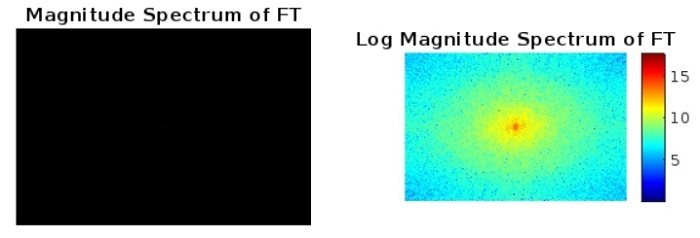
這就是我們如何在 MATLAB 中查詢影像的正向傅立葉變換的方法。現在,讓我們學習如何查詢影像的逆傅立葉變換。
使用 MATLAB 進行影像的逆傅立葉變換
MATLAB 提供了一個內建函式“ifft2”來查詢函式或訊號的逆傅立葉變換。
在這裡,我們解釋了使用 MATLAB 查詢影像的逆傅立葉變換的分步過程
步驟 (1) – 讀取傅立葉變換後的影像。
步驟 (2) – 應用“ifft2”函式查詢逆傅立葉變換後的影像。
步驟 (3) – 取逆傅立葉變換後圖像的絕對值的 log 值。
步驟 (4) – 顯示逆傅立葉變換後的影像。
示例
以下示例程式演示了這些步驟的實際實現,以使用 MATLAB 查詢影像的逆傅立葉變換。
% MATLAB code to perform Inverse Fourier Transform of an image
% Read the original input image
img = imread('https://tutorialspoint.tw/assets/questions/media/14304-1687425236.jpg');

% Convert the input image to grayscale
gray_img = rgb2gray(img);

% Calculate Fourier Transform of the image
FT = fftshift(fft2(gray_img));

% Find inverse Fourier Transform of the Fourier transformed image
inverse_FT_img = ifft2(ifftshift(FT));	% FT is the Fourier transformed image

% Take the log of the absolute value of the inverse transformed image
inverse_FT_img_log = log(abs(inverse_FT_img));

% Display the original, log-transformed, and inverse transformed images
subplot(2, 2, 1);
imshow(gray_img);
title('Original Image');

subplot(2, 2, 2);
imshow(inverse_FT_img_log, []);
title('Log Inverse Transformed Image');

subplot(2, 2, 3);
imshow(abs(inverse_FT_img), []);
title('Inverse Transformed Image');
輸出
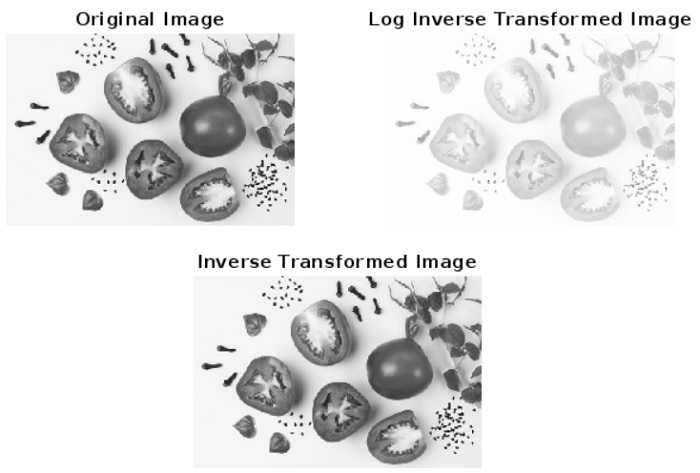
這就是我們如何在 MATLAB 中透過遵循簡單的步驟查詢影像的逆傅立葉變換的方法。
結論
在本教程中,我們解釋了傅立葉變換 (FT) 和逆傅立葉變換 (IFT) 的概念。我們還透過示例程式解釋瞭如何在 MATLAB 中查詢正向傅立葉變換和逆傅立葉變換。您可以使用自己的影像嘗試以上程式碼來查詢它們的 FT 和 IFT。

495 次檢視
