
- BabylonJS 教程
- BabylonJS - 首頁
- BabylonJS - 簡介
- BabylonJS - 環境設定
- BabylonJS - 概覽
- BabylonJS - 基本元素
- BabylonJS - 材質
- BabylonJS - 動畫
- BabylonJS - 攝像機
- BabylonJS - 光照
- BabylonJS - 引數化形狀
- BabylonJS - 網格
- VectorPosition 和 Rotation
- BabylonJS - 貼花
- BabylonJS - Curve3
- BabylonJS - 動態紋理
- BabylonJS - 視差對映
- BabylonJS - 鏡頭光暈
- BabylonJS - 建立螢幕截圖
- BabylonJS - 反射探測
- 標準渲染管道
- BabylonJS - ShaderMaterial
- BabylonJS - 骨骼和骨架
- BabylonJS - 物理引擎
- BabylonJS - 播放聲音和音樂
- BabylonJS 有用的資源
- BabylonJS - 快速指南
- BabylonJS - 有用的資源
- BabylonJS - 討論
BabylonJS - 環形
在本節中,我們將學習如何建立環形形狀。
語法
以下是建立 Torus 的語法 -
var torus = BABYLON.Mesh.CreateTorus("torus", 5, 1, 10, scene, false, BABYLON.Mesh.DEFAULTSIDE);
引數
考慮以下引數來建立 Torus -
名稱 - 這是環形的名稱。
直徑 - 這是環形的直徑。
厚度:這是環形的厚度。
細分 - 這指的是使用一個或多個幾何形狀對平面進行鑲嵌。
場景 - 這是環形需要附加的場景。
布林 - 如果需要更改環形的形狀,可以將值設定為 true。這主要在變形時使用。
側面方向 - 它使用 BABYLON.Mesh.DEFAULTSIDE 作為預設選項。
演示 - 環形
<!doctype html>
<html>
   <head>
      <meta charset = "utf-8">
      <title>MDN Games: Babylon.js demo - shapes</title>
      <script src = "babylon.js"></script>
      <style>
         html,body,canvas { margin: 0; padding: 0; width: 100%; height: 100%; font-size: 0; }
      </style>
   </head>

   <body>
      <canvas id = "renderCanvas"></canvas>
      <script type = "text/javascript">
         var canvas = document.getElementById("renderCanvas");
         var engine = new BABYLON.Engine(canvas, true);
         var createScene  = function() {
            var scene = new BABYLON.Scene(engine);
            scene.clearColor = new BABYLON.Color3(0, 1, 0);
            var camera = new BABYLON.ArcRotateCamera("Camera", 1, 0.8, 10, new BABYLON.Vector3(0, 0, 0), scene);
            var light = new BABYLON.HemisphericLight("hemi", new BABYLON.Vector3(0, 1, 0), scene);

            var torus = BABYLON.Mesh.CreateTorus("torus", 5, 1, 10, scene, false);

            scene.activeCamera.attachControl(canvas);
            return scene;
         };
         var scene = createScene();
         engine.runRenderLoop(function() {
            scene.render();
         });
      </script>
   </body>
</html>
輸出
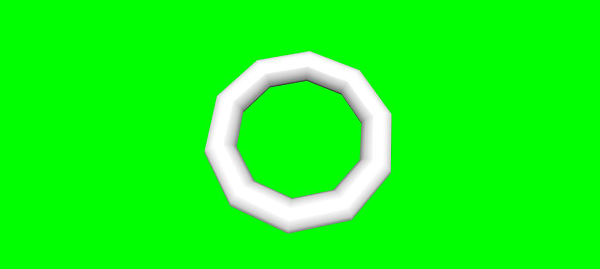
babylonjs_basic_elements.htm
廣告