
- BabylonJS 教程
- BabylonJS - 首頁
- BabylonJS - 簡介
- BabylonJS - 環境設定
- BabylonJS - 概述
- BabylonJS - 基本元素
- BabylonJS - 材質
- BabylonJS - 動畫
- BabylonJS - 相機
- BabylonJS - 光照
- BabylonJS - 引數化形狀
- BabylonJS - 網格
- 向量位置和旋轉
- BabylonJS - 貼花
- BabylonJS - 三維曲線 (Curve3)
- BabylonJS - 動態紋理
- BabylonJS - 視差貼圖
- BabylonJS - 鏡頭光暈
- BabylonJS - 建立螢幕截圖
- BabylonJS - 反射探針
- 標準渲染管線
- BabylonJS - 著色器材質 (ShaderMaterial)
- BabylonJS - 骨骼和骨架
- BabylonJS - 物理引擎
- BabylonJS - 播放聲音和音樂
- BabylonJS 有用資源
- BabylonJS - 快速指南
- BabylonJS - 有用資源
- BabylonJS - 討論
BabylonJS - 動態紋理
BabylonJS 的動態紋理建立一個畫布,您可以輕鬆地在紋理上寫入文字。它還允許您使用畫布並使用 html5 畫布提供的所有功能與動態紋理一起使用。
我們將做一個示例,該示例將演示如何在紋理上寫入文字,還將在我們建立的網格上繪製貝塞爾曲線。
語法
以下是建立動態紋理的語法:
var myDynamicTexture = new BABYLON.DynamicTexture(name, option, scene);
引數
以下是建立動態紋理所需的引數:
name - 動態紋理的名稱
option - 將包含動態紋理的寬度和高度
scene - 建立的場景
語法
以下是如何在紋理上寫入文字的語法:
myDynamicTexture.drawText(text, x, y, font, color, canvas color, invertY, update);
引數
以下是寫在紋理上文字所需的的引數:
text - 要寫入的文字;
x - 距左邊緣的距離;
Y - 距頂部或底部邊緣的距離,取決於 invertY;
font - 以 font-style、font-size、font_name 形式表示的字型定義;
invertY - 預設值為 true,在這種情況下,y 是距頂部的距離,當為 false 時,y 是距底部的距離,字母反轉;
update - 預設值為 true,動態紋理將立即更新。
演示
<!doctype html>
<html>
   <head>
      <meta charset = "utf-8">
      <title>MDN Games: Babylon.js demo - shapes</title>
      <script src = "https://end3r.github.io/MDN-Games-3D/Babylon.js/js/babylon.js"></script>
      <style>
         html,body,canvas { margin: 0; padding: 0; width: 100%; height: 100%; font-size: 0; }
      </style>
   </head>

   <body>
      <canvas id = "renderCanvas"></canvas>
      <script type = "text/javascript">
         var canvas = document.getElementById("renderCanvas");

         var engine = new BABYLON.Engine(canvas, true);
         var createScene  = function() {
            var scene = new BABYLON.Scene(engine);

            var camera = new BABYLON.ArcRotateCamera("Camera", -Math.PI/2, Math.PI / 3, 25, BABYLON.Vector3.Zero(), scene);
            camera.attachControl(canvas, true);

            var light = new BABYLON.HemisphericLight("light1", new BABYLON.Vector3(0, 1, 0), scene);
            light.intensity = 0.7;

            var box = BABYLON.Mesh.CreateBox("box", 3.0, scene);
            box.position = new BABYLON.Vector3(0, 0, -5);

            //Create dynamic texture
            var textureGround = new BABYLON.DynamicTexture("dynamic texture", {width:512, height:256}, scene);
            var textureContext = textureGround.getContext();

            var materialGround = new BABYLON.StandardMaterial("Mat", scene);
            materialGround.diffuseTexture = textureGround;
            box.material = materialGround;

            //Add text to dynamic texture
            var font = "bold 60px Arial";
            textureGround.drawText("Box", 200, 150, font, "green", "white", true, true);
            return scene;
         };
         var scene = createScene();
         engine.runRenderLoop(function() {
            scene.render();
         });
      </script>
   </body>
</html>
輸出

動態紋理還允許如下使用 html5 畫布方法和屬性:
語法
var ctx = myDynamicTexture.getContext();
演示
<!doctype html>
<html>
   <head>
      <meta charset = "utf-8">
      <title> Babylon.JS : Demo2</title>
      <script src = "babylon.js"></script>
      <style>
         canvas { width: 100%; height: 100%;}
      </style>
   </head>

   <body>
      <canvas id = "renderCanvas"></canvas>
      <script type = "text/javascript">
         var canvas = document.getElementById("renderCanvas");
         var engine = new BABYLON.Engine(canvas, true);
         var createScene = function () {
            var scene = new BABYLON.Scene(engine);

            var camera = new BABYLON.ArcRotateCamera("Camera", -Math.PI/2, Math.PI / 3, 25, BABYLON.Vector3.Zero(), scene);
            camera.attachControl(canvas, true);

            var light = new BABYLON.HemisphericLight("light1", new BABYLON.Vector3(0, 1, 0), scene);
            light.intensity = 0.7;

            var ground = BABYLON.MeshBuilder.CreateGround("ground1", {width: 20, height: 10, subdivisions: 25}, scene);

            //Create dynamic texture
            var textureGround = new BABYLON.DynamicTexture("dynamic texture", 512, scene);
            var textureContext = textureGround.getContext();

            var materialGround = new BABYLON.StandardMaterial("Mat", scene);
            materialGround.diffuseTexture = textureGround;
            ground.material = materialGround;

            //Draw on canvas
            textureContext.beginPath();
            textureContext.moveTo(75,40);
            textureContext.bezierCurveTo(75,37,70,25,50,25);
            textureContext.bezierCurveTo(20,25,20,62.5,20,62.5);
            textureContext.bezierCurveTo(20,80,40,102,75,120);
            textureContext.bezierCurveTo(110,102,130,80,130,62.5);
            textureContext.bezierCurveTo(130,62.5,130,25,100,25);
            textureContext.bezierCurveTo(85,25,75,37,75,40);
            textureContext.fillStyle = "red";
            textureContext.fill();
            textureGround.update();

            return scene;
         };
         var scene = createScene();
            engine.runRenderLoop(function() {
            scene.render();
         });
      </script>
   </body>
</html>
輸出
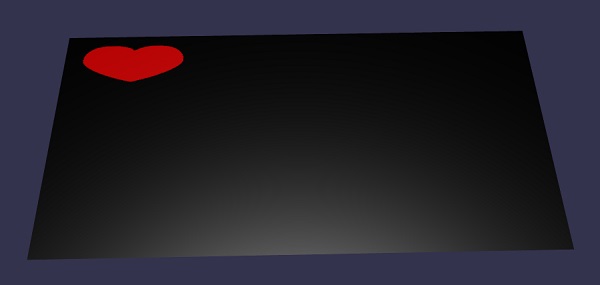
解釋
我們建立了地面網格並向其添加了動態紋理。
//ground mesh
var ground = BABYLON.MeshBuilder.CreateGround("ground1", {width: 20, height: 10, subdivisions: 25}, scene);

//Create dynamic texture
var textureGround = new BABYLON.DynamicTexture("dynamic texture", 512, scene);

//adding dynamic texture to ground using standard material
var materialGround = new BABYLON.StandardMaterial("Mat", scene);
materialGround.diffuseTexture = textureGround;
ground.material = materialGround;
要在動態紋理上使用畫布,我們需要首先呼叫畫布方法:
var textureContext = textureGround.getContext()
在畫布上,我們將新增貝塞爾曲線如下:
textureContext.beginPath();
textureContext.moveTo(75,40);

textureContext.bezierCurveTo(75,37,70,25,50,25);
textureContext.bezierCurveTo(20,25,20,62.5,20,62.5);
textureContext.bezierCurveTo(20,80,40,102,75,120);
textureContext.bezierCurveTo(110,102,130,80,130,62.5);
textureContext.bezierCurveTo(130,62.5,130,25,100,25);
textureContext.bezierCurveTo(85,25,75,37,75,40);

textureContext.fillStyle = "red";
textureContext.fill();
textureGround.update();
廣告