
- BabylonJS 教程
- BabylonJS - 首頁
- BabylonJS - 簡介
- BabylonJS - 環境設定
- BabylonJS - 概述
- BabylonJS - 基本元素
- BabylonJS - 材質
- BabylonJS - 動畫
- BabylonJS - 相機
- BabylonJS - 光源
- BabylonJS - 引數化形狀
- BabylonJS - 網格
- 向量位置和旋轉
- BabylonJS - 貼花
- BabylonJS - Curve3
- BabylonJS - 動態紋理
- BabylonJS - 視差貼圖
- BabylonJS - 鏡頭光暈
- BabylonJS - 建立螢幕截圖
- BabylonJS - 反射探針
- 標準渲染管線
- BabylonJS - ShaderMaterial
- BabylonJS - 骨骼和骨架
- BabylonJS - 物理引擎
- BabylonJS - 播放聲音和音樂
- BabylonJS 有用資源
- BabylonJS - 快速指南
- BabylonJS - 有用資源
- BabylonJS - 討論
BabylonJS - 標準渲染管線
StandardRenderingPipeline 提供了一組與現實世界相關的後處理效果。 存在不同的後處理效果,例如燈光效果和照明效果。
在下面給出的示例中,您將看到各種效果,例如鏡頭效果、燈光的後處理效果等。
它使用 HDR 立方體紋理,並且紋理必須是 .hdr。 此紋理提供全景效果,您可以在旋轉相機時看到。
var hdrTexture = new BABYLON.HDRCubeTexture("images/GravelPlaza_REF.hdr", scene, 512);
呼叫標準渲染管線類以使用以下程式碼行獲取效果:
// Create rendering pipeline
var pipeline = new BABYLON.StandardRenderingPipeline("standard", scene, 1.0 / devicePixelRatio, null, [camera]);
pipeline.lensTexture = new BABYLON.Texture("images/lensdirt.jpg", scene)
在下面顯示的演示中,我們將建立 cubetexture 環境。 我們將為此使用地面網格並將標準渲染管線應用於整個場景。
使用 lensTexture(一個影像)將其提供給它,並且您可以在移動場景時看到相同的紋理。
演示
<!doctype html>
<html>
   <head>
      <meta charset = "utf-8">
      <title>BabylonJs - Basic Element-Creating Scene</title>
      <script src = "babylon.js"></script>
      <style>
         canvas {width: 100%; height: 100%;}
      </style>
   </head>

   <body>
      <canvas id = "renderCanvas"></canvas>
      <script type = "text/javascript">
         var canvas = document.getElementById("renderCanvas");
         var engine = new BABYLON.Engine(canvas, true);

         var createScene  = function() {
            var scene = new BABYLON.Scene(engine);
            var camera = new BABYLON.ArcRotateCamera("Camera", -Math.PI / 4, Math.PI / 2.5, 200, BABYLON.Vector3.Zero(), scene);
            camera.attachControl(canvas, true);
            camera.minZ = 0.1;

            // Light
            new BABYLON.PointLight("point", new BABYLON.Vector3(0, 40, 0), scene);

            // Environment Texture
            var hdrTexture = new BABYLON.HDRCubeTexture("images/GravelPlaza_REF.hdr", scene, 512);

            // Skybox
            var hdrSkybox = BABYLON.Mesh.CreateBox("hdrSkyBox", 1000.0, scene);
            var hdrSkyboxMaterial = new BABYLON.PBRMaterial("skyBox", scene);
            hdrSkyboxMaterial.backFaceCulling = false;
            hdrSkyboxMaterial.reflectionTexture = hdrTexture.clone();
            hdrSkyboxMaterial.reflectionTexture.coordinatesMode = BABYLON.Texture.SKYBOX_MODE;
            hdrSkyboxMaterial.microSurface = 1.0;
            hdrSkyboxMaterial.cameraExposure = 0.6;
            hdrSkyboxMaterial.cameraContrast = 1.6;
            hdrSkyboxMaterial.disableLighting = true;
            hdrSkybox.material = hdrSkyboxMaterial;
            hdrSkybox.infiniteDistance = true;

            // Create mesh
            var woodbox = BABYLON.MeshBuilder.CreateBox("plane", {
               width: 40,
               height: 50,
               depth: 65
            }, scene);

            var wood = new BABYLON.PBRMaterial("wood", scene);
            wood.reflectionTexture = hdrTexture;
            wood.directIntensity = 1.5;
            wood.environmentIntensity = 0.5;
            wood.specularIntensity = 0.3;
            wood.cameraExposure = 0.9;
            wood.cameraContrast = 1.6;

            wood.reflectivityTexture = new BABYLON.Texture("images/reflectivity.png", scene);
            wood.useMicroSurfaceFromReflectivityMapAlpha = true;

            wood.albedoColor = BABYLON.Color3.White();
            wood.albedoTexture = new BABYLON.Texture("images/albedo.png", scene);
            woodbox.material = wood;

            // Create rendering pipeline
            var pipeline = new BABYLON.StandardRenderingPipeline("standard", scene, 1.0 / devicePixelRatio, null, [camera]);
            pipeline.lensTexture = new BABYLON.Texture("images/lensdirt.jpg", scene);

            // Return scene
            return scene;
         };
         var scene = createScene();
         engine.runRenderLoop(function() {
            scene.render();
         });
      </script>
   </body>
</html>
建立 images 資料夾並將 .hdr 檔案儲存在其中。 我們使用了來自 www.hdrlabs.com 的 images/GravelPlaza_REF.hdr。
您可以下載您選擇的 .hdr 型別檔案並在演示連結中使用。
輸出
以上程式碼行將生成以下輸出:
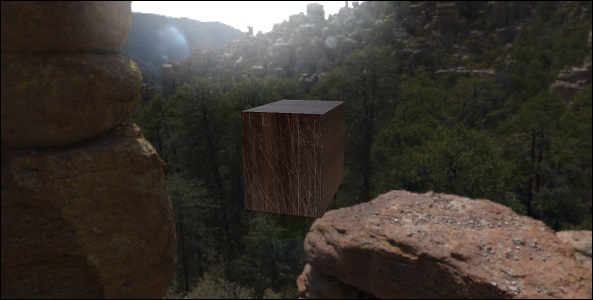
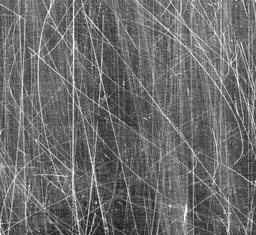
在此演示中,我們使用了影像 images/GravelPlaza_REF.hdr、images/reflectivity.png、images/albedo.png、images/lensdirt.jpg。 這些影像儲存在本地 images/ 資料夾中,並在下面貼上以供參考。 您可以下載您選擇的任何影像並在演示連結中使用。 請注意,很難在這裡貼上 .hdr 檔案,因為它的尺寸非常大。
Images/reflectivity.png
Images/albedo.png

Images/lensdirt.png

廣告