
- BabylonJS 教程
- BabylonJS - 主頁
- BabylonJS - 簡介
- BabylonJS - 環境設定
- BabylonJS - 概覽
- BabylonJS - 基本元素
- BabylonJS - 材質
- BabylonJS - 動畫
- BabylonJS - 相機
- BabylonJS - 光線
- BabylonJS - 引數化形狀
- BabylonJS - 網格
- 向量位置和旋轉
- BabylonJS - 貼花
- BabylonJS - Curve3
- BabylonJS - 動態紋理
- BabylonJS - 視差對映
- BabylonJS - 鏡頭光暈
- BabylonJS - 建立螢幕截圖
- BabylonJS - 反射探測器
- 標準渲染管道
- BabylonJS - ShaderMaterial
- BabylonJS - 骨骼
- BabylonJS - 物理引擎
- BabylonJS - 播放聲音和音樂
- BabylonJS 有用資源
- BabylonJS - 快速指南
- BabylonJS - 有用資源
- BabylonJS - 討論
BabylonJS - 網格變形目標
我們已經看到了線條、帶狀、多邊形等的變形。現在我們在這個示例中將會看到球體和盒子的變形。使用變形目標,可以改變球體的形狀,如下面的示例中所示。
語法
var box = BABYLON.Mesh.CreateBox("box1", 3.0, scene);
var manager = new BABYLON.MorphTargetManager();
box.morphTargetManager = manager;
演示
<!doctype html>
<html>
   <head>
      <meta charset = "utf-8">
      <title>BabylonJs - Basic Element-Creating Scene</title>
      <script src = "babylon.js"></script>
      <style>
         canvas {width: 100%; height: 100%;}
      </style>
   </head>

   <body>
      <canvas id = "renderCanvas"></canvas>
      <script type = "text/javascript">
         var scrambleUp = function(data) {
            console.log(data);
            for (index = 0; index < data.length; index ++) {
               data[index] += 1.8 * Math.random();
            }
         }

         var scrambleDown = function(data) {
            for (index = 0; index < data.length; index ++) {
               data[index] -= 1.8 * Math.random();
            }
         }

         var canvas = document.getElementById("renderCanvas");
         var engine = new BABYLON.Engine(canvas, true);

         var createScene  = function() {
            var scene = new BABYLON.Scene(engine);

            // This creates and positions a free camera (non-mesh)
            var camera = new BABYLON.ArcRotateCamera("camera1", 1.14, 1.13, 10, BABYLON.Vector3.Zero(), scene);

            // This targets the camera to scene origin
            camera.setTarget(BABYLON.Vector3.Zero());

            // This attaches the camera to the canvas
            camera.attachControl(canvas, true);

            // This creates a light, aiming 0,1,0 - to the sky (non-mesh)
            var light = new BABYLON.HemisphericLight("light1", new BABYLON.Vector3(0, 1, 0), scene);

            // Default intensity is 1. Let's dim the light a small amount
            light.intensity = 0.7;

            // Our built-in 'sphere' shape. Params: name, subdivs, size, scene
            var box = BABYLON.Mesh.CreateBox("box1", 3.0, scene);//BABYLON.Mesh.CreateSphere("sphere1", 16, 2, scene);

            var materialSphere = new BABYLON.StandardMaterial("mat", scene);
            materialSphere.diffuseTexture = new BABYLON.Texture("images/sphere.jpg", scene);
            box.material = materialSphere;

            //var sphere2 = BABYLON.Mesh.CreateSphere("sphere2", 16, 2, scene);//BABYLON.Mesh.CreateBox("box", 6.0, scene);
            var box1 = BABYLON.Mesh.CreateBox("box2", 3.0, scene);
            box1.setEnabled(false);
            box1.updateMeshPositions(scrambleUp);
            var manager = new BABYLON.MorphTargetManager();
            box.morphTargetManager = manager;

            var target0 = BABYLON.MorphTarget.FromMesh(box1, "sphere2", 0.25);
            manager.addTarget(target0);

            var sphere = BABYLON.Mesh.CreateSphere("sphere", 16, 2, scene);//BABYLON.Mesh.CreateSphere("sphere1", 16, 2, scene);
            sphere.position.x="10";

            var materialSphere = new BABYLON.StandardMaterial("mat", scene);
            materialSphere.diffuseTexture = new BABYLON.Texture("sphere.jpg", scene);
            sphere.material = materialSphere;

            var sphere2 = BABYLON.Mesh.CreateSphere("sphere2", 16, 2, scene);//BABYLON.Mesh.CreateBox("box", 6.0, scene);
            sphere2.setEnabled(false);
            sphere2.updateMeshPositions(scrambleUp);

            var manager1 = new BABYLON.MorphTargetManager();
            sphere.morphTargetManager = manager1;

            var target2 = BABYLON.MorphTarget.FromMesh(sphere2, "sphere4", 0.25);
            manager1.addTarget(target2);
            return scene;
         };
         var scene = createScene();
         engine.runRenderLoop(function() {
            scene.render();
         });
      </script>
   </body>
</html>
輸出
上述程式碼行會生成以下輸出 -
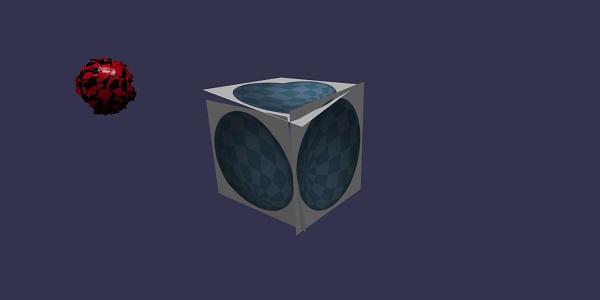
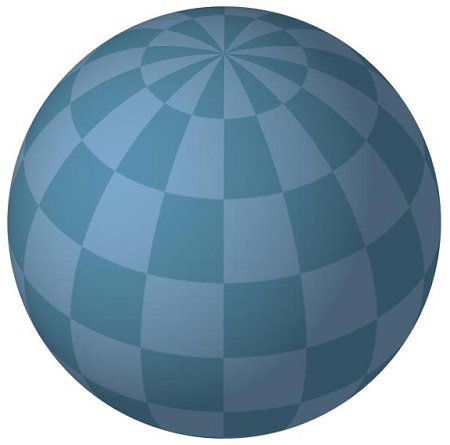
在這個演示中,我們使用了 sphere.jpg 影像。這些影像儲存在本地 images/ 資料夾中,並如下所示貼上以供參考。你可以下載任何你選擇的影像並在演示連結中使用。
images/sphere.jpg
解釋
var box = BABYLON.Mesh.CreateBox("box1", 3.0, scene);
var manager = new BABYLON.MorphTargetManager();
box.morphTargetManager = manager;
上述程式碼建立一個盒子並將其新增到 morphTargetManager 中。考慮以下示例以理解這一點 -
box.morphTargetManager = manager;
要建立變形物件,請執行以下命令並將網格分配給 morphTargetManager。
var manager = new BABYLON.MorphTargetManager();
另一個盒子如下圖所示建立 -
var box1 = BABYLON.Mesh.CreateBox("box2", 3.0, scene);
box1.setEnabled(false);
box1.updateMeshPositions(scrambleUp);
var manager = new BABYLON.MorphTargetManager();
box.morphTargetManager = manager;
var target0 = BABYLON.MorphTarget.FromMesh(box1, "box2", 0.25);
manager.addTarget(target0);
盒子呼叫 updateMeshPositions(scrambleUp); scrambleUp 是新增隨機數的函式。
var target0 = BABYLON.MorphTarget.FromMesh(box1, "box2", 0.25);
manager.addTarget(target0);
上述程式碼在 box1 上建立 morphtarget 並向其新增影響 -0.25。
在瀏覽器中檢查上述演示以檢視結果。
babylonjs_mesh.htm
廣告