
- 巴比倫 JS 教程
- 巴比倫 JS - 主頁
- 巴比倫 JS - 簡介
- 巴比倫 JS - 環境設定
- 巴比倫 JS - 概覽
- 巴比倫 JS - 基本元素
- 巴比倫 JS - 材質
- 巴比倫 JS - 動畫
- 巴比倫 JS - 相機
- 巴比倫 JS - 光源
- 巴比倫 JS - 引數形狀
- 巴比倫 JS - 蒙皮
- 向量位置和旋轉
- 巴比倫 JS - 貼花
- 巴比倫 JS - 曲線 3
- 巴比倫 JS - 動態紋理
- 巴比倫 JS - 視差對映
- 巴比倫 JS - 鏡頭光暈
- 巴比倫 JS - 建立螢幕截圖
- 巴比倫 JS - 反射探針
- 標準渲染管道
- 巴比倫 JS - 著色器材質
- 巴比倫 JS - 骨骼和骨架
- 巴比倫 JS - 物理引擎
- 巴比倫 JS - 播放聲音和音樂
- 巴比倫 JS 實用資源
- 巴比倫 JS - 快速指南
- 巴比倫 JS - 實用資源
- 巴比倫 JS - 討論
巴比倫 JS - 蒙皮邊緣渲染器
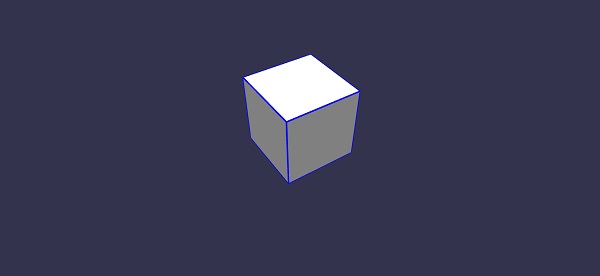
邊緣渲染用於在蒙皮周圍繪製邊緣,如上方的輸出所示。
執行以下程式碼行以呼叫蒙皮上的以下方法,並提供顏色、要繪製的邊緣寬度等。
var box = BABYLON.Mesh.CreateBox("box1", 2, scene);
box.enableEdgesRendering();
box.edgesWidth = 4.0;
box.edgesColor = new BABYLON.Color4(0, 0, 1, 1);
演示
<!doctype html>
<html>
   <head>
      <meta charset = "utf-8">
      <title>BabylonJs - Basic Element-Creating Scene</title>
      <script src = "babylon.js"></script>
      <style>
         canvas {width: 100%; height: 100%;}
      </style>
   </head>

   <body>
      <canvas id = "renderCanvas"></canvas>
      <script type = "text/javascript">
         var canvas = document.getElementById("renderCanvas");
         var engine = new BABYLON.Engine(canvas, true);

         var createScene  = function() {
            var scene = new BABYLON.Scene(engine);
            var camera = new BABYLON.ArcRotateCamera("camera1", 0,Math.PI / 3,10.0,new BABYLON.Vector3(0, 0,0), scene);
            camera.setTarget(BABYLON.Vector3.Zero());
            camera.attachControl(canvas, true);

            var light = new BABYLON.HemisphericLight("light1", new BABYLON.Vector3(0, 1, 0), scene);
            var box = BABYLON.Mesh.CreateBox("box1", 2, scene);

            box.enableEdgesRendering();
            box.edgesWidth = 4.0;
            box.edgesColor = new BABYLON.Color4(0, 0, 1, 1);
            box.position.y = 1.2;
            return scene
         };
         var scene = createScene();
         engine.runRenderLoop(function() {
            scene.render();
         });
      </script>
   </body>
</html>
輸出
babylonjs_mesh.htm
廣告