
- BabylonJS 教程
- BabylonJS - 首頁
- BabylonJS - 簡介
- BabylonJS - 環境設定
- BabylonJS - 概述
- BabylonJS - 基本元素
- BabylonJS - 材質
- BabylonJS - 動畫
- BabylonJS - 相機
- BabylonJS - 光源
- BabylonJS - 引數化形狀
- BabylonJS - 網格
- 向量位置和旋轉
- BabylonJS - 貼花
- BabylonJS - 曲線3
- BabylonJS - 動態紋理
- BabylonJS - 視差貼圖
- BabylonJS - 鏡頭光暈
- BabylonJS - 建立螢幕截圖
- BabylonJS - 反射探針
- 標準渲染管道
- BabylonJS - 著色器材質
- BabylonJS - 骨骼和骨架
- BabylonJS - 物理引擎
- BabylonJS - 播放聲音和音樂
- BabylonJS 有用資源
- BabylonJS - 快速指南
- BabylonJS - 有用資源
- BabylonJS - 討論
BabylonJS - 網格操作
操作用於向網格新增互動。當您單擊網格時,或者當網格相交或碰撞時,會啟用事件。
語法
以下語法用於建立 actionmanager -
ground.actionManager = new BABYLON.ActionManager(scene);
演示
<!doctype html>
<html>
   <head>
      <meta charset = "utf-8">
      <title>BabylonJs - Basic Element-Creating Scene</title>
      <script src = "babylon.js"></script>
      <style>
         canvas {width: 100%; height: 100%;}
      </style>
   </head>

   <body>
      <canvas id = "renderCanvas"></canvas>
      <script type = "text/javascript">
         var canvas = document.getElementById("renderCanvas");
         var engine = new BABYLON.Engine(canvas, true);

         var createScene  = function() {
            var scene = new BABYLON.Scene(engine);
            scene.clearColor = new BABYLON.Color3( .5, .5, .5);
            var camera = new BABYLON.ArcRotateCamera("camera1",  0, 0, 0, new BABYLON.Vector3(0, 0, -0), scene);
            camera.setPosition(new BABYLON.Vector3(0, 0, -100));
            camera.attachControl(canvas, true);

            var light = new BABYLON.HemisphericLight("light1", new BABYLON.Vector3(1, 0.5, 0), scene);
            //	light.intensity = 0.7;

            var pl = new BABYLON.PointLight("pl", new BABYLON.Vector3(0, 0, 0), scene);
            //pl.diffuse = new BABYLON.Color3(1, 1, 1);
            //pl.specular = new BABYLON.Color3(1, 0, 0);
            //pl.intensity = 0.95;

            var gmat = new BABYLON.StandardMaterial("mat1", scene);
            gmat.alpha = 1.0;

            //gmat.diffuseColor = new BABYLON.Color3(1, 0, 0);
            var texture = new BABYLON.Texture("images/mat.jpg", scene);
            gmat.diffuseTexture = texture;

            var ground = BABYLON.MeshBuilder.CreateGround("ground", {width: 150, height:15}, scene);
            ground.material = gmat;

            ground.actionManager = new BABYLON.ActionManager(scene);
            //ground.actionManager.registerAction(
               new BABYLON.InterpolateValueAction(
                  BABYLON.ActionManager.OnPickTrigger, light, "diffuse", BABYLON.Color3.Black(), 1000
               )
            );

            ground.actionManager.registerAction(
               new BABYLON.InterpolateValueAction(
                  BABYLON.ActionManager.OnPickTrigger, light, "diffuse", BABYLON.Color3.Green(), 1000
               )
            ).then(new BABYLON.SetValueAction(
               BABYLON.ActionManager.NothingTrigger, ground.material, "wireframe", false));

            var mat = new BABYLON.StandardMaterial("mat1", scene);
            mat.alpha = 1.0;
            mat.diffuseColor = new BABYLON.Color3(1, 0, 0);
            var texture = new BABYLON.Texture("images/rugby.jpg", scene);
            mat.diffuseTexture = texture;

            var sphere = BABYLON.MeshBuilder.CreateSphere("sphere", {diameter: 5, diameterX:5}, scene);
            sphere.position= new BABYLON.Vector3(15,0,0);
            sphere.material = mat;

            sphere.actionManager = new BABYLON.ActionManager(scene);

            //sphere.actionManager.registerAction(
               new BABYLON.InterpolateValueAction(
                  BABYLON.ActionManager.OnPickTrigger, camera, "alpha", 0, 500, condition1));

            scene.registerBeforeRender(function () {
               //sphere.actionManager.registerAction(new BABYLON.SetValueAction({
                  trigger: BABYLON.ActionManager.OnIntersectionEnterTrigger,
                  parameter: ground
               }, sphere, "scaling", new BABYLON.Vector3(1.2, 1.2, 1.2)));

               sphere.actionManager.registerAction(new BABYLON.SetValueAction({
                  trigger: BABYLON.ActionManager.OnIntersectionEnterTrigger,
                  parameter: { mesh:ground, usePreciseIntersection: true}
               }, sphere, "scaling", new BABYLON.Vector3(1.2, 1.2, 1.2)));
            });
            return scene;
         };
         var scene = createScene();
         engine.runRenderLoop(function() {
            scene.render();
         });
      </script>
   </body>
</html>
輸出
以上程式碼行生成以下輸出 -
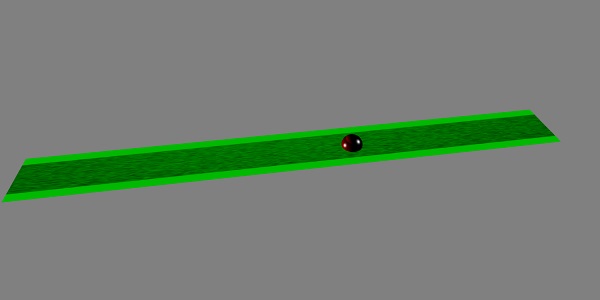
在此演示中,我們使用了名為 mat.jpg、rugby.jpg 的影像。這些影像儲存在本地 images/ 資料夾中,並在下面貼上以供參考。您可以下載任何您選擇的影像並在演示連結中使用。
地面和球體使用的影像如下所示。
images/mat.jpg
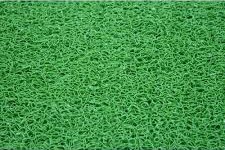
images/rugby.jpg

解釋
為地面建立操作。建立 actionmanager 後,您需要註冊操作。
ground.actionManager.registerAction(
   new BABYLON.InterpolateValueAction(
      BABYLON.ActionManager.OnPickTrigger, light, "diffuse", BABYLON.Color3.Green(), 1000
   )
).then(new BABYLON.SetValueAction(BABYLON.ActionManager.NothingTrigger, ground.material, "wireframe", false));
InterpolateValueAction 事件呼叫 OnPickTrigger,當有人單擊地面時觸發。燈光會漫射,顏色會變為綠色。
操作管理器還有更多觸發器,如下所示 -
BABYLON.ActionManager.NothingTrigger - 從不觸發。用於具有 action .then 函式的子操作。
BABYLON.ActionManager.OnPickTrigger - 當用戶觸控/點選網格時觸發。
BABYLON.ActionManager.OnDoublePickTrigger - 當用戶雙擊/雙擊網格時觸發。
BABYLON.ActionManager.OnPickDownTrigger - 當用戶按下觸控/點選網格時觸發。
BABYLON.ActionManager.OnPickUpTrigger - 當用戶鬆開觸控/點選網格時觸發。
BABYLON.ActionManager.OnPickOutTrigger - 當用戶按下觸控/點選網格然後移出網格時觸發。
BABYLON.ActionManager.OnLeftPickTrigger - 當用戶使用左鍵觸控/點選網格時觸發。
BABYLON.ActionManager.OnRightPickTrigger:當用戶使用右鍵觸控/點選網格時觸發。
BABYLON.ActionManager.OnCenterPickTrigger - 當用戶使用中間鍵觸控/點選網格時觸發。
BABYLON.ActionManager.OnLongPressTrigger - 當用戶長時間(由 BABYLONActionManager.LongPressDelay 定義)觸控/點選網格時觸發。
BABYLON.ActionManager.OnPointerOverTrigger - 當指標位於網格上時觸發。僅觸發一次。
BABYLON.ActionManager.OnPointerOutTrigger - 當指標不再位於網格上時觸發。僅觸發一次。
BABYLON.ActionManager.OnIntersectionEnterTrigger - 當網格與另一個網格相交時觸發。僅觸發一次。
BABYLON.ActionManager.OnIntersectionExitTrigger - 當網格不再與另一個網格相交時觸發。僅觸發一次。
BABYLON.ActionManager.OnKeyDownTrigger - 按下鍵時觸發。
BABYLON.ActionManager.OnKeyUpTrigger - 鬆開鍵時觸發。