
- Zend Framework 教程
- Zend Framework - 首頁
- Zend Framework - 簡介
- Zend Framework - 安裝
- 框架應用程式
- Zend Framework - MVC 架構
- Zend Framework - 概念
- Zend Framework - 服務管理器
- Zend Framework - 事件管理器
- Zend Framework - 模組系統
- 應用程式結構
- Zend Framework - 建立模組
- Zend Framework - 控制器
- Zend Framework - 路由
- Zend Framework - 檢視層
- Zend Framework - 佈局
- 模型和資料庫
- 不同的資料庫
- 表單和驗證
- Zend Framework - 檔案上傳
- Zend Framework - Ajax
- Cookie 管理
- 會話管理
- Zend Framework - 身份驗證
- 郵件管理
- Zend Framework - 單元測試
- Zend Framework - 錯誤處理
- Zend Framework - 例項
- Zend Framework 有用資源
- Zend Framework - 快速指南
- Zend Framework - 有用資源
- Zend Framework - 討論
Zend Framework - 例項
本章將學習如何在 Zend Framework 中建立一個完整的基於 MVC 的員工應用程式。請按照以下步驟操作。
步驟 1:Module.php
首先,我們應該在 – myapp/module/Employee/src/ 目錄內建立一個 Employee 模組,然後實現 ConfigProviderInterface 介面。
Module 類的完整程式碼如下:
<?php
namespace Employee;
use Zend\ModuleManager\Feature\ConfigProviderInterface;
class Module implements ConfigProviderInterface {
   public function getConfig() {
      return include __DIR__ . '/../config/module.config.php';
   }
}
步驟 2:composer.json
使用以下程式碼在 autoload 部分的 composer.json 中配置 Tutorial 模組。
"autoload": {
   "psr-4": {
      "Application\\": "module/Application/src/",
      "Tutorial\\": "module/Tutorial/src/",
      "Employee\\": "module/Employee/src/"
   }
}
現在,使用 composer update 命令更新應用程式。
composer update
Composer 命令將對應用程式進行必要的更改,並在下面的命令提示符中顯示日誌。
Loading composer repositories with package information
Updating dependencies (including require-dev)
   - Removing zendframework/zend-component-installer (0.3.0)
   - Installing zendframework/zend-component-installer (0.3.1)
   Downloading: 100%

   - Removing zendframework/zend-stdlib (3.0.1)
   - Installing zendframework/zend-stdlib (3.1.0)
   Loading from cache

   - Removing zendframework/zend-eventmanager (3.0.1)
   - Installing zendframework/zend-eventmanager (3.1.0)
   Downloading: 100%

   - Removing zendframework/zend-view (2.8.0)
   - Installing zendframework/zend-view (2.8.1)
   Loading from cache

   - Removing zendframework/zend-servicemanager (3.1.0)
   - Installing zendframework/zend-servicemanager (3.2.0)
   Downloading: 100%

   - Removing zendframework/zend-escaper (2.5.1)
   - Installing zendframework/zend-escaper (2.5.2)
   Loading from cache

   - Removing zendframework/zend-http (2.5.4)
   - Installing zendframework/zend-http (2.5.5)
   Loading from cache

   - Removing zendframework/zend-mvc (3.0.1)
   - Installing zendframework/zend-mvc (3.0.4)
   Downloading: 100%

   - Removing phpunit/phpunit (5.7.4)
   - Installing phpunit/phpunit (5.7.5)
   Downloading: 100%

Writing lock file
Generating autoload files
步驟 3:Employee 模組的 module.config.php
建立模組配置檔案“module.config.php”,位於 myapp/module/Employee/config 目錄下,程式碼如下:
<?php
namespace Employee;
use Zend\ServiceManager\Factory\InvokableFactory;
use Zend\Router\Http\Segment;
return [
   'controllers' => [
      'factories' => [
         Controller\EmployeeController::class => InvokableFactory::class,
      ],
   ],
   'view_manager' => [
      'template_path_stack' => ['employee' => __DIR__ . '/../view',],
   ],
];
現在,在應用程式級別的配置檔案 myapp/config/modules.config.php 中配置 Employee 模組。
return ['Zend\Router', 'Zend\Validator', 'Application', 'Tutorial', 'Employee'];
步驟 4:EmployeeController
建立一個新的 PHP 類 EmployeeController,擴充套件 AbstractActionController,並將其放在 myapp/module/Employee/src/Controller 目錄下。
完整的程式碼列表如下:
<?php
namespace Employee\Controller;
use Zend\Mvc\Controller\AbstractActionController;
use Zend\View\Model\ViewModel;
class EmployeeController extends AbstractActionController {
   public function indexAction() {
      return new ViewModel();
   }
}
步驟 5:路由配置
讓我們在 Employee 模組中新增一個段路由。更新 Employee 模組配置檔案 module.config.php,位於 myapp/module/Employee/config。
<?php
namespace Employee;
use Zend\ServiceManager\Factory\InvokableFactory;
use Zend\Router\Http\Segment;
return [
   'controllers' => [
      'factories' => [
         Controller\EmployeeController::class => InvokableFactory::class,
      ],
   ],
   'router' => [
      'routes' => [
         'employee' => [
            'type' => Segment::class,
            'options' => [
               'route' => '/employee[/:action[/:id]]',
               'constraints' => [
                  'action' => '[a-zA-Z][a-zA-Z0-9_-]*',
                  'id' => '[0-9]+',
               ],
               'defaults' => [
                  'controller' => Controller\EmployeeController::class,
                  'action' => 'index',
               ],
            ],
         ],
      ],
   ],
   'view_manager' => [
      'template_path_stack' => [
         'employee' => __DIR__ . '/../view',
      ],
   ],
];
我們已成功添加了 Employee 模組的路由。下一步是為 Employee 應用程式建立一個檢視指令碼。
步驟 6:建立 ViewModel
建立一個名為“index.phtml”的檔案,位於 myapp/module/Employee/view/employee/employee 目錄下。
在檔案中新增以下更改:
<div class = "row content">
   <h3>This is my first Zend application</h3>
</div>
Move to “EmployeeController.php” file and edit the following changes,

<?php
namespace Employee\Controller;
use Zend\Mvc\Controller\AbstractActionController;
use Zend\View\Model\ViewModel;
class EmployeeController extends AbstractActionController {
   public function indexAction() {
      return new ViewModel();
   }
}
最後,我們已成功完成 Employee 模組。我們可以使用以下 url 訪問它:https://:8080/employee。
結果
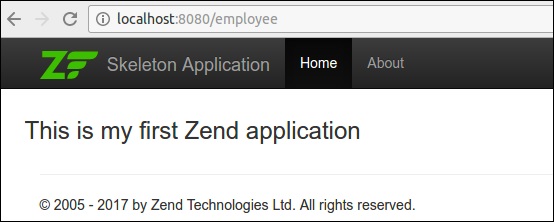
下一步,我們將執行員工應用程式中的新增、編輯和刪除資料操作。要執行這些操作,我們應該首先建立一個數據庫模型。這將在下一步中介紹。
步驟 7:建立一個模型
讓我們在模組的src 目錄中建立一個模型 Employee。通常,模型分組在 Model 資料夾下 (myapp/module/Employee/src/Model/Employee.php)
<?php
namespace Employee\Model;
class Employee {
   public $id;
   public $emp_name;
   public $emp_job;
}
步驟 8:MySQL 表
使用以下命令在本地 MYSQL 伺服器中建立一個名為tutorials的資料庫:
create database tutorials;
讓我們使用以下 SQL 命令在資料庫中建立一個名為employee的表:
use tutorials;
CREATE TABLE employee (
   id int(11) NOT NULL auto_increment,
   emp_name varchar(100) NOT NULL,
   emp_job varchar(100) NOT NULL,
   PRIMARY KEY (id)
);
使用以下查詢將資料插入employee表:
INSERT INTO employee (emp_name, emp_job) VALUES ('Adam',  'Tutor');
INSERT INTO employee (emp_name, emp_job) VALUES ('Bruce',  'Programmer');
INSERT INTO employee (emp_name, emp_job) VALUES ('David',  'Designer');
步驟 9:更新資料庫配置
使用必要的資料庫驅動程式資訊更新全域性配置檔案 myapp/config/autoload/global.php。
return [
   'db' => [
      'driver' => 'Pdo',
      'dsn' => 'mysql:dbname = tutorials;host=localhost',
      'driver_options' => [PDO::MYSQL_ATTR_INIT_COMMAND => 'SET NAMES \'UTF8\''],
   ],
];
現在,在本地配置檔案 myapp/config/autoload/local.php 中更新資料庫憑據。透過這種方式,我們可以分離本地和即時資料庫連線憑據。
<?php
return array(
   'db' => array('username' => '<user_name>', 'password' => '<password>',),
);
步驟 10:實現 exchangeArray
在 Employee 模型中實現 exchangeArray 函式。
<?php
namespace Employee\Model;
class Employee {
   public $id;
   public $emp_name;
   public $emp_job;
   public function exchangeArray($data) {
      $this->id = (!empty($data['id'])) ? $data['id'] : null;
      $this->emp_name = (!empty($data['emp_name'])) ? $data['emp_name'] : null;
      $this->emp_job = (!empty($data['emp_job'])) ? $data['emp_job'] : null;
   }
}
步驟 11:使用 TableGateway 獲取 Employee 資料
在 Model 資料夾中建立類 EmployeeTable。它在以下程式碼塊中定義。
<?php
namespace Employee\Model;
use Zend\Db\TableGateway\TableGatewayInterface;
class EmployeeTable {
   protected $tableGateway;
   public function __construct(TableGatewayInterface $tableGateway) {
      $this->tableGateway = $tableGateway;
   }
   public function fetchAll() {
      $resultSet = $this->tableGateway->select();
      return $resultSet;
   }
}
步驟 12:配置 EmployeeTable 類
使用getServiceConfig()方法更新Module.php中的員工服務
<?php
namespace Employee;
use Zend\Db\Adapter\AdapterInterface;
use Zend\Db\ResultSet\ResultSet;
use Zend\Db\TableGateway\TableGateway;
use Zend\ModuleManager\Feature\ConfigProviderInterface;

class Module implements ConfigProviderInterface {
   public function getConfig() {
      return include __DIR__ . '/../config/module.config.php';
   }
   public function getServiceConfig() {
      return [
         'factories' => [
            Model\EmployeeTable::class => function (    $container) {
               $tableGateway = $container>get( Model\EmployeeTableGateway::class);
               $table = new Model\EmployeeTable($tableGateway);
               return $table;
            },
            Model\EmployeeTableGateway::class => function ($container) {
               $dbAdapter = $container->get(AdapterInterface::class);
               $resultSetPrototype = new ResultSet();
               $resultSetPrototype->setArrayObjectPrototype(new Model\Employee());
               return new TableGateway('employee', $dbAdapter, null, $resultSetPrototype);
            },
         ],
      ];
   }
}
步驟 13:在控制器中新增 Employee 服務
如下所示更新 myapp/module/config/module.config.php 中 Employee 模組配置的控制器部分。
'controllers' => [
   'factories' => [
      Controller\EmployeeController::class => function($container) {
         return new Controller\EmployeeController(
            $container->get(Model\EmployeeTable::class)
         );
      },
   ],
]
步驟 14:為 EmployeeController 新增建構函式
新增帶有EmployeeTable作為引數的建構函式並編輯以下更改。
<?php
namespace Employee\Controller;
use Zend\Mvc\Controller\AbstractActionController;
use Zend\View\Model\ViewModel;
use Employee\Model\Employee;
use Employee\Model\EmployeeTable;

class EmployeeController extends AbstractActionController {
   private $table;
   public function __construct(EmployeeTable $table) {
      $this->table = $table;
   }
   public function indexAction() {
      $view = new ViewModel([
         'data' => $this->table->fetchAll(),
      ]);
      return $view;
   }
}
步驟 15:在檢視指令碼“index.phtml”中顯示員工資訊
轉到檔案index.phtml並進行以下更改:
<?php
$title = 'Employee application';
$this->headTitle($title);
?>

<table class="table">
   <tr>
      <th>Employee Name</th>
      <th>Employee Job</th>
      <th>Edit/Delete operations</th>
   </tr>
   <?php foreach ($data as $empdata) : ?>
   <tr>
      <td><?php echo $this->escapeHtml($empdata->emp_name);?></td>
      <td><?php echo $this->escapeHtml($empdata->emp_job);?></td>
      <td>
         <a href="<?php echo $this->url('employee',
            array('action'=>'edit', 'id' =>$empdata->id));?>">Edit</a>
         <a href="<?php echo $this->url('employee',
            array('action'=>'delete', 'id' => $empdata->id));?>">Delete</a>
      </td>
   </tr>
   <?php endforeach; ?>
</table>
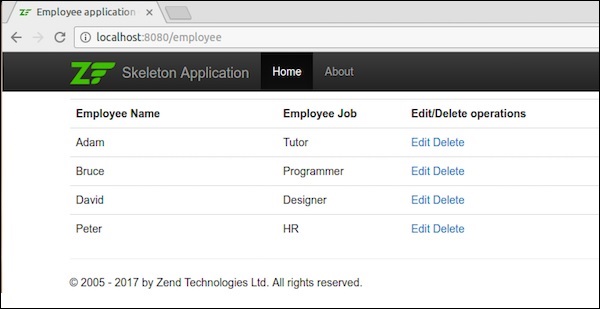
現在我們已經成功建立了一個數據庫模型,並且可以在應用程式中獲取記錄。
使用 url 請求應用程式:https://:8080/employee。
結果

下一步解釋了員工模組中的插入、編輯和刪除資料操作。
步驟 16:建立一個員工表單
在 myapp/module/Employee/src/Form 目錄中建立一個名為EmployeeForm.php的檔案。它在下面的程式碼塊中描述。
<?php
namespace Employee\Form;
use Zend\Form\Form;

class EmployeeForm extends Form {
   public function __construct($name = null) {
      /
      / we want to ignore the name passed
      parent::__construct('employee');
      $this->add(array(
         'name' => 'id',
         'type' => 'Hidden',
      ));
      $this->add(array(
         'name' => 'emp_name',
         'type' => 'Text',
         'options' => array(
            'label' => 'Name',
         ),
      ));
      $this->add(array(
         'name' => 'emp_job',
         'type' => 'Text',
         'options' => array(
            'label' => 'Job',
         ),
      ));
      $this->add(array(
         'name' => 'submit',
         'type' => 'Submit',
         'attributes' => array(
            'value' => 'Go',
            'id' => 'submitbutton',
         ),
      ));
   }
}
步驟 17:更新 Employee 模型
更新員工模型並實現 InputFilterAwareInterface。轉到目錄 myapp/module/Employee/src/Employee/Model 並對Employee.php檔案新增以下更改。
<?php
namespace Employee\Model;

// Add these import statements
use Zend\InputFilter\InputFilter;
use Zend\InputFilter\InputFilterAwareInterface;
use Zend\InputFilter\InputFilterInterface;

class Employee implements InputFilterAwareInterface {
   public $id;
   public $emp_name;
   public $emp_job;
   protected $inputFilter;
   public function exchangeArray($data) {
      $this->id = (isset($data['id'])) ? $data['id'] : null;
      $this->emp_name = (isset($data['emp_name'])) ? $data['emp_name'] : null;
      $this->emp_job = (isset($data['emp_job']))  ? $data['emp_job'] : null;
   }

   // Add content to these methods:
   public function setInputFilter(InputFilterInterface $inputFilter) {
      throw new \Exception("Not used");
   }
   public function getInputFilter() {
      if (!$this->inputFilter) {
         $inputFilter = new InputFilter();
         $inputFilter->add(array(
            'name' => 'id',
            'required' => true,
            'filters' => array(
               array('name' => 'Int'),
            ),
         ));
         $inputFilter->add(array(
            'name' => 'emp_name',
            'required' => true,
            'filters' => array(
               array('name' => 'StripTags'),
               array('name' => 'StringTrim'),
            ),
            'validators' => array(
               array('name' => 'StringLength',
                        'options' => array(
                           'encoding' => 'UTF-8',
                           'min' => 1,
                           'max' => 50,
                        ),
                    ),
                ),
            ));
         $inputFilter->add(array(
            'name' => 'emp_job',
            'required' => true,
            'filters' => array(
               array('name' => 'StripTags'),
               array('name' => 'StringTrim'),
            ),
            'validators' => array(
               array('name' => 'StringLength',
                  'options' => array(
                     'encoding' => 'UTF-8',
                     'min' => 1,
                     'max' => 50,
                  ),
                  ),
               ),
         ));
         $this->inputFilter = $inputFilter;
      }
      return $this->inputFilter;
   }
}
步驟 18:在 Employee Controller 中新增 addAction
在EmployeeController類中新增以下更改。
<?php
use Zend\Mvc\Controller\AbstractActionController;
use Zend\View\Model\ViewModel;
use Employee\Model\Employee;
use Employee\Model\EmployeeTable;
use Employee\Form\EmployeeForm;

public function addAction() {
   $form = new EmployeeForm();
   $form->get('submit')->setValue('Add');
   $request = $this->getRequest();

   if ($request->isPost()) {
      $employee = new Employee();
      $form->setInputFilter($employee->getInputFilter());
      $form->setData($request->getPost());

      if ($form->isValid()) {
         $employee->exchangeArray($form->getData());
         $this->table->saveEmployee($employee);

         // Redirect to list of employees
         return $this->redirect()->toRoute('employee');
      }
   }
   return array('form' => $form);
}
步驟 19:在 EmployeeTable 類中新增儲存功能
在 EmployeeTable 類中新增以下兩個函式 – myapp/module/Employee/src/Model/EmployeeTable.php
public function getEmployee($id) {
   $id  = (int) $id;
   $rowset = $this->tableGateway->select(array('id' => $id));
   $row = $rowset->current();
   if (!$row) {
      throw new \Exception("Could not find row $id");
   }
   return $row;
}
public function saveEmployee(Employee $employee) {
   $data = array (
      'emp_name' => $employee->emp_name,
      'emp_job'  => $employee->emp_job,
   );
   $id = (int) $employee->id;
   if ($id == 0) {
      $this->tableGateway->insert($data);
   } else {
      if ($this->getEmployee($id)) {
         $this->tableGateway->update($data, array('id' => $id));
      } else {
         throw new \Exception('Employee id does not exist');
      }
   }
}
步驟 20:為 AddAction 方法建立檢視指令碼 Add.phtml
在myapp/module/view/employee/employee 中的“Add.phtml”檔案中新增以下更改。
<?php
   $title = 'Add new employee';
   $this->headTitle($title);
?>
<h1><?php echo $this->escapeHtml($title); ?></h1>

<?php
   $form->setAttribute('action', $this->url('employee', array('action' => 'add')));
   $form->prepare();
   echo $this->form()->openTag($form);
   echo $this->formHidden($form->get('id'));
   echo $this->formRow($form->get('emp_name'))."<br>";
   echo $this->formRow($form->get('emp_job'))."<br>";
   echo $this->formSubmit($form->get('submit'));
   echo $this->form()->closeTag();
Request the application using the url, https://:8080/employee/add
結果
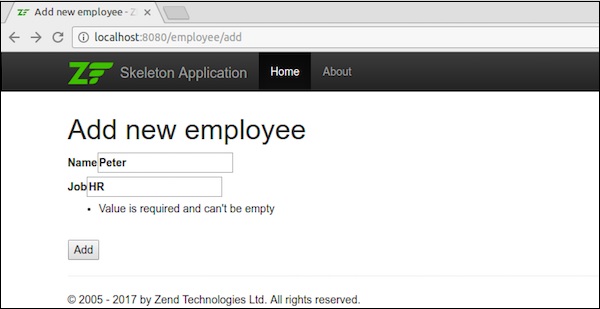
新增資料後,它將重定向到主頁。
步驟 21:編輯員工記錄
讓我們在 Employee 模組中執行編輯資料操作。在Employeecontroller.php中更新以下更改。
public function editAction() {
   $id = (int) $this->params()->fromRoute('id', 0);
   if (!$id) {
      return $this->redirect()->toRoute('employee', array(
         'action' => 'add'
      ));
   }
   try {
      $employee = $this->table->getEmployee($id);
   } catch (\Exception $ex) {
      return $this->redirect()->toRoute('employee', array(
         'action' => 'index'
      ));
   }
   $form = new EmployeeForm();
   $form->bind($employee);
   $form->get('submit')->setAttribute('value', 'Edit');
   $request = $this->getRequest();

   if ($request->isPost()) {
      $form->setInputFilter($employee->getInputFilter());
      $form->setData($request->getPost());
      if ($form->isValid()) {
         $this->table->saveEmployee($employee);

         // Redirect to list of employees
         return $this->redirect()->toRoute('employee');
      }
   }
   return array('id' => $id, 'form' => $form,);
}
在這裡,我們查詢匹配路由中的id,然後載入員工詳細資訊以進行編輯操作。
步驟 22:Employee.php
現在,在位於myapp/module/Employee/src/Employee/Model/目錄下的“Employee.php”檔案中新增以下更改。
public function getArrayCopy() {
   return get_object_vars($this);
}
在這裡,Zend\Stdlib\Hydrator\ArraySerializable 期望在模型中找到兩種方法:getArrayCopy()和exchangeArray()。
其中,exchangeArray() 用於迭代。此函式用於從員工表繫結資料。
現在,我們需要為editAction()建立一個檢視指令碼。
步驟 23:建立 Edit.phtml
在 module/Employee/view/employee/employee/edit.phtml 中建立一個檢視指令碼檔案
<?php
   $title = 'Edit employee records';
   $this->headTitle($title);
?>
<h1><?php echo $this->escapeHtml($title); ?></h1>

<?php
$form = $this->form;
$form->setAttribute('action', $this->url(
   'employee',
   array('action' => 'edit', 'id' => $this->id,)
));
$form->prepare();
echo $this->form()->openTag($form);
echo $this->formHidden($form->get('id'));
echo $this->formRow($form->get('emp_name'))."<br>";
echo $this->formRow($form->get('emp_job'))."<br>";
echo $this->formSubmit($form->get('submit'));
echo $this->form()->closeTag();
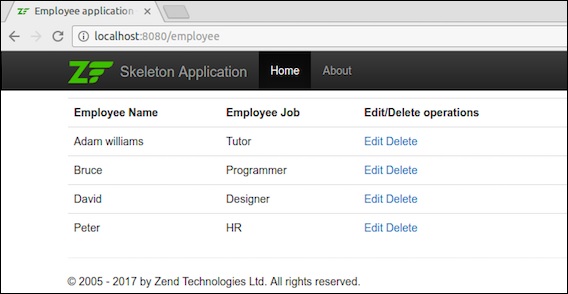
編輯員工詳細資訊如下圖所示。
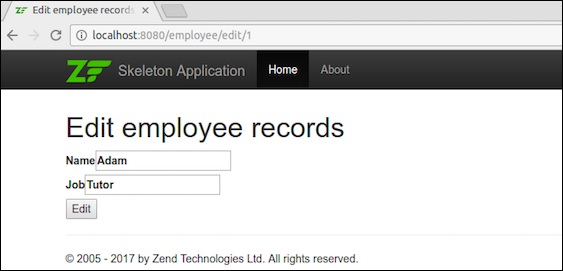
編輯資料後,它將重定向到主頁。
步驟 24:新增 deleteEmployee 方法
在 EmployeeTable 類中新增 deleteEmployee 方法 – myapp/module/Employee/src/Model/EmployeeTable.php
public function deleteEmployee($id) {
   $this->tableGateway->delete(['id' => (int) $id]);
}
步驟 25:刪除員工記錄
現在讓我們在 Employee 模組中執行刪除資料操作。在 EmployeeController 類中新增以下方法deleteAction。
public function deleteAction() {
   $id = (int) $this->params()->fromRoute('id', 0);
   if (!$id) {
      return $this->redirect()->toRoute('employee');
   }
   $request = $this->getRequest();
   if ($request->isPost()) {
      $del = $request->getPost('del', 'No');
      if ($del == 'Yes') {
         $id = (int) $request->getPost('id');
         $this->table->deleteEmployee($id);
      }
      return $this->redirect()->toRoute('employee');
   }
   return array(
      'id' => $id,
      'employee' => $this->table->getEmployee($id)
   );
}
在這裡,deleteEmployee() 方法透過其id刪除員工,並重定向到員工列表頁面(主頁)。
現在讓我們為 deleteAction() 方法建立相應的檢視指令碼。
步驟 26:建立一個檢視指令碼
在myapp/module/Employee/view/employee/employee/delete.phtml中建立一個名為 delete.phtml 的檔案,並在其中新增以下程式碼。
<?php
   $title = 'Delete an employee record';
   $this->headTitle($title);
?>
<h1><?php echo $this->escapeHtml($title); ?></h1>

'<?php echo $this->escapeHtml($employee->emp_name); ?>' by
'<?php echo $this->escapeHtml($employee->emp_job); ?&'?
<?php
   $url = $this->url('employee', array('action' => 'delete', 'id' => $this->id,));
?>

<form action ="<?php echo $url; ?>" method = "post">
   <div>
      <input type = "hidden" name = "id" value = "<?php echo (int) $employee->id; ?>" />
      <input type = "submit" name = "del" value = "Yes" />
      <input type = "submit" name = "del" value = "No" />
   </div>
</form>
現在,使用主頁中的編輯連結刪除任何員工,結果如下圖所示。
結果
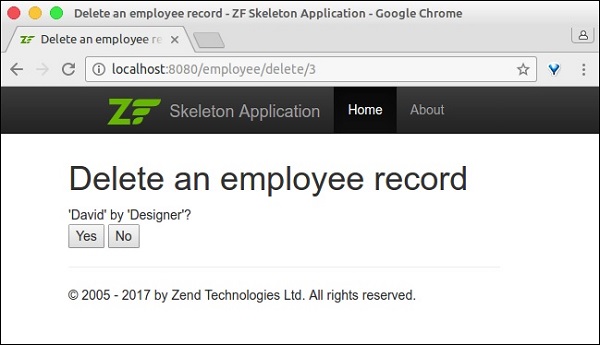
我們已經透過實現所有必要的特性成功完成了 Employee 模組。
結論
在當前競爭激烈的環境中,Zend 框架在開發人員中佔據首位。它為 PHP 語言中的任何程式或任何型別的應用程式提供抽象。它是一個成熟的框架,支援現代 PHP 語言特性。它有趣、專業、不斷發展,並與當前技術保持同步。