
- Zend Framework 教程
- Zend Framework - 首頁
- Zend Framework - 簡介
- Zend Framework - 安裝
- 骨架應用
- Zend Framework - MVC 架構
- Zend Framework - 概念
- Zend Framework - 服務管理器
- Zend Framework - 事件管理器
- Zend Framework - 模組系統
- 應用結構
- Zend Framework - 建立模組
- Zend Framework - 控制器
- Zend Framework - 路由
- Zend Framework - 檢視層
- Zend Framework - 佈局
- 模型 & 資料庫
- 不同的資料庫
- 表單 & 驗證
- Zend Framework - 檔案上傳
- Zend Framework - Ajax
- Cookie 管理
- 會話管理
- Zend Framework - 認證
- 郵件管理
- Zend Framework - 單元測試
- Zend Framework - 錯誤處理
- Zend Framework - 工作示例
- Zend Framework 有用資源
- Zend Framework - 快速指南
- Zend Framework - 有用資源
- Zend Framework - 討論
Zend Framework - 骨架應用
讓我們使用 Zend Framework 的 MVC 層和模組系統建立一個骨架應用。
使用 Composer 安裝
建立新的 Zend Framework 專案最簡單的方法是使用 Composer。它定義如下:
$ cd /path/to/install
$ composer create-project -n -sdev zendframework/skeleton-application myapp
您將在螢幕上看到以下結果:
Installing zendframework/skeleton-application (dev-master
   941da45b407e4f09e264f000fb537928badb96ed)
   - Installing zendframework/skeleton-application (dev-master master)
   Cloning master

Created project in myapp
Loading composer repositories with package information
Installing dependencies (including require-dev) from lock file
   - Installing zendframework/zend-component-installer (0.3.0)
   Loading from cache

   - Installing zendframework/zend-stdlib (3.0.1)
   Loading from cache

   - Installing zendframework/zend-config (2.6.0)
   Loading from cache

   - Installing zendframework/zend-loader (2.5.1)
   Loading from cache

   - Installing zendframework/zend-eventmanager (3.0.1)
   Loading from cache

   - Installing zendframework/zend-view (2.8.0)
   Loading from cache

   - Installing container-interop/container-interop (1.1.0)
   Loading from cache

   - Installing zendframework/zend-servicemanager (3.1.0)
   Loading from cache

   - Installing zendframework/zend-validator (2.8.1)
   Loading from cache

   - Installing zendframework/zend-escaper (2.5.1)
   Loading from cache

   - Installing zendframework/zend-uri (2.5.2)
   Loading from cache

   - Installing zendframework/zend-http (2.5.4)
   Loading from cache

   - Installing zendframework/zend-router (3.0.2)
   Loading from cache

   - Installing zendframework/zend-modulemanager (2.7.2)
   Loading from cache

   - Installing zendframework/zend-mvc (3.0.1)
   Loading from cache

   - Installing zendframework/zend-skeleton-installer (0.1.3)
   Loading from cache

   - Installing zfcampus/zf-development-mode (3.0.0)
   Loading from cache
zendframework/zend-config suggests installing zendframework/zend-filter
   (Zend\Filter component)
zendframework/zend-config suggests installing zendframework/zend-i18n
   (Zend\I18n component)
zendframework/zend-config suggests installing zendframework/zend-json
   (Zend\Json to use the Json reader or writer classes)
zendframework/zend-view suggests installing zendframework/zend-authentication
   (Zend\Authentication component)
zendframework/zend-view suggests installing zendframework/zend-feed
   (Zend\Feed component)
zendframework/zend-view suggests installing zendframework/zend-filter
   (Zend\Filter component)
zendframework/zend-view suggests installing zendframework/zend-i18n
   (Zend\I18n component)
zendframework/zend-view suggests installing zendframework/zend-json
   (Zend\Json component)
zendframework/zend-view suggests installing zendframework/zend-navigation
   (Zend\Navigation component)
zendframework/zend-view suggests installing zendframework/zend-paginator
   (Zend\Paginator component)
zendframework/zend-view suggests installing zendframework/zend-permissions-acl
   (Zend\Permissions\Acl component)
zendframework/zend-servicemanager suggests installing ocramius/proxy-manager
   (ProxyManager 1.* to handle lazy initialization of services)
zendframework/zend-validator suggests installing zendframework/zend-db
   (Zend\Db component)
zendframework/zend-validator suggests installing zendframework/zend-filter
   (Zend\Filter component, required by the Digits validator)
zendframework/zend-validator suggests installing zendframework/zend-i18n
   (Zend\I18n component to allow translation of validation error messages as well as
   to use the various Date validators)
zendframework/zend-validator suggests installing zendframework/zend-i18nresources
   (Translations of validator messages)
zendframework/zend-validator suggests installing zendframework/zend-math
   (Zend\Math component)
zendframework/zend-validator suggests installing zendframework/zend-session
   (Zend\Session component)
zendframework/zend-router suggests installing zendframework/zend-i18n
   (^2.6, if defining translatable HTTP path segments)

zendframework/zend-modulemanager suggests installing zendframework/zend-console
   (Zend\Console component)
zendframework/zend-mvc suggests installing zendframework/zend-json ((^2.6.1 ||
   ^3.0) To auto-deserialize JSON body content in AbstractRestfulController
   extensions, when json_decode is unavailable)
zendframework/zend-mvc suggests installing zendframework/zend-mvc-console
   (zend-mvc-console provides the ability to expose zend-mvc as a console application)
zendframework/zend-mvc suggests installing zendframework/zend-mvc-i18n
   (zendmvc-i18n provides integration with zend-i18n, including a translation bridge
   and translatable route segments)
zendframework/zend-mvc suggests installing zendframework/zend-mvc-pluginfileprg
   (To provide Post/Redirect/Get functionality around forms that container
   file uploads)
zendframework/zend-mvc suggests installing zendframework/zend-mvc-pluginflashmessenger
   (To provide flash messaging capabilities between requests)
zendframework/zend-mvc suggests installing zendframework/zend-mvc-pluginidentity
   (To access the authenticated identity (per zend-authentication) in controllers)
zendframework/zend-mvc suggests installing zendframework/zend-mvc-plugin-prg
   (To provide Post/Redirect/Get functionality within controllers)
zendframework/zend-mvc suggests installing zendframework/zend-psr7bridge
   ((^0.2) To consume PSR-7 middleware within the MVC workflow)
zendframework/zend-mvc suggests installing zendframework/zend-servicemanager-di
   (zend-servicemanager-di provides utilities for integrating zend-di and
   zendservicemanager in your zend-mvc application)

Generating autoload files
   Removing optional packages from composer.json
   Updating composer.json
Removing zendframework/zend-skeleton-installer...
   - Removing zendframework/zend-skeleton-installer (0.1.3)
   Removed plugin zendframework/zend-skeleton-installer.
   Removing from composer.json
   Complete!
> zf-development-mode enable
You are now in development mode.
現在應用程式已安裝,您可以立即使用 **PHP 內建的 Web 伺服器** 進行測試:
$ cd path/to/install/myapp
$ composer serve
然後您將看到以下響應:
> php -S 0.0.0.0:8080 -t public/ public/index.php
這將在埠 8080 上啟動 PHP 內建的 CLI 伺服器。開發伺服器啟動後,您可以訪問 **(https://:8080/)** 上的站點。內建的 CLI 伺服器僅用於開發目的。
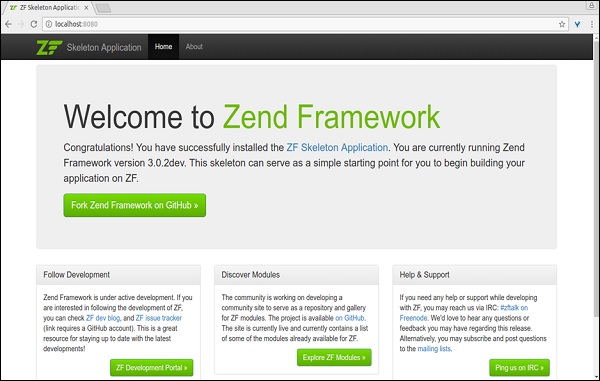
單元測試
要執行骨架單元測試,請在終端中輸入以下命令。
$ composer require --dev zendframework/zend-test
它將產生以下響應:
Using version ^3.0 for zendframework/zend-test
   ./composer.json has been updated
Loading composer repositories with package information
Updating dependencies (including require-dev)
   - Installing zendframework/zend-dom (2.6.0)
   Loading from cache

   - Installing zendframework/zend-console (2.6.0)
   Loading from cache

   - Installing sebastian/version (2.0.1)
   Loading from cache

   - Installing symfony/yaml (v3.2.1)
   Downloading: 100%

   - Installing sebastian/resource-operations (1.0.0)
   Loading from cache

   - Installing sebastian/recursion-context (2.0.0)
   Loading from cache

   - Installing sebastian/object-enumerator (2.0.0)
   Loading from cache

   - Installing sebastian/global-state (1.1.1)
   Loading from cache

   - Installing sebastian/exporter (2.0.0)
   Loading from cache

   - Installing sebastian/environment (2.0.0)
   Loading from cache

   - Installing sebastian/diff (1.4.1)
   Loading from cache

   - Installing sebastian/comparator (1.2.2)
   Loading from cache

   - Installing phpunit/php-text-template (1.2.1)
   Loading from cache

   - Installing doctrine/instantiator (1.0.5)
   Loading from cache

   - Installing phpunit/phpunit-mock-objects (3.4.3)
   Downloading: 100%

   - Installing phpunit/php-timer (1.0.8)
   Loading from cache

   - Installing phpunit/php-file-iterator (1.4.2)
   Loading from cache

   - Installing sebastian/code-unit-reverse-lookup (1.0.0)
   Loading from cache

   - Installing phpunit/php-token-stream (1.4.9)
   Loading from cache

   - Installing phpunit/php-code-coverage (4.0.4)
   Downloading: 100%

   - Installing webmozart/assert (1.2.0)
   Loading from cache

   - Installing phpdocumentor/reflection-common (1.0)
   Loading from cache

   - Installing phpdocumentor/type-resolver (0.2.1)
   Loading from cache

   - Installing phpdocumentor/reflection-docblock (3.1.1)
   Loading from cache

   - Installing phpspec/prophecy (v1.6.2)
   Loading from cache

   - Installing myclabs/deep-copy (1.5.5)
   Loading from cache

   - Installing phpunit/phpunit (5.7.4)
   Downloading: 100%

   - Installing zendframework/zend-test (3.0.2)
   Loading from cache

zendframework/zend-console suggests installing zendframework/zend-filter
   (To support DefaultRouteMatcher usage)
symfony/yaml suggests installing symfony/console (For validating YAML files
   using the lint command)
sebastian/global-state suggests installing ext-uopz (*)
phpunit/phpunit-mock-objects suggests installing ext-soap (*)
phpunit/php-code-coverage suggests installing ext-xdebug (>=2.4.0)
phpunit/phpunit suggests installing phpunit/php-invoker (~1.1)
phpunit/phpunit suggests installing ext-xdebug (*)
zendframework/zend-test suggests installing zendframework/zend-mvc-console
   (^1.1.8, to test MVC <-> console integration)
Writing lock file
Generating autoload files
現在測試支援已啟用,因此您可以使用以下命令執行測試。
$ ./vendor/bin/phpunit
Apache Web 伺服器
在生產環境中託管基於 Zend Framework 的應用程式非常簡單直接。只需在 Apache 配置檔案中建立一個 **VirtualHost** 並將 **DocumentRoot** 指向 Zend Framework 應用程式的 **Public** 資料夾。
下面給出了一個示例配置 (myapp):
<VirtualHost *:80>
   ServerName myapp.localhost
   DocumentRoot /path/to/install/myapp/public
   <Directory /path/to/install/myapp/public>
      DirectoryIndex index.php
      AllowOverride All
      Order allow,deny
      Allow from all
      <IfModule mod_authz_core.c>
         Require all granted
      </IfModule>
   </Directory>
</VirtualHost>
廣告