
- Zend Framework 教程
- Zend Framework - 首頁
- Zend Framework - 簡介
- Zend Framework - 安裝
- 框架應用程式
- Zend Framework - MVC 架構
- Zend Framework - 概念
- Zend Framework - 服務管理器
- Zend Framework - 事件管理器
- Zend Framework - 模組系統
- 應用程式結構
- Zend Framework - 建立模組
- Zend Framework - 控制器
- Zend Framework - 路由
- Zend Framework - 檢視層
- Zend Framework - 佈局
- 模型與資料庫
- 不同的資料庫
- 表單與驗證
- Zend Framework - 檔案上傳
- Zend Framework - Ajax
- Cookie 管理
- 會話管理
- Zend Framework - 身份驗證
- 郵件管理
- Zend Framework - 單元測試
- Zend Framework - 錯誤處理
- Zend Framework - 例項
- Zend Framework 有用資源
- Zend Framework - 快速指南
- Zend Framework - 有用資源
- Zend Framework - 討論
Zend Framework - 佈局
佈局代表多個檢視的公共部分,例如頁首和頁尾。預設情況下,佈局應儲存在view/layout資料夾中。
佈局配置在模組的module.config.php檔案中的view_manager部分定義。
框架應用程式的預設配置如下:
'view_manager' => array(
   'display_not_found_reason' => true,
   'display_exceptions' => true,
   'doctype' => 'HTML5',
   'not_found_template' => 'error/404',
   'exception_template' => 'error/index',
   'template_map' => array(
      'layout/layout' => __DIR__ . '/../view/layout/layout.phtml',
      'application/index/index' => __DIR__ . '/../view/application/index/index.phtml',
      'error/404' => __DIR__ . '/../view/error/404.phtml',
      'error/index' => __DIR__ . '/../view/error/index.phtml',
   ),
   'template_path_stack' => array(
   __DIR__ . '/../view',
),
這裡,template_map用於指定佈局。如果找不到佈局,則會返回錯誤。讓我們看一下框架應用程式的主要佈局。
Layout.phtml
<?= $this->doctype() ?>
<html lang = "en">
   <head>
      <meta charset = "utf-8">
      <?= $this->headTitle('ZF Skeleton Application')->setSeparator(' - ')>
         setAutoEscape(false) ?>
      <?= $this->headMeta()
         ->appendName('viewport', 'width = device-width, initial-scale = 1.0')
         ->appendHttpEquiv('X-UA-Compatible', 'IE = edge')
      ?>

      <!-- Le styles -->
      <?= $this->headLink(['rel' => 'shortcut icon', 'type' =>
         'image/vnd.microsoft.icon',
         'href' => $this->basePath() . '/img/favicon.ico'])
         ->prependStylesheet($this->basePath('css/style.css'))
         ->prependStylesheet($this->basePath('css/bootstraptheme.min.css'))
         ->prependStylesheet($this->basePath('css/bootstrap.min.css'))
      ?>

      <!-- Scripts -->
      <?= $this->headScript()
         ->prependFile($this->basePath('js/bootstrap.min.js'))
         ->prependFile($this->basePath('js/jquery-3.1.0.min.js'))
      ?>
   </head>

   <body>
      <nav class = "navbar navbar-inverse navbar-fixed-top" role = "navigation">
         <div class = "container">
            <div class = "navbar-header">
               <button type = "button" class = "navbar-toggle" data-
                  toggle = "collapse" data-target = ".navbar-collapse">
                  <span class = "icon-bar"></span>
                  <span class = "icon-bar"></span>
                  <span class = "icon-bar"></span>
               </button>

               <a class = "navbar-brand" href = "<?= $this->url('home') ?>">
                  <img src = "<?= $this->basePath('img/zf-logo-mark.svg') ?>
                     " height = "28" alt = "Zend Framework <?= \Application\Module::
                     VERSION ?>"/> Skeleton Application
               </a>
            </div>

            <div class = "collapse navbar-collapse">
               <ul class = "nav navbar-nav">
                  <li class = "active"><a href = "<?=
                     $this->url('home') ?>">Home</a></li>
               </ul>
            </div>
         </div>
      </nav>

      <div class = "container">
         <?= $this->content ?>
         <hr>
         <footer>
            <p>© 2005 - <?= date('Y') ?> by Zend Technologies Ltd.
               All rights reserved.</p>
         </footer>
      </div>
      <?= $this->inlineScript() ?>
   </body>
</html>
正如你分析佈局一樣,它主要使用了我們在上一章討論過的檢視助手。仔細觀察,佈局使用了一個特殊的變數$this->content。這個變數很重要,因為它將被實際請求頁面的檢視指令碼(模板)替換。
建立新的佈局
讓我們為我們的教程模組建立一個新的佈局。
首先,讓我們在“public/css”目錄下建立一個tutorial.css檔案。
 body {
   background-color: lightblue;
}
h1 {
   color: white;
   text-align: center;
}
在/myapp/module/Tutorial/view/layout/目錄下建立一個新的佈局檔案newlayout.phtml,並複製現有佈局的內容。然後,使用HeadLink助手類在佈局頭部部分新增tutorial.css樣式表。
<?php echo $this->headLink()->appendStylesheet('/css/tutorial.css');?>
使用URL助手在導航部分新增一個新的about連結。
<li><a href = "<?= $this->url('tutorial', ['action' => 'about']) ?>">About</a></li>
此佈局頁面是教程模組應用程式的公共頁面。更新教程模組配置檔案中的view_manager部分。
'view_manager' => array(
   'template_map' => array(
      'layout/layout' => __DIR__ . '/../view/layout/newlayout.phtml'),
   'template_path_stack' => array('tutorial' => __DIR__ . '/../view',),
)
在TutorialController中新增aboutAction函式。
 public function aboutAction() {
}
在myapp/module/Tutorial/view/tutorial/tutorial/目錄下新增about.phtml檔案,內容如下。
<h2>About page</h2>
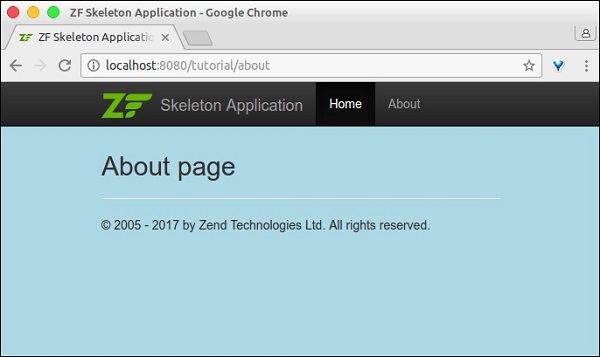
現在,您可以執行應用程式了:https://:8080/tutorial/about。
廣告