
- Zend Framework 教程
- Zend Framework - 首頁
- Zend Framework - 簡介
- Zend Framework - 安裝
- 骨架應用
- Zend Framework - MVC 架構
- Zend Framework - 概念
- Zend Framework - 服務管理器
- Zend Framework - 事件管理器
- Zend Framework - 模組系統
- 應用結構
- Zend Framework - 建立模組
- Zend Framework - 控制器
- Zend Framework - 路由
- Zend Framework - 檢視層
- Zend Framework - 佈局
- 模型 & 資料庫
- 不同的資料庫
- 表單 & 驗證
- Zend Framework - 檔案上傳
- Zend Framework - Ajax
- Cookie 管理
- 會話管理
- Zend Framework - 認證
- 郵件管理
- Zend Framework - 單元測試
- Zend Framework - 錯誤處理
- Zend Framework - 工作示例
- Zend Framework 有用資源
- Zend Framework - 快速指南
- Zend Framework - 有用資源
- Zend Framework - 討論
Zend Framework - 檢視層
檢視層是 MVC 應用的表示層。它將應用邏輯與表示邏輯分離。在一個典型的 PHP Web 應用中,所有業務邏輯和設計都混合在一起。混合使得小型專案的開發速度更快。但是,在大專案中,涉及到很多高階架構時,它就會徹底失敗。要更改 Web 應用的設計,開發人員也需要處理業務邏輯。這可能造成災難性的後果,導致業務邏輯中斷。
Zend Framework 提供了一個經過深思熟慮、簡潔、靈活且可擴充套件的檢視層。檢視層作為一個單獨的模組提供,即 **Zend/View**,並與 **Zend/Mvc** 模組很好地整合。Zend 檢視層被分成多個元件,彼此之間很好地互動。
其各個元件如下所示:
**變數容器** - 儲存檢視層的資料。
**檢視模型** - 儲存變數容器和設計模板。
**渲染器** - 處理來自檢視模型的資料和模板,並輸出設計表示,可能是最終的 HTML 輸出。
**解析器** - 以渲染器可以消費的方式解析檢視模型中可用的模板。
**檢視 (Zend\View\View)** - 將請求對映到渲染器,然後將渲染器對映到響應。
**渲染策略** - 檢視用來將請求對映到渲染器的策略。
**響應策略** - 檢視用來將渲染器對映到響應的策略。
檢視層,**View** 處理 **ViewModel**,使用 **Resolver** 解析模板,使用 **Rendering Strategy** 渲染它,最後使用 **Response Renderer** 輸出它。
檢視層配置
像控制器一樣,檢視層可以在模組的配置檔案中配置,稱為 - **module.config.php**。主要配置是指定模板將放置的位置。這可以透過在“module.config.php”中新增以下配置來實現。
'view_manager' => [
   'template_path_stack' => ['tutorial' => __DIR__ . '/../view',],
]
預設情況下,檢視層對其所有元件都有預設行為。例如,**ViewModel** 根據“lowercase-module-name/lowercase-controller-name/lowercase-action-name”規則,在模板根目錄內解析控制器的操作的模板名稱。但是,這可以透過 **ViewModel** 的 **setTemplate()** 方法覆蓋。
控制器和檢視層
預設情況下,控制器不需要向檢視層傳送任何資料。將模板放在正確的位置就足夠了。
例如,在我們的示例 **TutorialController** 中,模板需要放在 **myapp/module/Tutorial/view/tutorial/tutorial/index.phtml**。**index.phtml** 指的是基於 PHP 的模板,它將由 PHPRenderer 渲染。還有其他渲染器,例如 **JsonRenderer** 用於 **json** 輸出和 **FeedRenderer** 用於 **rss** 和 **atom** 輸出。
完整的列表如下所示:
<?php
namespace Tutorial\Controller;
use Zend\Mvc\Controller\AbstractActionController;
use Zend\View\Model\ViewModel;
class TutorialController extends AbstractActionController {
   public function indexAction() {
   }
}
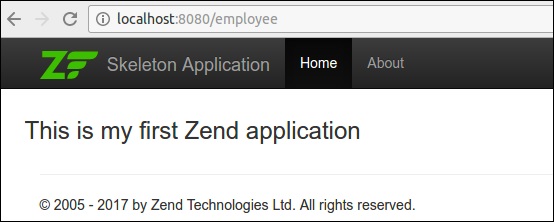
Zend 應用模板
<div class = "row content">
   <h3>This is my first Zend application</h3>
</div>
最後,我們成功完成了 **Tutorial** 模組,我們可以使用 URL 訪問它 - **https://:8080/tutorial**。
將資料傳遞到檢視層
將資料傳送到檢視層的最簡單方法是使用 **ViewModel** 引數。修改後的 **indexAction** 方法如下所示:
public function indexAction() {
   $view = new ViewModel([
      'message' => 'Hello, Tutorial'
   ]);
   return $view;
}
現在,更改 **index.phtml** 檔案如下所示:
<div class = "row content">
   <h3>This is my first Zend application</h3>
   <h4><?php echo $this->message?></h4>
</div>
檢視助手
檢視助手用於編寫小的、原子化的函式,以便在模板中使用。Zend 框架提供了一個介面,**Zend\View\Helper\HelperInterface**,用於編寫標準的檢視助手。
HelperInterface 只有兩個方法:
**setView()** - 此方法接受 **Zend\View\Renderer\RendererInterface** 例項/實現。
**getView()** - 用於檢索該例項。
**HelperInterface** 的完整程式碼列表如下所示:
namespace Zend\View\Helper;
use Zend\View\Renderer\RendererInterface as Renderer;
interface HelperInterface {
   /**
      * Set the View object
      *
      * @param  Renderer $view
      * @return HelperInterface
   */
   public function setView(Renderer $view);
   /**
      * Get the View object
      *
      * @return Renderer
   */
   public function getView();
}
要在檢視指令碼中使用助手,請使用 **$this->helperName()** 訪問它。
內建助手
Zend Framework 為各種目的提供了許多內建助手函式。**zend-mvc** 中的一些可用檢視助手如下所示:
URL
URL 助手用於生成與應用中定義的路由匹配的 URL。
URL 助手的定義如下所示:
$this->url($name, $params, $options, $reuseMatchedParameters)
例如,在教程模組中,路由名為 **tutorial**,它有兩個引數 **action** 和 **id**。我們可以使用 URL 助手生成兩個不同的 URL,如下所示:
<a href = "<? = $this->url('tutorial'); ?>">Tutorial Index</a>
<a href = "<? = $this->url('tutorial', ['action' => 'show', 'id' =>10]); ?>">
   Details of Tutorial #10
</a>
結果如下所示:
<a href = "/tutorial">Tutorial Index</a>
<a href = "/tutorial/show/10"> Details of Tutorial #10</a>
佔位符
佔位符助手用於在檢視指令碼和檢視例項之間保持內容。它提供選項來初始設定資料,然後在後續階段使用它。
例如,我們可以設定,比如 **公司名稱**,然後在所有其他地方使用它。
<?php $this->placeholder('companyname')->set("TutorialsPoint") ?>
<?= $this->placeholder('companyname'); ?>
佔位符提供了一些高階選項,可以從 PHP 陣列和物件生成複雜內容。它還可以選擇捕獲模板本身的某些部分。
例如,以下程式碼捕獲中間的模板結果並將其儲存在 **productlist** 佔位符中。
類 - 產品
class Product {
   public $name;
   public $description;
}
控制器
$p1 = new Product();
$p1->name = 'Car';
$p1->description = 'Car';
$p2 = new Product();
$p2->name = 'Cycle';
$p2->description = 'Cycle';
$view = new ViewModel(['products' => $products]);
模板
<!-- start capture -->
<?php $this->placeholder('productlist')->captureStart();
   foreach ($this->products as $product): ?>
<div>
   <h2><?= $product->name ?></h2>
   <p><?= $product->description ?></p>
</div>
<?php endforeach; ?>
<?php $this->placeholder('productlist')->captureEnd() ?>
<!-- end capture -->
<?= $this->placeholder('productlist') ?>
結果
<div class = "foo">
   <h2>Car</h2>
   <p>Car</p>
</div>
<div class = "foo">
   <h2>Cycle</h2>
   <p>Cycle</p>
</div>
文件型別
Doctype 助手用於生成各種 html 文件型別。它是 **Placeholder** 助手的具體實現。文件型別可以在引導檔案和配置檔案中設定。
基本用法如下所示:
應用引導檔案
use Zend\View\Helper\Doctype;
$doctypeHelper = new Doctype();
$doctypeHelper->doctype('XHTML5');
模組配置
// module/Application/config/module.config.php:
return [
   /* ... */
   'view_manager' => [
      'doctype' => 'html5',
      /* ... */
   ],
];
模板
<?php echo $this->doctype() ?>
標題
HeadTitle 助手用於生成 html 標題元素。它是 **Placeholder** 助手的具體實現。Zend 提供了一個選項,可以在模組配置檔案中設定標題,並且可以在任何級別設定,例如站點、模組、控制器、操作等。HeadTitle 的部分程式碼如下所示:
模組
headTitleHelper->append($action);
$headTitleHelper->append($controller);
$headTitleHelper->append($module);
$headTitleHelper->append($siteName);
模板
<?= $this->headTitle() ?>
結果
action - controller - module - Zend Framework
元資料
HeadMeta 助手用於生成 html 元標記。它是 **Placeholder** 助手的具體實現。
**模板** -
<?php
   $this->headMeta()->appendName('keywords', 'turorialspoint, zend framework, php');
   echo $this->headMeta()
?>
結果
<meta name = "keywords" content = "tutorialspoint, zend framework, php" />
連結
HeadLink 助手用於生成包含外部資源的 html 連結。它是 **Placeholder** 助手的具體實現。
模板
<?php
   // setting links in a view script:
   $this->headLink(['rel' => 'icon', 'href' => '/img/favicon.ico'], 'PREPEND')
      ->appendStylesheet('/styles/site.css')
      ->prependStylesheet('/styles/mystyle.css', 'screen', true, ['id' => 'mystyle']);

   // rendering the links from the layout:
   echo $this->headLink();
?>
結果
<link href = "/styles/mystyle.css" media = "screen" rel = "stylesheet"
   type = "text/css" id = "mystyle">
<link href = "/img/favicon.ico" rel = "icon">
<link href = "/styles/site.css" media = "screen" rel = "stylesheet" type = "text/css">
樣式
HeadStyle 助手用於生成內聯 CSS 樣式。它是 **Placeholder** 助手的具體實現。
模板
<?php $this->headStyle()->appendStyle($styles); ?>
<?php echo $this->headStyle() ?>
指令碼
HeadScript 用於生成內聯指令碼或包含外部指令碼。它是 **Placeholder** 助手的具體實現。
模板
<? $this->headScript()->appendFile(‘/js/sample.js’);?>
<?php echo $this->headScript() ?>
內聯指令碼
InlineScript 用於在 html 模板的頭部和主體部分生成指令碼。它派生自 HeadScript。
HTML 列表
HTMLList 用於生成有序和無序列表。HTMLList 的定義如下所示:
定義
htmlList($items, $ordered, $attribs, $escape)
模板
$items = [
   '2015',
   ['March', 'November'],
   '2016',
];
echo $this->htmlList($items);
結果
<ul>
   <li>2015
      <ul>
         <li>March</li>
         <li>November</li>
      </ul>
   </li>
   <li>2016</li>
</ul>
迴圈
Cycle 用於在迴圈環境中生成備選方案。它具有 assign、next 和 prev 函式。
控制器
$view = new ViewModel(['message' => 'Hello, Tutorial', 'data' => array('One', 'Two')]);
模板
<?php $this->cycle()->assign(['#F0F0F0', '#FFF'], 'colors'); ?>

<table>
   <?php foreach ($this->data as $datum): ?>
   <tr style = "background-color: <?= $this->cycle()->setName('colors')>next() ?>">
      <td><?= $this->escapeHtml($datum) ?></td>
   </tr>
   <?php endforeach ?>
</table>
結果
<table>
   <tr style = "background-color: #F0F0F0">
      <td>One</td>
   </tr>
   <tr style = "background-color: #FFF">
      <td>Two</td>
   </tr>
</table>
一些其他重要的內建助手如下所示:
**BasePath** - BasePath 用於生成應用根目錄的 public 資料夾的路徑。
**Partial** - Partial 用於在其自己的變數範圍內渲染特定的模板。
**PartialLoop** - PartialLoop 與 Partial 類似,但用於迴圈環境中。
**Identity** - Identity 用於從身份驗證服務中檢索已登入使用者的身份。
**JSON** - JSON 用於 RESTful 環境中,其中輸出為 JSON 格式。它發出正確的 HTTP 標頭並停用佈局概念。
Zend Framework 中還有許多其他助手,例如 **i18n 助手、表單助手、分頁助手、導航助手** 等。
建立檢視助手
Zend Framework 提供了一個內建的 **AbstractHelper**,它實現了 **HelperInterface** 來編寫檢視助手。
編寫新助手的步驟如下所示:
**步驟 1** - 擴充套件類 **Zend\View\Helper\AbstractHelper**。
**步驟 2** - 覆蓋 **__invoke()** 函式。
**步驟 3** - 在 **module.config.php 檔案** 中設定配置。
**步驟 4** - 在檢視指令碼中使用檢視助手。
現在讓我們建立一個 **TestHelper**
在 **myapp/module/Tutorial/src/View 目錄** 中建立 Helper 資料夾。在 Helper 目錄中編寫 **TestHelper**,即 **TestHelper.php**。
完整的列表如下所示:
<?php
namespace Tutorial\View\Helper;
use Zend\View\Helper\AbstractHelper;
class TestHelper extends AbstractHelper {
   public function __invoke() {
      $output = "I am from test helper";
      return htmlspecialchars($output, ENT_QUOTES, 'UTF-8');
   }
}
在 **module.config.php** 中設定配置。
'view_helpers' => [
   'aliases' => [
      'testHelper' => View\Helper\TestHelper::class,
   ],
   'factories' => [
      View\Helper\TestHelper::class => InvokableFactory::class,
   ],
],
在 **about** 檢視指令碼中使用新建立的 **TestHelper**。
<?= $this->testHelper() ?>