
- Seaborn 教程
- Seaborn - 首頁
- Seaborn - 簡介
- Seaborn - 環境設定
- 匯入資料集和庫
- Seaborn - 圖表美學
- Seaborn - 顏色調色盤
- Seaborn - 直方圖
- Seaborn - 核密度估計
- 視覺化成對關係
- Seaborn - 繪製分類資料
- 觀測值的分佈
- Seaborn - 統計估計
- Seaborn - 繪製寬格式資料
- 多面板分類圖
- Seaborn - 線性關係
- Seaborn - Facet Grid
- Seaborn - Pair Grid
- 函式參考
- Seaborn - 函式參考
- Seaborn 有用資源
- Seaborn - 快速指南
- Seaborn - 有用資源
- Seaborn - 討論
Seaborn.xkcd_palette() 方法
Seaborn.xkcd_palette() 方法用於根據 xkcd 顏色調查建立具有顏色名稱的調色盤。(要了解更多資訊,請訪問以下連結。)
此方法只是 seaborn.xkcd_rgb 字典的一個簡單包裝器。也就是說,它返回所有顏色列表作為 RGB 元組,這些元組的行為類似於其 seaborn 顏色調色盤。
語法
以下是xkcd_palette() 方法的語法:
seaborn.xkcd_palette(colors)
引數
此方法的引數如下所述。
| 序號 | 引數和描述 |
|---|---|
| 1 | 顏色 接受作為 seaborn.xkcd_rgb 字典中鍵的字串列表。 |
返回值
xkcd_palette() 方法返回一個 Seaborn 顏色調色盤。
示例 1
我們將需要傳遞一個字串列表作為輸入,這些字串是顏色名稱,然後顏色將作為調色盤輸出。這些字串應該是 seaborn.xkcd_rgb 字典的一部分。
import seaborn as sns
import matplotlib.pyplot as plt
data = sns.xkcd_palette(["forest green","mauve","teal","indigo"])
sns.palplot(data)
plt.show()
輸出
輸出如下:

示例 2
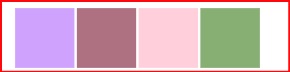
在這個例子中,我們將傳遞一些其他的顏色,並瞭解字典中不同的顏色。
import seaborn as sns
import matplotlib.pyplot as plt
data = sns.xkcd_palette(["lilac","mauve","pale pink","sage"])
sns.palplot(data)
plt.show()
輸出
輸出如下:
示例 3
讓我們來看另一個例子:
import seaborn as sns
import matplotlib.pyplot as plt
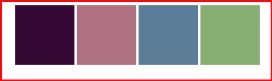
sns.xkcd_palette(["eggplant","mauve","steel blue","sage"])
sns.palplot(data)
plt.show()
輸出
輸出如下:
seaborn_color_palettes_introduction.htm
廣告