
- Seaborn 教程
- Seaborn - 首頁
- Seaborn - 簡介
- Seaborn - 環境設定
- 匯入資料集和庫
- Seaborn - 圖表美學
- Seaborn - 顏色調色盤
- Seaborn - 直方圖
- Seaborn - 核密度估計
- 視覺化成對關係
- Seaborn - 繪製分類資料
- 觀測值的分佈
- Seaborn - 統計估計
- Seaborn - 繪製寬格式資料
- 多面板分類圖
- Seaborn - 線性關係
- Seaborn - Facet Grid
- Seaborn - Pair Grid
- 函式參考
- Seaborn - 函式參考
- Seaborn 有用資源
- Seaborn - 快速指南
- Seaborn - 有用資源
- Seaborn - 討論
Seaborn.load_dataset() 方法
Seaborn.load_dataset() 方法用於載入Seaborn庫中內建的資料集。為了描述seaborn或建立可重複的錯誤報告示例,此函式提供了對一些示例資料集的快速訪問。
日常使用不需要此方法。為了對分類變數建立合適的順序,對某些資料集進行了一小部分預處理。
語法
以下是seaborn.load_dataset()方法的語法:
seaborn.load_dataset(name, cache=True, data_home=None, **kws)
引數
以下是seaborn.load_dataset()的引數:
| 序號 | 引數和描述 |
|---|---|
| 1 | 名稱 (Name) 接受字串值,它是資料集的名稱。 |
| 2 | 快取 (Cache) 接受布林值,這是一個可選引數。如果為True,則首先嚐試從本地快取載入,如果需要下載則儲存到快取。 |
| 3 | 資料主目錄 (Data_home) 此可選引數接受字串值,它是設定快取資料所在的目錄。 |
返回值
此方法返回一個pandas DataFrame。
載入資料集
為了繪製圖表,我們需要資料,如果所需格式的資料和所需資料沒有現成可用,可以使用Seaborn庫中提供的資料集。
Seaborn除了是一個統計圖表工具包外,還包含各種預設資料集。我們將使用一個內建資料集作為預設資料集的示例。
讓我們在第一個示例中考慮tips資料集。“tips”資料集包含關於可能在餐廳用餐的人的資訊,以及他們是否給服務員留下小費,以及他們的性別、吸菸狀況和其他因素。
get_dataset_names() 方法用於檢索Seaborn中所有可用內建資料集的名稱。
seaborn.get_dataset_names()
load_dataset() 方法用於將名稱為name的資料集載入到資料結構中。
Tips=seaborn.load_dataset('tips')
以上程式碼行將名稱為“tips”的資料集載入到名為tips的資料結構中。因此,此方法有助於從庫中載入資料集。
示例1
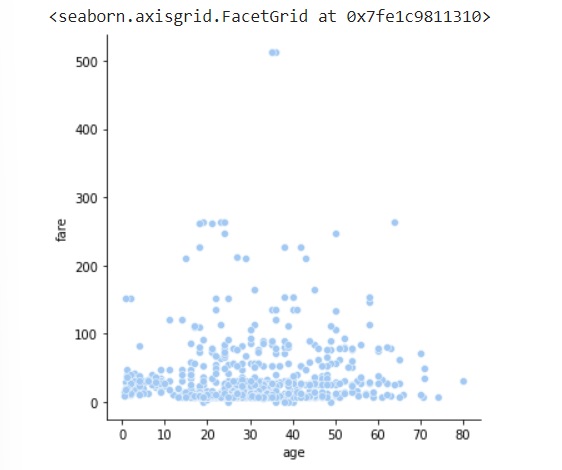
以下是一個載入titanic資料集的示例
import seaborn as sns
import matplotlib.pyplot as plt
dts= sns.load_dataset("titanic")
dts.head()
sns.relplot(data=dts, x="age", y="fare")
plt.show()
輸出
以下是上述示例的輸出:
示例2
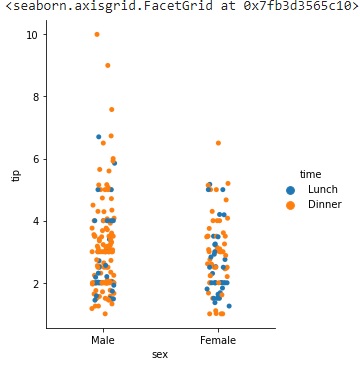
在下面的示例中,我們載入tips資料集:
import seaborn as sns
import matplotlib.pyplot as plt
tips=sns.load_dataset("tips")
tips.head()
sns.catplot(data=tips,x="sex",y="tip",hue="time",height=5, aspect=.8)
plt.show()
輸出
這將生成以下輸出:
示例3
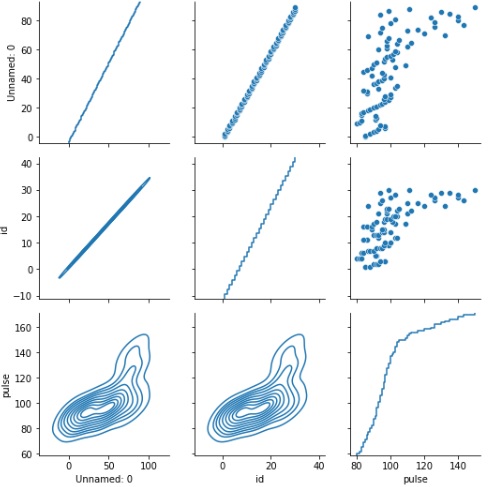
讓我們來看另一個示例:
import seaborn as sns
import matplotlib.pyplot as plt
exercise=sns.load_dataset("exercise")
exercise.head()
g=sns.PairGrid(exercise)
g.map_upper(sns.scatterplot)
g.map_lower(sns.kdeplot)
g.map_diag(sns.ecdfplot)
plt.show()
輸出
執行後,以上示例將生成以下示例:
seaborn_utility_functions_introduction.htm
廣告