- Seaborn 教程
- Seaborn - 首頁
- Seaborn - 簡介
- Seaborn - 環境設定
- 匯入資料集和庫
- Seaborn - 圖形美觀
- Seaborn - 調色盤
- Seaborn - 直方圖
- Seaborn - 核密度估計
- 視覺化成對關係
- Seaborn - 繪製分類資料
- 觀測值的分佈
- Seaborn - 統計估計
- Seaborn - 繪製寬格式資料
- 多面板分類圖
- Seaborn - 線性關係
- Seaborn - Facet Grid
- Seaborn - Pair Grid
- 函式參考
- Seaborn - 函式參考
- Seaborn 有用資源
- Seaborn - 快速指南
- Seaborn - 有用資源
- Seaborn - 討論
Seaborn.get_dataset_names() 方法
Seaborn.get_dataset_names() 方法用於檢視 Seaborn 庫中所有內建資料集的名稱。為了描述 Seaborn 或建立可重複的錯誤投訴示例,此函式提供了對一些示例資料集的快速訪問。
日常使用不需要它。為了為分類變數建立適當的排序,對某些資料集進行了一些少量預處理。
語法
以下是 seaborn.get_dataset_names() 方法的語法:
seaborn.get_dataset_names()
引數
此方法不接受任何引數。
返回值
此方法返回 Seaborn 中所有內建資料集名稱的列表。
Seaborn.get_dataset_names() 方法
為了繪製圖形,我們需要資料,如果資料不容易以所需的格式和包含所需資料的方式獲得,則可以使用 Seaborn 庫中提供的資料集。
除了是一個統計圖表工具包之外,Seaborn 還包含各種預設資料集。我們將使用其中一個內建資料集作為預設資料集的示例。
為了檢視 Seaborn 庫中所有可用的資料集,可以使用以下方法來實現。
示例 1
get_dataset_names() 方法有助於檢索 Seaborn 中所有可用的內建資料集的名稱。
import seaborn as sns
list = sns.get_dataset_names()
print(list)
輸出
執行此示例後,將獲得以下列表。
['anagrams', 'anscombe', 'attention', 'brain_networks', 'car_crashes', 'diamonds', 'dots', 'exercise', 'flights', 'fmri', 'gammas', 'geyser', 'iris', 'mpg', 'penguins', 'planets', 'taxis', 'tips', 'titanic']
可以使用任何一個內建資料集來繪製圖形。要載入資料集,可以使用 seaborn.load_dataset() 方法來實現。
load_dataset() 方法有助於將名稱為的資料集載入到資料結構中。出於本示例的目的,我們將載入 tips 資料集。
Tips=seaborn.load_dataset('tips')
以上程式碼行有助於將名稱為“tips”的資料集載入到名為 tips 的資料結構中。因此,此方法有助於從庫中載入資料集。
示例 2
以下是一個使用 get_dataset_names() 方法載入 titanic 資料集的示例:
import seaborn as sns
import matplotlib.pyplot as plt
list = sns.get_dataset_names()
name = list[21]
dts= sns.load_dataset(name)
dts.head()
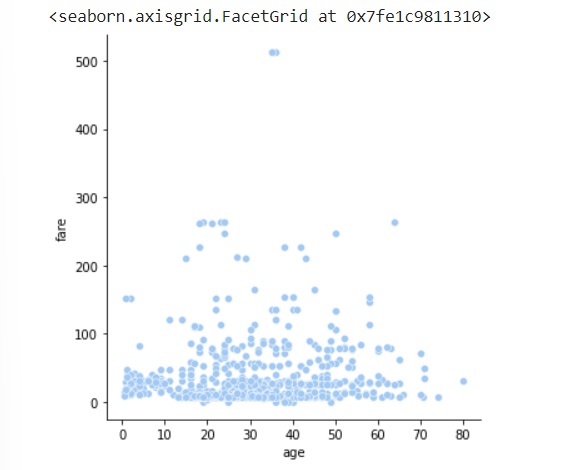
sns.relplot(data=dts, x="age", y="fare")
plt.show()
輸出
以下是上述示例的輸出:
示例 3
以下是一個使用 get_dataset_names() 方法載入 tips 資料集的示例:
import seaborn as sns
import matplotlib.pyplot as plt
list = sns.get_dataset_names()
name = list[20]
tips=sns.load_dataset(name)
tips.head()
sns.catplot(data=tips,x="sex",y="tip",hue="time",height=5, aspect=.8)
plt.show()
輸出
這將生成以下輸出:

示例 4
讓我們再看一個例子:
import seaborn as sns
import matplotlib.pyplot as plt
list = sns.get_dataset_names()
name = list[11]
print(name)
exercise=sns.load_dataset("exercise")
exercise.head()
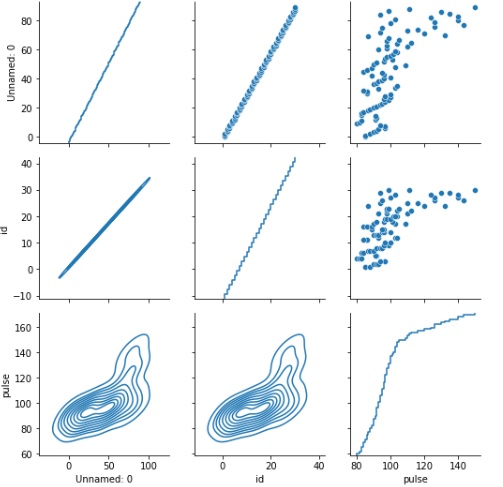
g=sns.PairGrid(exercise)
g.map_upper(sns.scatterplot)
g.map_lower(sns.kdeplot)
g.map_diag(sns.ecdfplot)
plt.show()
輸出
執行後,上述示例將生成以下示例: