- Scikit Image 教程
- Scikit Image - 簡介
- Scikit Image - 影像處理
- Scikit Image - Numpy 影像
- Scikit Image - 影像資料型別
- Scikit Image - 使用外掛
- Scikit Image - 影像處理
- Scikit Image - 讀取影像
- Scikit Image - 寫入影像
- Scikit Image - 顯示影像
- Scikit Image - 影像集合
- Scikit Image - 影像堆疊
- Scikit Image - 多個影像
Scikit Image - 影像集合
在計算機視覺和影像處理中,影像集合是一個術語,用於描述一組或一組影像,這些影像被視為一個整體,以便同時管理和處理多個影像。
它可以用於儲存和管理一組相關的影像,例如影片中的一系列幀,或來自各種來源的影像集合。它簡化了多個影像的管理和處理,使影像處理和計算機視覺任務更容易處理。
skimage 中的 ImageCollection 類
在 scikit-image 庫中,影像集合由一個ImageCollection類表示,該類提供載入、管理和操作影像檔案集合的功能。
它允許您指定一個模式或檔名列表,將相應的影像載入到記憶體中,並方便地訪問它們。以下是此類的語法:
class skimage.io.ImageCollection(load_pattern, conserve_memory=True, load_func=None, **load_func_kwargs)
以下是類的引數:
- load_pattern - 表示要載入的檔名模式的字串或字串列表。檔名路徑可以是絕對路徑或相對路徑。
- conserve_memory(可選) - 布林值。如果設定為 True,則一次只保留一個影像在記憶體中。如果設定為 False,則載入後將快取影像以提高後續訪問速度。
- load_func(可選) - 用於讀取影像檔案的可呼叫物件。預設情況下,它使用 scikit-image 庫中的 imread 函式。但是,如果需要,您可以指定不同的函式。
- **load_func_kwargs(可選) - 傳遞給 load_func 函式的其他關鍵字引數。
它建立一個 ImageCollection 物件,允許您對載入的影像執行各種操作,例如遍歷集合、訪問單個影像以及對整個集合應用操作。
示例 1
以下示例將演示如何載入指定目錄中的所有 JPEG 檔案。生成的 ImageCollection 物件將儲存在 collection 變數中。
from skimage import io

# Load all the JPEG files in a directory
collection = io.ImageCollection('Images_/*.jpg')
print('Type:',type(collection))
print('Total loaded JPEG files are',len(collection))
輸出
輸出顯示了 collection 物件的型別和載入的 JPEG 檔案的數量。
Type: < class 'skimage.io.collection.ImageCollection'>
Total loaded JPEG files are 5
示例 2
以下示例演示瞭如何使用 ImageCollection 物件的 files 屬性訪問擴充套件檔名。
from skimage import io

# Load all the JPEG and PNG files in a directory
collection = io.ImageCollection(['Images_/*.jpg', 'Images_/*.png'])
# Access the expanded file list
file_list = collection.files
# Print the list of files one by one
print("Files:")
for image in file_list:
   print(image)
輸出
Files:
Images_\Blank.png
Images_\Blank_img.png
Images_\ColorDots.png
Images_\Trees.jpg
Images_\WhiteDots2.jpg
Images_\WhiteDots4.jpg
Images_\Zoo.jpg
Images_\balloons_noisy.png
Images_\binary image.png
Images_\tree.jpg
您還可以使用 skimage.io 模組中的名為 io.imread_collection() 的直接函式來讀取影像集合。
imread_collection() 函式
imread_collection() 函式用於載入影像集合,它將返回一個 ImageCollection 物件,表示載入的影像集合。
以下是函式的語法和引數:
skimage.io.imread_collection(load_pattern, conserve_memory=True, plugin=None, **plugin_args)
以下是此函式的引數:
- load_pattern - 表示要載入的檔名模式的字串或字串列表。檔名路徑可以是絕對路徑或相對路徑。
- conserve_memory(可選) - 布林值。如果設定為 True,則一次只保留一個影像在記憶體中。如果設定為 False,則載入後將快取影像以提高後續訪問速度。
- plugin_args(可選) - 將傳遞給所選外掛的其他關鍵字引數。
imread_collection() 是一個方便的包裝函式,它在內部建立一個 ImageCollection 物件以載入影像集合。除了直接使用 ImageCollection 類之外,當您需要根據模式或檔名列表快速載入影像時,在簡單的用例中使用 imread_collection() 函式是一個好主意。
示例 1
以下示例演示如何載入特定目錄中的所有 tiff 檔案。
from skimage import io

# Load all the tiff images
collection = io.imread_collection('Images_/*.tiff', plugin='tifffile')
print('Dipaly the tifffile collection:')
print(collection)
輸出
Dipaly the tifffile collection:
['Images_\\file_example_TIFF_1MB.tiff', 'Images_\\file_example_TIFF_10MB.tiff']
示例 2
以下示例將透過指定字串列表(模式)載入 tiff 和 JPEG 影像的集合。
from skimage import io

# Load a collection of JPEG and tifffile images
collection = io.imread_collection(['Image Collection/*.jpg', 'Image
Collection/*.tiff'])
print('Dipaly the JPEG and tifffile collection:')
print(collection)
輸出
Dipaly the JPEG and tifffile collection:
['Image Collection\\Trees.jpg', 'Image Collection\\WhiteDots2.jpg', 'Image
Collection\\WhiteDots4.jpg', 'Image Collection\\Zoo.jpg', 'Image
Collection\\file_example_TIFF_1MB.tiff', 'Image
Collection\\file_example_TIFF_10MB.tiff', 'Image Collection\\tree.jpg']
Imread_collection_wrapper() 函式
imread_collection_wrapper 是一個裝飾器函式,用於建立 imread_collection() 函式的自定義版本。此包裝函式封裝了使用指定的影像讀取函式建立 ImageCollection 物件的邏輯。
以下是此函式的語法:
skimage.io.imread_collection_wrapper(imread)
imshow_collection() 函式
imshow_collection() 函式用於顯示影像集合。它將 ImageCollection 物件作為輸入,並顯示集合中包含的影像。
以下是函式的語法和引數:
skimage.io.imshow_collection(ic, plugin=None, **plugin_args)
以下是引數:
- ic - 表示要顯示的影像集合的 ImageCollection 物件。
- plugin(可選) - 指定用於影像顯示的外掛名稱的字串。預設情況下,將嘗試不同的外掛,直到找到合適的外掛。
- plugin_args - 傳遞給所選外掛以進行影像顯示的其他關鍵字引數。
示例
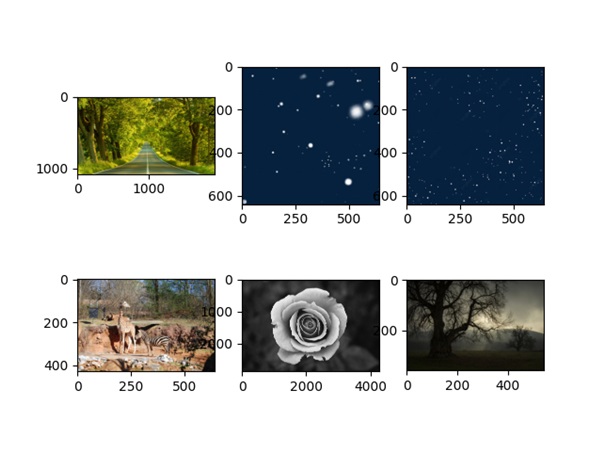
以下示例演示瞭如何使用 imshow_collection() 函式來顯示影像集合。
from skimage import io

# Load all the JPEG and PNG files in a directory
collection = io.ImageCollection('Images_/*.jpg')
# Access the expanded file list
file_list = collection.files
# Print the list of files one by one
print("Files:")
for image in file_list:
   print(image)
# Display the collection of images
io.imshow_collection(collection)
io.show()
輸出
執行以上程式碼將得到以下結果: