
- RichFaces 教程
- RichFaces - 首頁
- RichFaces - 概述
- RichFaces - 環境設定
- RichFaces - 架構
- RichFaces - 基本概念
- RichFaces - 富皮膚
- RichFaces - 輸入元件
- RichFaces - 輸出元件
- RichFaces - 迭代元件
- RichFaces - 選擇元件
- RichFaces - 選單元件
- RichFaces - 富樹
- RichFaces - 錯誤處理
- RichFaces 有用資源
- RichFaces - 快速指南
- RichFaces - 有用資源
- RichFaces - 討論
RichFaces - 選擇元件
本章將學習RichFaces技術提供的不同選擇元件。
<rich:pickList>
使用此標籤,我們可以從填充的列表中選擇一個值。它還允許我們將列表元件新增到另一個列表中並從中移除。以下示例演示了其工作方式。建立一個xhtml檔案,命名為“pickListExample.xhtml”,並將以下程式碼放入其中。
<?xml version = "1.0" encoding = "UTF-8"?>
<!DOCTYPE html>
<html xmlns  =  "http://www.w3.org/1999/xhtml"
   xmlns:h = "http://java.sun.com/jsf/html"
   xmlns:f = "http://java.sun.com/jsf/core"
   xmlns:ui = "http://java.sun.com/jsf/facelets"
   xmlns:a4j = "http://richfaces.org/a4j"
   xmlns:rich = "http://richfaces.org/rich">

   <h:head>
      <title>PickList Example</title>
   </h:head>

   <h:body>
      <h:form>
         <h:outputText value  =  "Pick List Example"/>
         <br/>
         <br/>

         <rich:pickList value = "#{managedBean.subjectList}"
            sourceCaption = "SubjectList"
            targetCaption = "Selected Subject"
            listWidth = "170px"
            listHeight = "120px"
            orderable = "true">

            <f:selectItems value = "#{managedBean.subjectList}"
               itemValue = "#{subject}" itemLabel = "#{subject.subjectName}"/>
         </rich:pickList>
      </h:form>
   </h:body>

</html>
我們需要修改我們的managedBean.java檔案以填充xhtml檔案中的列表元件。以下是我們修改後的Java檔案的快照。
import java.util.Arrays;
import java.util.List;
import javax.faces.bean.ManagedBean;
import javax.faces.bean.RequestScoped;

@ManagedBean
@RequestScoped

public class managedBean {
   String message;
   String job;
   private List<String> SubjectList = Arrays.asList(
      "Richface","AJAX","JAVA","JSF","DOTNET","python");

   public String getMessage() {
      return message;
   }
   public void setMessage(String message) {
      System.out.println("setMessage method is getting called with--"+message);
      this.message = message;
   }
   public String getJob() {
      return job;
   }
   public void setJob(String job) {
      System.out.println("setJob method is getting called with--"+job);
      this.job = job;
   }
   public List<String> getSubjectList() {
      return SubjectList;
   }
   public void setSubjectList(List<String> SubjectList) {
      this.SubjectList = SubjectList;
   }
}
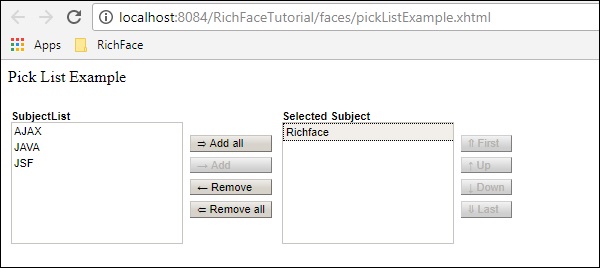
上面的程式碼將在瀏覽器中產生以下輸出。“pickList”標籤的“value”屬性就是bean類的“getSubjectList()”。“itemValue”是物件類的縮寫,相應的“itemLabel”是例項變數名。在此示例中,我們的pickList標籤自動建立了兩個名為“sourceCaption”和“targetCaption”的單獨列表。“orderable”屬性用於維護目標列表中的選擇順序。
<rich:orderingList>
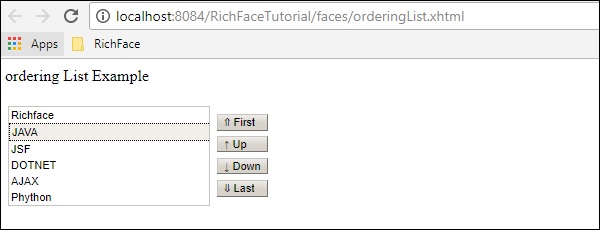
此標籤用於呈現整個列表。<orderingList>將自動提供一些類似按鈕的功能來遍歷列表,並幫助對選定專案進行排序。在下面的示例中,我們將使用以下程式碼為“OrderingListExample.xhtml”建立一個orderingList。
<?xml version = "1.0" encoding = "UTF-8"?>
<!DOCTYPE html>
<html xmlns = "http://www.w3.org/1999/xhtml"
   xmlns:h = "http://java.sun.com/jsf/html"
   xmlns:f = "http://java.sun.com/jsf/core"
   xmlns:ui = "http://java.sun.com/jsf/facelets"
   xmlns:a4j = "http://richfaces.org/a4j"
   xmlns:rich = "http://richfaces.org/rich">

   <h:head>
      <title>OrderingList Example</title>
   </h:head>

   <h:body>
      <h:form>
         <h:outputText value = "ordering List Example"/><br/><br/>
         <rich:orderingList value = "#{managedBean.subjectList}"
            itemValue = "#{subject}"
            itemLabel = "#{subject.subjectName}" >
         </rich:orderingList>
      </h:form>
   </h:body>

</html>
我們不需要更改bean類,因為我們正在使用不同的標籤來表示相同的列表。與前面的示例一樣,這裡的value屬性也包含來自“getSubjectList()”的整個列表。“itemValue”和“itemLabel”分別儲存物件類和相應例項變數的值。
上面的程式碼將在瀏覽器中產生以下輸出。
<rich:ListShuttle>
ListShuttle標籤在RichFaces 3中可用。它有助於遍歷一個列表並將相同的值放入另一個列表。在RichFaces 4中,此標籤已被移除,因為可以使用上面描述的另一個名為<rich:pickList>的新標籤實現相同的功能。如果您使用的是RichFaces 3.0,則可以按以下方式使用此標籤。
<rich:listShuttle sourceValue = "#{toolBar.freeItems}"
   targetValue = "#{toolBar.items}" var = "items" listsHeight = "150"
   sourceListWidth = "130" targetListWidth = "130"
   sourceCaptionLabel = "Available Items"
   targetCaptionLabel = "Currently Active Items"
   converter = "listShuttleconverter">

   <rich:column width = "18">
      <h:graphicImage value = "#{items.iconURI}"></h:graphicImage>
   </rich:column>

   <rich:column>
      <h:outputText value = "#{items.label}"></h:outputText>
   </rich:column>

   <a4j:support event = "onlistchanged" reRender = "toolBar" />
   <a4j:support event = "onorderchanged" reRender = "toolBar" />
</rich:listShuttle>
使用pickList比使用此標籤更方便,因為只需兩行程式碼即可使用pickList實現相同的功能。