
- Python Pyramid 教程
- Python Pyramid - 首頁
- Python Pyramid - 概述
- Pyramid - 環境設定
- Python Pyramid - Hello World
- Pyramid - 應用配置
- Python Pyramid - URL 路由
- Python Pyramid - 檢視配置
- Python Pyramid - 路由字首
- Python Pyramid - 模板
- Pyramid - HTML 表單模板
- Python Pyramid - 靜態資源
- Python Pyramid - 請求物件
- Python Pyramid - 響應物件
- Python Pyramid - 會話
- Python Pyramid - 事件
- Python Pyramid - 訊息閃現
- Pyramid - 使用 SQLAlchemy
- Python Pyramid - Cookiecutter
- Python Pyramid - 建立專案
- Python Pyramid - 專案結構
- Python Pyramid - 包結構
- 手動建立專案
- 命令列 Pyramid
- Python Pyramid - 測試
- Python Pyramid - 日誌記錄
- Python Pyramid - 安全性
- Python Pyramid - 部署
- Python Pyramid 有用資源
- Python Pyramid - 快速指南
- Python Pyramid - 有用資源
- Python Pyramid - 討論
Python Pyramid - 會話
會話是指客戶端登入伺服器到登出伺服器之間的時間間隔。會話物件也是一個字典物件,包含會話變數及其關聯值的鍵值對。在 Pyramid 中,它作為請求物件的屬性可用。
為了處理會話機制,Pyramid 應用物件必須配置一個會話工廠,該工廠返回會話物件。Pyramid 核心提供了一個基本的會話工廠,它使用 Cookie 來儲存會話資訊。
預設會話工廠
pyramid.session 模組定義了 SignedCookieSessionFactory 類。它的物件需要一個金鑰來對會話 Cookie 資訊進行數字簽名。
from pyramid.session import SignedCookieSessionFactory
my_session_factory = SignedCookieSessionFactory('abcQWE123!@#')
Configurator 類的 set_session_factory() 方法使用此工廠物件來設定會話。
config.set_session_factory(my_session_factory)
完成此操作後,會話物件現在可用於實現為 request.session 屬性。要新增會話變數,請使用:
request.session['user'] = 'Admin'
要檢索會話變數,請使用:
user=request.session['user']
要刪除會話變數,請使用 pop() 方法。
request.session.pop('user')
會話示例
下面描述了在 Pyramid 應用中使用會話變數的方法。首先,登入路由(與 login() 檢視函式相關聯)在瀏覽器上顯示登入表單。
@view_config(route_name='login')
def login(request):
   html="""
   <html>
   <body>
      <form action='/add'> Enter User name :
         <input type='text' name='user'>
         <input type='submit' value='submit'>
      </form>
   </body>
   </html>
   """
return Response(html)
add() 函式讀取“user”表單屬性,並使用其值新增會話變數。
@view_config(route_name='addsession')
def add(request):
   request.session['user']=request.params['user']
   return Response("<h2>Session object added.</h2><br><h3><a href='/read'>click here</a></h3>")
read() 檢視讀取回會話變數資料並顯示歡迎訊息。
@view_config(route_name='readsession')
def read(request):
   user=request.session['user']
   response="<h2>Welcome {} </h2>".format(user)+"<br><h3><a href='/logout'>Logout</a></h3>"
   return Response(response)
這些檢視以及會話工廠都新增到應用配置中。
config.set_session_factory(my_session_factory)
config.add_route('login','/')
config.add_route('logout','/logout')
config.add_route('addsession', '/add')
config.add_route('readsession', '/read')
config.scan('session')
示例
完整程式碼如下:
from wsgiref.simple_server import make_server
from pyramid.config import Configurator
from pyramid.response import Response
from pyramid.view import view_config
from pyramid.session import SignedCookieSessionFactory
my_session_factory = SignedCookieSessionFactory('abcQWE123!@#')

@view_config(route_name='login')
def login(request):
   html="""
   <html>
   <body>
   <form action='/add'>
      Enter User name :
      <input type='text' name='user'>
      <input type='submit' value='submit'>
   </form>
   </body>
   </html>
"""
   return Response(html)
@view_config(route_name='addsession')
def add(request):
   request.session['user']=request.params['user']
   return Response("<h2>Session object added.</h2><br><h3><a href='/read'>click here</a></h3>")

@view_config(route_name='readsession')
def read(request):
   user=request.session['user']
   response="<h2>Welcome {} </h2>".format(user)+"<br><h3><a href='/logout'>Logout</a>>/<h3>"
   return Response(response)

@view_config(route_name='logout')
def logout(request):
   request.session.pop('user')
   response="<h2>You have been logged out </h2><br><h3><a href='/'>Login</a></h3>"
   return Response(response)

if __name__ == '__main__':
   with Configurator() as config:
      config.set_session_factory(my_session_factory)
      config.add_route('login','/')
      config.add_route('logout','/logout')
      config.add_route('addsession', '/add')
      config.add_route('readsession', '/read')
      config.scan('session')
      app = config.make_wsgi_app()
   server = make_server('0.0.0.0', 6543, app)
   server.serve_forever()
將此指令碼另存為 Pyramid 虛擬環境資料夾中的子資料夾(稱為“session”)中的 main.py。請注意,此子資料夾必須有一個空的 __init__.py 檔案才能被視為包。
輸出
執行 main.py 並輸入 https://:6543/ 以在瀏覽器中開啟登入表單。
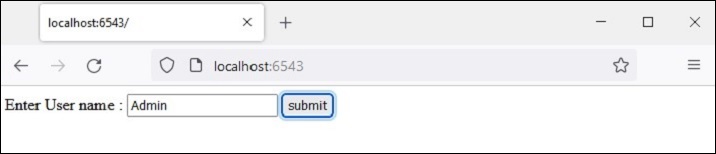
輸入使用者名稱並按下“提交”按鈕。給定的名稱將儲存為“user”會話變數。
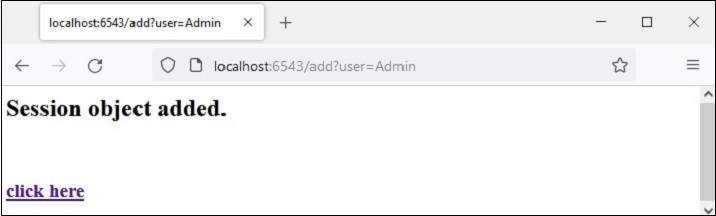
“點選此處”連結讀取回 session 變數並顯示歡迎訊息。

“登出”連結彈出 session 變數並將瀏覽器帶回登入頁面。