- Python Pyramid 教程
- Python Pyramid - 首頁
- Python Pyramid - 概述
- Pyramid - 環境設定
- Python Pyramid - Hello World
- Pyramid - 應用程式配置
- Python Pyramid - URL 路由
- Python Pyramid - 檢視配置
- Python Pyramid - 路由字首
- Python Pyramid - 模板
- Pyramid - HTML 表單模板
- Python Pyramid - 靜態資源
- Python Pyramid - 請求物件
- Python Pyramid - 響應物件
- Python Pyramid - 會話
- Python Pyramid - 事件
- Python Pyramid - 訊息閃現
- Pyramid - 使用 SQLAlchemy
- Python Pyramid - Cookiecutter
- Python Pyramid - 建立專案
- Python Pyramid - 專案結構
- Python Pyramid - 包結構
- 手動建立專案
- 命令列 Pyramid
- Python Pyramid - 測試
- Python Pyramid - 日誌記錄
- Python Pyramid - 安全性
- Python Pyramid - 部署
- Python Pyramid 有用資源
- Python Pyramid - 快速指南
- Python Pyramid - 有用資源
- Python Pyramid - 討論
Python Pyramid - 訊息閃現
訊息閃現機制被 Web 應用程式框架用於向用戶提供關於其與應用程式互動的某些反饋。閃現的訊息由會話物件儲存在佇列中。
閃現訊息機制使得可以在一個檢視中建立訊息並在下一個呼叫的檢視函式中渲染它成為可能。與上一節一樣,我們必須首先啟用會話工廠才能處理會話。要向訊息佇列中新增訊息,請使用會話物件的 **flash()** 方法。
request.session.flash('Hello World')
會話具有 **pop_flash()** 和 **peek_flash()** 方法。pop_flash() 方法從佇列中刪除最後新增的訊息。peek_flash() 方法如果佇列中有訊息則返回 true,如果佇列為空則返回 false。
這兩種方法都用於模板網頁中,從佇列中獲取一個或多個訊息並將其渲染為響應的一部分。
訊息閃現示例
下面的示例演示了訊息閃現機制。在這裡,login() 檢視程式碼檢查它是否是由 POST 或 GET 方法呼叫的。如果方法是 GET,它將渲染帶有使用者名稱和密碼欄位的登入表單。提交的表單將使用 POST 方法提交到相同的 URL。
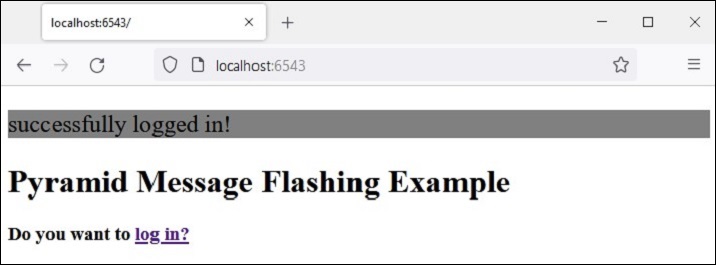
當檢測到 POST 方法時,檢視進一步檢查輸入的有效性並將適當的訊息閃現到會話佇列中。這些錯誤閃現訊息由 login 模板本身提取,而成功閃現訊息閃現後,客戶端將重定向到 index() 檢視以渲染 index 模板。
應用程式程式碼中的兩個檢視為:
@view_config(route_name='login', renderer='templates/login.html')
def login(request):
   if request.method == 'POST':
   if request.POST['password']=='' or request.POST['username']=='':
      request.session.flash('User name and password is required')
      return HTTPFound(location=request.route_url('login'))
   if len(request.POST['password'])in range(1,9):
      request.session.flash('Weak password!')
   if request.POST['username']not in ['admin', 'manager', 'supervisor']:
      request.session.flash('successfully logged in!')
      return HTTPFound(location=request.route_url('index'))
   else:
      request.session.flash('Reserved user ID Forbidden!')
      return HTTPFound(location=request.route_url('login'))
   return {}

@view_config(route_name='index', renderer='templates/index.html')
def index(request):
   return {}
login.html 模板包含以下程式碼:
<!doctype html>
<html>
<head>
   <style>
      p {background-color:grey; font-size: 150%}
   </style>
</head>
<body>
   <h1>Pyramid Message Flashing Example</h1>
   {% if request.session.peek_flash()%}
      <div id="flash">
         {% for message in request.session.pop_flash() %}
         <p>{{ message }}</p>
         {% endfor %}
      </div>
   {% endif %}
   <h3>Login Form</h3>
   <form action="" method="POST">
      <dl>
         <dt>Username:
            <dd><input type="text" name="username">
         <dt>Password:
         <dd><input type="password" name="password">
      </dl>
      <input type="submit" value="Login">
   </form>
</body>
</html>
在顯示登入表單之前,jinja2 模板程式碼遍歷訊息佇列,將每個訊息彈出到 **<div id='flash'>** 部分。
以下是 **index.html** 的指令碼,它閃現由 login() 檢視插入的成功訊息:
<!doctype html>
<html>
<head>
   <style>
      p {background-color:grey; font-size: 150%}
   </style>
</head>
<body>
   {% if request.session.peek_flash()%}
   <div id="flash">
   {% for message in request.session.pop_flash() %}
   <p>{{ message }}</p>
   {% endfor %}
   {% endif %}
   <h1>Pyramid Message Flashing Example</h1>
   <h3>Do you want to <a href = "/login">
   <b>log in?</b></a></h3>
</body>
</html>
示例
此示例的應用程式程式碼為 **main.py**
from wsgiref.simple_server import make_server
from pyramid.config import Configurator
from pyramid.response import Response
from pyramid.view import view_config
from pyramid.session import SignedCookieSessionFactory
from pyramid.httpexceptions import HTTPFound

my_session_factory = SignedCookieSessionFactory(' abcQWE123!@#')
@view_config(route_name='login', renderer='templates/login.html')
def login(request):
   if request.method == 'POST':
      if request.POST['password']=='' or  request.POST['username']=='':
      request.session.flash('User name and password is required')
      return HTTPFound(location=request.route_url('login'))
   if len(request.POST['password'])in range(1,9):
      request.session.flash('Weak password!')
   if request.POST['username']not in ['admin', 'manager', 'supervisor']:
      request.session.flash('successfully logged in!')
      return HTTPFound(location=request.route_url('index'))
   else:
      request.session.flash('Reserved user ID Forbidden!')
      return HTTPFound(location=request.route_url('login'))
   return {}

@view_config(route_name='index', renderer='templates/index.html')
def index(request):
   return {}

if __name__ == '__main__':
   with Configurator() as config:
      config.set_session_factory(my_session_factory)
      config.include('pyramid_jinja2')
      config.add_jinja2_renderer(".html")
      config.add_route('login','/login')
      config.add_route('index','/')
      config.scan('flash')
      app = config.make_wsgi_app()
   server = make_server('0.0.0.0', 6543, app)
   server.serve_forever()
將此程式程式碼另存為 Pyramid 虛擬環境中 flash 子資料夾下的 **app.py**,並在其中放置一個空白的 **__init__.py**。將兩個模板(“index.html”和“login.html”)儲存在 **flush\templates** 資料夾中。
輸出
執行 main.py 並透過點選 **https://:6543/login** 連結在瀏覽器中開啟登入表單。
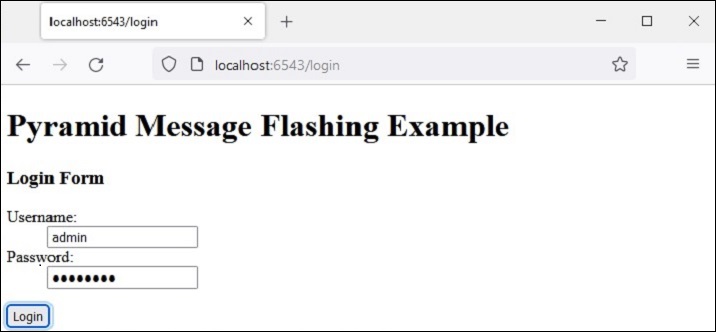
嘗試輸入一個保留使用者名稱“admin”、“manager”或“supervisor”。錯誤訊息將如下所示閃現:
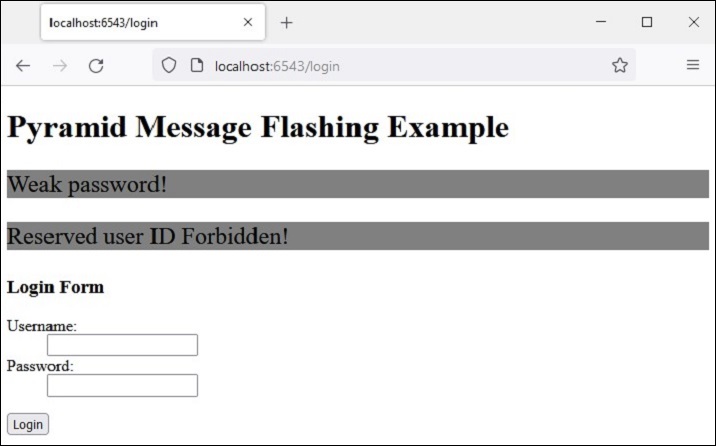
這次,輸入可接受的憑據並檢視結果: