
- Python Pyramid 教程
- Python Pyramid - 首頁
- Python Pyramid - 概述
- Pyramid - 環境設定
- Python Pyramid - Hello World
- Pyramid - 應用配置
- Python Pyramid - URL 路由
- Python Pyramid - 檢視配置
- Python Pyramid - 路由字首
- Python Pyramid - 模板
- Pyramid - HTML 表單模板
- Python Pyramid - 靜態資源
- Python Pyramid - 請求物件
- Python Pyramid - 響應物件
- Python Pyramid - 會話
- Python Pyramid - 事件
- Python Pyramid - 訊息閃現
- Pyramid - 使用 SQLAlchemy
- Python Pyramid - Cookiecutter
- Python Pyramid - 建立專案
- Python Pyramid - 專案結構
- Python Pyramid - 包結構
- 手動建立專案
- 命令列 Pyramid
- Python Pyramid - 測試
- Python Pyramid - 日誌記錄
- Python Pyramid - 安全性
- Python Pyramid - 部署
- Python Pyramid 有用資源
- Python Pyramid - 快速指南
- Python Pyramid - 有用資源
- Python Pyramid - 討論
Python Pyramid - 安全性
Pyramid 的宣告式安全系統確定當前使用者的身份並驗證使用者是否可以訪問某些資源。安全策略可以阻止使用者呼叫檢視。在呼叫任何檢視之前,授權系統使用請求中的憑據來確定是否允許訪問。
安全策略定義為一個類,它藉助於在pyramid.security模組中定義的以下方法來控制使用者訪問許可權:
forget(request) - 此方法返回適合“忘記”當前已認證使用者擁有的憑據集的標頭元組。它通常在檢視函式的主體中使用。
remember(request, userid) - 此方法在請求的響應上返回標頭元組序列。它們適合於使用當前安全策略“記住”一組憑據,例如 userid。常見的用法可能如下所示,在檢視函式的主體中。
已認證使用者的訪問許可權由此模組中Allowed和Denied類的物件控制。
為了實現身份、記住和忘記機制的功能,Pyramid 提供了在pyramid.authentication模組中定義的以下輔助類:
SessionAuthenticationHelper - 將 userid 儲存在會話中。
AuthTktCookieHelper - 使用“身份驗證票證”cookie 儲存 userid。
我們還可以使用extract_http_basic_credentials()函式透過 HTTP 基本身份驗證檢索使用者憑據。
要從 WSGI 環境中的 REMOTE_USER 中檢索 userid,可以使用request.environ.get('REMOTE_USER')。
示例
現在讓我們學習如何藉助以下示例實現安全策略。“development.ini”的示例如下:
[app:main]
use = egg:tutorial
pyramid.reload_templates = true
pyramid.includes = pyramid_debugtoolbar
hello.secret = a12b

[server:main]
use = egg:waitress#main
listen = localhost:6543
然後,我們在以下 Python 程式碼中編寫安全策略類,並將其儲存為security.py:
from pyramid.authentication import AuthTktCookieHelper
USERS = {'admin': 'admin', 'manager': 'manager'}
class SecurityPolicy:
   def __init__(self, secret):
      self.authtkt = AuthTktCookieHelper(secret=secret)
   def identity(self, request):
      identity = self.authtkt.identify(request)
      if identity is not None and identity['userid'] in USERS:
      return identity
   def authenticated_userid(self, request):
      identity = self.identity(request)
      if identity is not None:
         return identity['userid']
   def remember(self, request, userid, **kw):
      return self.authtkt.remember(request, userid, **kw)
   def forget(self, request, **kw):
      return self.authtkt.forget(request, **kw)
我們包資料夾中的__init__.py檔案定義了以下配置。上面定義的安全策略類使用Configurator類的set_security_policy()方法新增到配置中。三個路由 - home、login 和 logout - 新增到配置中。
from pyramid.config import Configurator
from .security import SecurityPolicy

def main(global_config, **settings):
   config = Configurator(settings=settings)
   config.include('pyramid_chameleon')
   config.set_security_policy(
      SecurityPolicy(
         secret=settings['hello.secret'],
      ),
   )
   config.add_route('home', '/')
   config.add_route('login', '/login')
   config.add_route('logout', '/logout')
   config.scan('.views')
   return config.make_wsgi_app()
三個與上述路由對應的檢視在 views.py 中定義。
from pyramid.httpexceptions import HTTPFound
from pyramid.security import remember, forget

from pyramid.view import view_config, view_defaults
from .security import USERS

@view_defaults(renderer='home.pt')
class HelloViews:
   def __init__(self, request):
      self.request = request
      self.logged_in = request.authenticated_userid
   @view_config(route_name='home')
   def home(self):
      return {'name': 'Welcome'}
   @view_config(route_name='login', renderer='login.pt')
   def login(self):
      request = self.request
      login_url = request.route_url('login')
      referrer = request.url
      if referrer == login_url:
         referrer = '/'
      came_from = request.params.get('came_from', referrer)
      message = ''
      login = ''
      password = ''
      if 'form.submitted' in request.params:
         login = request.params['login']
         password = request.params['password']
         pw = USERS.get(login)
         if pw == password:
            headers = remember(request, login)
            return HTTPFound(location=came_from, headers=headers)
         message = 'Failed login'
         return dict(
            name='Login', message=message,
            url=request.application_url + '/login',
            came_from=came_from,
            login=login, password=password,)

   @view_config(route_name='logout')
   def logout(self):
      request = self.request
      headers = forget(request)
      url = request.route_url('home')
      return HTTPFound(location=url, headers=headers)
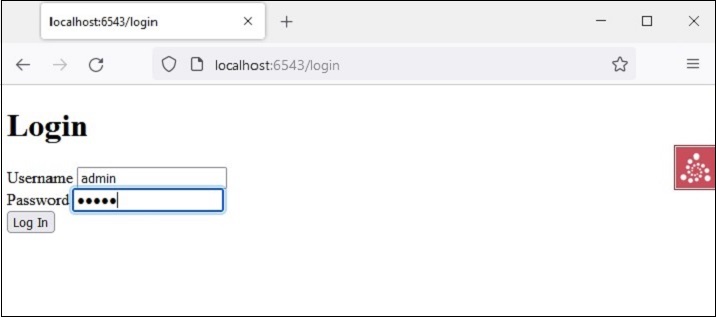
login 檢視呈現登入表單。當用戶輸入的使用者 ID 和密碼針對 USERS 列表進行驗證時,“記住”這些詳細資訊。另一方面,logout 檢視透過“忘記”來釋放這些詳細資訊。
home 檢視呈現以下變色龍模板 - home.pt
<!DOCTYPE html>
<html lang="en">
<body>
   <div>
      <a tal:condition="view.logged_in is None" href="${request.application_url}/login">Log In</a>
      <a tal:condition="view.logged_in is not None" href="${request.application_url}/logout">Logout</a>
   </div>
   <h1>Hello. ${name}</h1>
</body>
</html>
以下是 login 檢視的變色龍模板login.pt。
<!DOCTYPE html>
<html lang="en">
<body>
   <h1>Login</h1>
   <span tal:replace="message"/>

   <form action="${url}" method="post">
      <input type="hidden" name="came_from" value="${came_from}"/>
      <label for="login">Username</label>
      <input type="text" id="login" name="login" value="${login}"/><br/>
      <label for="password">Password</label>
      <input type="password" id="password" name="password" value="${password}"/><br/>
      <input type="submit" name="form.submitted" value="Log In"/>
   </form>
</body>
</html>
development.ini 和 setup.py 放在外部專案資料夾中,而__init__.py、views.py、security.py和模板home.pt以及login.pt應儲存在名為 hello 的包資料夾下。
使用以下命令安裝包:
Env\hello>pip3 install -e.
使用pserve實用程式啟動伺服器。
pserve development.ini
輸出
開啟瀏覽器並訪問https://:6543/連結。

單擊“登入”連結以開啟登入表單:
主頁返回,連結更改為登出,因為憑據已記住。
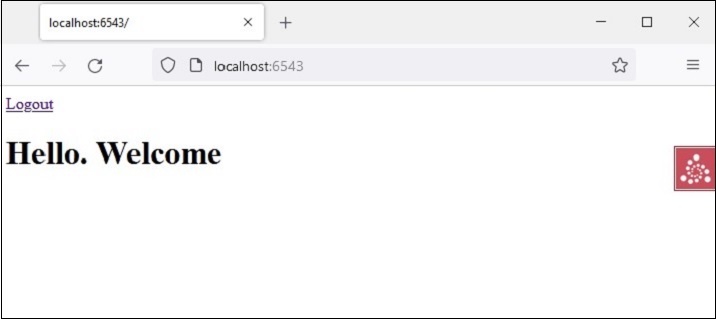
單擊“登出”連結將導致忘記憑據並顯示預設主頁。