- GWT 教程
- GWT - 首頁
- GWT - 概述
- GWT - 環境設定
- GWT - 應用
- GWT - 建立應用
- GWT - 部署應用
- GWT - CSS 樣式
- GWT - 基本元件
- GWT - 表單元件
- GWT - 複雜元件
- GWT - 佈局面板
- GWT - 事件處理
- GWT - 自定義元件
- GWT - UIBinder
- GWT - RPC 通訊
- GWT - JUnit 整合
- GWT - 除錯應用
- GWT - 國際化
- GWT - History 類
- GWT - 書籤支援
- GWT - 日誌框架
- GWT 有用資源
- GWT - 問答
- GWT - 快速指南
- GWT - 有用資源
- GWT - 討論
GWT - FlexTable 元件
介紹
FlexTable 元件表示一個靈活的表格,它可以按需建立單元格。它可以是不規則的(即每一行可以包含不同數量的單元格),並且可以將單個單元格設定為跨越多行或多列。
類宣告
以下是com.google.gwt.user.client.ui.FlowPanel類的宣告:
public class FlexTable
   extends HTMLTable
類建構函式
| 序號 | 建構函式 & 描述 |
|---|---|
| 1 |
FlexTable() 空Flex表格的建構函式。 |
類方法
| 序號 | 函式名稱 & 描述 |
|---|---|
| 1 |
void addCell(int row) 將單元格新增到指定行。 |
| 2 |
int getCellCount(int row) 獲取給定行上的單元格數量。 |
| 3 |
FlexTable.FlexCellFormatter getFlexCellFormatter() 顯式獲取 FlexTable.FlexCellFormatter。 |
| 4 |
int getRowCount() 獲取行數。 |
| 5 |
void insertCell(int beforeRow, int beforeColumn) 將單元格插入到 FlexTable 中。 |
| 6 |
int insertRow(int beforeRow) 將一行插入到 FlexTable 中。 |
| 7 |
protected void prepareCell(int row, int column) 確保單元格存在。 |
| 8 |
protected void prepareRow(int row) 確保行存在。 |
| 9 |
void removeAllRows() 移除表格中的所有行。 |
| 10 |
void removeCell(int row, int col) 從表格中移除指定的單元格。 |
| 11 |
void removeCells(int row, int column, int num) 從表格中移除指定行中的多個單元格。 |
| 12 |
void removeRow(int row) 從表格中移除指定行。 |
繼承的方法
此類繼承自以下類的方法:
com.google.gwt.user.client.ui.UIObject
com.google.gwt.user.client.ui.Widget
com.google.gwt.user.client.ui.Panel
com.google.gwt.user.client.ui.HTMLTable
java.lang.Object
FlexTable 元件示例
此示例將引導您完成簡單的步驟,以演示如何在 GWT 中使用 FlexTable 元件。按照以下步驟更新我們在GWT - 建立應用章節中建立的 GWT 應用:
| 步驟 | 描述 |
|---|---|
| 1 | 按照GWT - 建立應用章節中的說明,建立一個名為HelloWorld的專案,放在com.tutorialspoint包下。 |
| 2 | 修改HelloWorld.gwt.xml、HelloWorld.css、HelloWorld.html和HelloWorld.java,如下所述。其餘檔案保持不變。 |
| 3 | 編譯並執行應用程式以驗證已實現邏輯的結果。 |
以下是修改後的模組描述符src/com.tutorialspoint/HelloWorld.gwt.xml的內容。
<?xml version = "1.0" encoding = "UTF-8"?>
<module rename-to = 'helloworld'>
   <!-- Inherit the core Web Toolkit stuff.                        -->
   <inherits name = 'com.google.gwt.user.User'/>

   <!-- Inherit the default GWT style sheet.                       -->
   <inherits name = 'com.google.gwt.user.theme.clean.Clean'/>

   <!-- Specify the app entry point class.                         -->
   <entry-point class = 'com.tutorialspoint.client.HelloWorld'/>

   <!-- Specify the paths for translatable code                    -->
   <source path = 'client'/>
   <source path = 'shared'/>

</module>
以下是修改後的樣式表文件war/HelloWorld.css的內容。
body {
   text-align: center;
   font-family: verdana, sans-serif;
}

h1 {
   font-size: 2em;
   font-weight: bold;
   color: #777777;
   margin: 40px 0px 70px;
   text-align: center;
}
.flexTable td {
   border: 1px solid #BBBBBB;
   padding: 3px;
}

.flexTable-buttonPanel td {
   border: 0px;
}

.fixedWidthButton {
   width: 150px;
}
以下是修改後的 HTML 宿主檔案war/HelloWorld.html的內容。
<html>
   <head>
      <title>Hello World</title>
      <link rel = "stylesheet" href = "HelloWorld.css"/>
      <script language = "javascript" src = "helloworld/helloworld.nocache.js">
      </script>
   </head>

   <body>
      <h1>FlexTable Widget Demonstration</h1>
      <div id = "gwtContainer"></div>
   </body>
</html>
讓我們來看一下 Java 檔案src/com.tutorialspoint/HelloWorld.java的內容,它將演示 FlexTable 元件的使用。
package com.tutorialspoint.client;

import com.google.gwt.core.client.EntryPoint;
import com.google.gwt.event.dom.client.ClickEvent;
import com.google.gwt.event.dom.client.ClickHandler;
import com.google.gwt.user.client.ui.Button;
import com.google.gwt.user.client.ui.DecoratorPanel;
import com.google.gwt.user.client.ui.FlexTable;
import com.google.gwt.user.client.ui.FlexTable.FlexCellFormatter;
import com.google.gwt.user.client.ui.HasHorizontalAlignment;
import com.google.gwt.user.client.ui.HasVerticalAlignment;
import com.google.gwt.user.client.ui.Image;
import com.google.gwt.user.client.ui.RootPanel;
import com.google.gwt.user.client.ui.VerticalPanel;

public class HelloWorld implements EntryPoint {

   public void onModuleLoad() {
      // Create a Flex Table
      final FlexTable flexTable = new FlexTable();
      FlexCellFormatter cellFormatter = flexTable.getFlexCellFormatter();
      flexTable.addStyleName("flexTable");
      flexTable.setWidth("32em");
      flexTable.setCellSpacing(5);
      flexTable.setCellPadding(3);

      // Add some text
      cellFormatter.setHorizontalAlignment(
      0, 1, HasHorizontalAlignment.ALIGN_LEFT);
      flexTable.setHTML(0, 0, "This is a FlexTable that supports"
         +" <b>colspans</b> and <b>rowspans</b>."
         +" You can use it to format your page"
         +" or as a special purpose table.");
      cellFormatter.setColSpan(0, 0, 2);

      // Add a button that will add more rows to the table
      Button addRowButton = new Button("Add a Row");
      addRowButton.addClickHandler(new ClickHandler() {
         @Override
         public void onClick(ClickEvent event) {
            addRow(flexTable);
         }
      });

      addRowButton.addStyleName("fixedWidthButton");

      // Add a button that will add more rows to the table
      Button removeRowButton = new Button("Remove a Row");
      removeRowButton.addClickHandler(new ClickHandler() {
         @Override
         public void onClick(ClickEvent event) {
            removeRow(flexTable);
         }
      });

      removeRowButton.addStyleName("fixedWidthButton");

      VerticalPanel buttonPanel = new VerticalPanel();
      buttonPanel.setStyleName("flexTable-buttonPanel");
      buttonPanel.add(addRowButton);
      buttonPanel.add(removeRowButton);
      flexTable.setWidget(0, 1, buttonPanel);
      cellFormatter.setVerticalAlignment(0, 1,
      HasVerticalAlignment.ALIGN_TOP);

      // Add two rows to start
      addRow(flexTable);
      addRow(flexTable);

      // Add the widgets to the root panel.
      RootPanel.get().add(flexTable);
   }

   /**
    * Add a row to the flex table.
    */
   private void addRow(FlexTable flexTable) {
      int numRows = flexTable.getRowCount();
      flexTable.setWidget(numRows, 0,
      new Image("https://tutorialspoint.tw/images/gwt-mini.png"));
      flexTable.setWidget(numRows, 1,
      new Image("https://tutorialspoint.tw/images/gwt-mini.png"));
      flexTable.getFlexCellFormatter().setRowSpan(0, 1, numRows + 1);
   }

   /**
    * Remove a row from the flex table.
    */
   private void removeRow(FlexTable flexTable) {
      int numRows = flexTable.getRowCount();
      if (numRows > 1) {
         flexTable.removeRow(numRows - 1);
         flexTable.getFlexCellFormatter().setRowSpan(0, 1, numRows - 1);
      }
   }
}
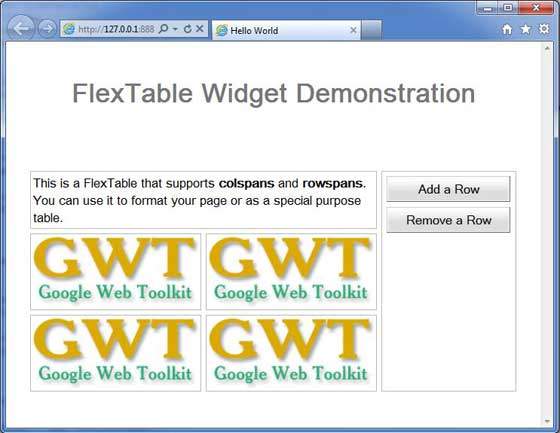
完成所有更改後,讓我們像在GWT - 建立應用章節中一樣,在開發模式下編譯並執行應用程式。如果應用程式一切正常,則會產生以下結果: