- Adobe Flex 教程
- Flex - 首頁
- Flex - 概述
- Flex - 環境
- Flex - 應用程式
- Flex - 建立應用程式
- Flex - 部署應用程式
- Flex - 生命週期階段
- Flex - 使用 CSS 設定樣式
- Flex - 使用皮膚設定樣式
- Flex - 資料繫結
- Flex - 基本控制元件
- Flex - 表單控制元件
- Flex - 複雜控制元件
- Flex - 佈局面板
- Flex - 視覺效果
- Flex - 事件處理
- Flex - 自定義控制元件
- Flex - RPC 服務
- Flex - FlexUnit 整合
- Flex - 除錯應用程式
- Flex - 國際化
- Flex - 列印支援
- Adobe Flex 資源
- Flex - 快速指南
- Flex - 有用資源
- Flex - 討論
Flex - 文字區域控制元件
簡介
TextArea 控制元件是一個文字輸入控制元件,允許使用者輸入和編輯多行格式化文字。
類宣告
以下是 spark.components.TextArea 類的宣告:
public class TextArea
   extends SkinnableTextBase
公共屬性
| 序號 | 屬性及描述 |
|---|---|
| 1 | content : Object 此屬性旨在在 MXML 中編譯時使用;要在執行時獲取或設定富文字內容,請改用 textFlow 屬性。 |
| 2 | heightInLines : Number 控制元件的預設高度,以行為單位。 |
| 3 | textFlow : flashx.textLayout.elements:TextFlow 表示此元件顯示的富文字的 TextFlow。 |
| 4 | widthInChars : Number 控制元件的預設寬度,以 em 單位為單位。 |
公共方法
| 序號 | 方法及描述 |
|---|---|
| 1 | TextArea() 建構函式。 |
| 2 | getFormatOfRange (requestedFormats:Vector.<String> = null, anchorPosition:int = -1, activePosition:int = 1):flashx.textLayout.formats:TextLayoutFormat 返回一個 TextLayoutFormat 物件,該物件指定指定字元範圍的計算格式。 |
| 3 | scrollToRange(anchorPosition:int = 0, activePosition:int):void 滾動以使文字範圍在容器中可見。 |
| 4 | setFormatOfRange (format:flashx.textLayout.formats:TextLayout Format, anchorPosition:int = -1, activePosition:int = -1):void 將指定的格式應用於指定範圍內的每個與給定格式對應的元素。 |
繼承的方法
此類繼承自以下類的方法:
- spark.components.supportClasses.SkinnableTextBase
- spark.components.supportClasses.SkinnableComponent
- mx.core.UIComponent
- mx.core.FlexSprite
- flash.display.Sprite
- flash.display.DisplayObjectContainer
- flash.display.InteractiveObject
- flash.display.DisplayObject
- flash.events.EventDispatcher
- Object
Flex TextArea 控制元件示例
讓我們按照以下步驟在 Flex 應用程式中檢查 TextArea 控制元件的使用,方法是建立一個測試應用程式:
| 步驟 | 描述 |
|---|---|
| 1 | 在包 com.tutorialspoint.client 下建立一個名為 HelloWorld 的專案,如Flex - 建立應用程式一章中所述。 |
| 2 | 修改 HelloWorld.mxml,如下所述。保持其餘檔案不變。 |
| 3 | 編譯並執行應用程式以確保業務邏輯按要求工作。 |
以下是修改後的 mxml 檔案 src/com.tutorialspoint/HelloWorld.mxml 的內容。
<?xml version = "1.0" encoding = "utf-8"?>
<s:Application xmlns:fx = "http://ns.adobe.com/mxml/2009"
   xmlns:s = "library://ns.adobe.com/flex/spark"
   xmlns:mx = "library://ns.adobe.com/flex/mx"
   width = "100%" height = "100%" minWidth = "500" minHeight = "500">

   <fx:Style source = "/com/tutorialspoint/client/Style.css" />
   <s:BorderContainer width = "550" height = "400" id = "mainContainer"
      styleName = "container">

      <s:VGroup width = "100%" height = "100%" gap = "50"
         horizontalAlign = "center" verticalAlign = "middle">
         <s:Label id = "lblHeader" text = "Form Controls Demonstration"
            fontSize = "40" color = "0x777777" styleName = "heading" />

         <s:Panel id = "textAreaPanel" title = "Using TextArea"
            width = "420" height = "200">
            <s:layout>
               <s:VerticalLayout  gap = "10" verticalAlign = "middle"
                  horizontalAlign = "center" />
            </s:layout>

            <s:TextArea width = "400" height = "100">
               <s:content>
                  This is <s:span color = "#FF0000">HTML text</s:span>
                  in an <s:span fontWeight = "bold">TextArea control</s:span>.
                  <s:span textDecoration = "underline">content</s:span> property
                  of the <s:span color = "#008800">TextArea control</s:span>
                  can be used to include basic HTML markup in including
                  <s:a href = "https://tutorialspoint.tw"
                  target = "_blank">links</s:a>.
               </s:content>
            </s:TextArea>
         </s:Panel>
      </s:VGroup>
   </s:BorderContainer>
</s:Application>
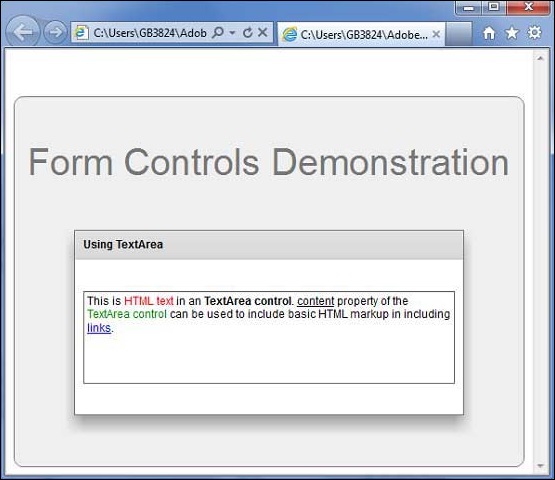
準備好所有更改後,讓我們以正常模式編譯並執行應用程式,就像我們在Flex - 建立應用程式一章中所做的那樣。如果您的應用程式一切正常,它將產生以下結果:[ 線上嘗試 ]