- Adobe Flex 教程
- Flex - 首頁
- Flex - 概述
- Flex - 環境
- Flex - 應用程式
- Flex - 建立應用程式
- Flex - 部署應用程式
- Flex - 生命週期階段
- Flex - 使用 CSS 設定樣式
- Flex - 使用皮膚設定樣式
- Flex - 資料繫結
- Flex - 基本控制元件
- Flex - 表單控制元件
- Flex - 複雜控制元件
- Flex - 佈局面板
- Flex - 視覺效果
- Flex - 事件處理
- Flex - 自定義控制元件
- Flex - RPC 服務
- Flex - FlexUnit 整合
- Flex - 除錯應用程式
- Flex - 國際化
- Flex - 列印支援
- Adobe Flex 資源
- Flex - 快速指南
- Flex - 有用資源
- Flex - 討論
Flex - 資料網格控制元件
簡介
DataGrid 控制元件在可滾動的網格上方顯示一行列標題。
類宣告
以下是 spark.components.DataGrid 類的宣告:
public class DataGrid
   extends SkinnableContainerBase
      implements IFocusManagerComponent, IIMESupport
公共屬性
以下是 DataGrid 控制元件的公共屬性。
| 序號 | 屬性及描述 |
|---|---|
| 1 | columnsLength : int 如果指定了 columns IList,則[只讀]返回 columns.length 的值,否則返回 0。 |
| 2 | dataProvider : IList 與網格中行對應的資料項列表。 |
| 3 | dataProviderLength : int 如果指定了 dataProvider IList,則[只讀]返回 dataProvider.length 的值,否則返回 0。 |
| 4 | dataTipField : String 資料提供程式中要顯示為資料提示的欄位的名稱。 |
| 5 | dataTipFunction : Function 指定要在資料提供程式的每個專案上執行的回撥函式,以確定其資料提示。 |
| 6 | editable : Boolean GridColumn editable 屬性的預設值,指示相應單元格的資料提供程式項是否可以編輯。 |
| 7 | editorColumnIndex : int 正在編輯的單元格的基於零的列索引[只讀]。 |
| 8 | editorRowIndex : int 正在編輯的單元格的基於零的行索引[只讀]。 |
| 9 | enableIME : Boolean 指示元件獲得焦點時是否應啟用 IME 的標誌[只讀]。 |
| 10 | imeMode : String GridColumn imeMode 屬性的預設值,指定 IME(輸入法編輯器)模式。 |
| 11 | itemEditor : IFactory GridColumn itemEditor 屬性的預設值,指定用於建立專案編輯器例項的 IGridItemEditor 類。 |
| 12 | itemEditorInstance : IGridItemEditor 如果存在,則對當前活動專案編輯器例項的引用[只讀]。 |
| 13 | itemRenderer : IFactory 用於未指定一個的列的專案渲染器。 |
| 14 | preserveSelection : Boolean 如果為 true,則在資料提供程式重新整理其集合時保留選擇。 |
| 15 | requestedColumnCount : int 此網格的測量寬度足以顯示前 requestedColumnCount 列。 |
| 16 | requestedMaxRowCount : int 網格的測量高度足以顯示不超過 requestedMaxRowCount 行。 |
| 17 | requestedMinColumnCount : int 此網格的測量寬度足以顯示至少 requestedMinColumnCount 列。 |
| 18 | requestedMinRowCount : int 網格的測量高度足以顯示至少 requestedMinRowCount 行。 |
| 19 | requestedRowCount : int 此網格的測量高度足以顯示前 requestedRowCount 行。 |
| 20 | requireSelection : Boolean 如果為 true 且 selectionMode 屬性不是 GridSelectionMode.NONE,則網格中必須始終選擇一個專案。 |
| 21 | resizableColumns : Boolean 指示使用者是否可以更改列的大小。 |
| 22 | rowHeight : Number 如果 variableRowHeight 為 false,則此屬性指定每行的實際高度(以畫素為單位)。 |
| 23 | selectedCell : CellPosition 如果 selectionMode 為 GridSelectionMode.SINGLE_CELL 或 GridSelectionMode.MULTIPLE_CELLS,則返回從第 0 行第 0 列開始,並在移至下一行之前遍歷每行中的每一列的第一個選定單元格。 |
| 24 | selectedCells : Vector.<CellPosition> 如果 selectionMode 為 GridSelectionMode.SINGLE_CELL 或 GridSelectionMode.MULTIPLE_CELLS,則返回一個 CellPosition 物件的 Vector,表示網格中選定單元格的位置。 |
| 25 | selectedIndex : int 如果 selectionMode 為 GridSelectionMode.SINGLE_ROW 或 GridSelectionMode.MULTIPLE_ROWS,則返回第一個選定行的 rowIndex。 |
| 26 | selectedIndices : Vector.<int> 如果 selectionMode 為 GridSelectionMode.SINGLE_ROW 或 GridSelectionMode.MULTIPLE_ROWS,則返回選定行的索引的 Vector。 |
| 27 | selectedItem : Object 如果 selectionMode 為 GridSelectionMode.SINGLE_ROW 或 GridSelectionMode.MULTIPLE_ROWS,則返回當前選定的資料提供程式中的專案,如果未選擇任何行,則返回 undefined。 |
| 28 | selectedItems : Vector.<Object> 如果 selectionMode 為 GridSelectionMode.SINGLE_ROW 或 GridSelectionMode.MULTIPLE_ROWS,則返回當前選定的資料提供程式專案的 Vector。 |
| 29 | selectionLength : int 如果 selectionMode 為 GridSelectionMode.SINGLE_ROW 或 GridSelectionMode.MULTIPLE_ROWS,則[只讀]返回選定行的數量。 |
| 30 | selectionMode : String 控制元件的選擇模式。 |
| 31 | showDataTips : Boolean 如果為 true,則為所有可見單元格顯示資料提示。 |
| 32 | sortableColumns : Boolean 指定使用者是否可以互動式排序列。 |
| 33 | typicalItem : Object 網格的佈局確保未指定寬度的列足夠寬以顯示此預設資料提供程式專案的專案渲染器。 |
| 34 | variableRowHeight : Boolean 如果為 true,則每行的高度是迄今為止顯示的單元格的首選高度的最大值。 |
| 35 | columns : IList 此網格顯示的 GridColumn 物件列表。 |
公共方法
以下是 DataGrid 控制元件的公共屬性。
| 序號 | 方法及描述 |
|---|---|
| 1 | DataGrid() 建構函式。 |
| 2 | addSelectedCell(rowIndex:int, columnIndex:int):Boolean 如果 selectionMode 為 GridSelectionMode.SINGLE_CELL 或 GridSelectionMode.MULTIPLE_CELLS,則將單元格新增到選擇並設定插入符號位置到該單元格。 |
| 3 | addSelectedIndex(rowIndex:int):Boolean 如果 selectionMode 為 GridSelectionMode.MULTIPLE_ROWS,則將此行新增到選擇並設定插入符號位置到此行。 |
| 4 | clearSelection():Boolean 如果 selectionMode 不是 GridSelectionMode.NONE,則移除所有選定的行和單元格。 |
| 5 | endItemEditorSession(cancel:Boolean = false):Boolean 關閉當前活動的編輯器,並透過呼叫專案編輯器的 save() 方法選擇儲存編輯器的值。 |
| 6 | ensureCellIsVisible(rowIndex:int, columnIndex:int = -1):void 如有必要,設定 verticalScrollPosition 和 horizontalScrollPosition 屬性,以便指定的單元格完全可見。 |
| 7 | invalidateCell(rowIndex:int, columnIndex:int):void 如果指定的單元格可見,則重新顯示它。 |
| 8 | invalidateTypicalItem():void |
| 9 | removeSelectedCell(rowIndex:int, columnIndex:int):Boolean 如果 selectionMode 為 GridSelectionMode.SINGLE_CELL 或 GridSelectionMode.MULTIPLE_CELLS,則從選擇中移除單元格並將插入符號位置設定為該單元格。 |
| 10 | removeSelectedIndex(rowIndex:int):Boolean 如果 selectionMode 為 GridSelectionMode.SINGLE_ROW 或 GridSelectionMode.MULTIPLE_ROWS,則從選擇中移除此行並將插入符號位置設定為此行。 |
| 11 | selectAll():Boolean 如果 selectionMode 為 GridSelectionMode.MULTIPLE_ROWS,則選擇所有行並移除插入符號;或者如果 selectionMode 為 GridSelectionMode.MULTIPLE_CELLS,則選擇所有單元格並移除插入符號。 |
| 12 | selectCellRegion(rowIndex:int, columnIndex:int, rowCount:uint, columnCount:uint):Boolean 如果 selectionMode 為 GridSelectionMode.MULTIPLE_CELLS,則將選擇設定為單元格區域中的所有單元格,並將插入符號位置設定為單元格區域中的最後一個單元格。 |
| 13 | selectIndices(rowIndex:int, rowCount:int):Boolean 如果 selectionMode 為 GridSelectionMode.MULTIPLE_ROWS,則將選擇設定為指定的行並將插入符號位置設定為 endRowIndex。 |
| 14 | selectionContainsCell(rowIndex:int, columnIndex:int):Boolean 如果 selectionMode 為 GridSelectionMode.SINGLE_CELL 或 GridSelectionMode.MULTIPLE_CELLS,則如果單元格在當前選擇中,則返回 true。 |
| 15 | selectionContainsCellRegion(rowIndex:int, columnIndex:int, rowCount:int, columnCount:int):Boolean 如果 selectionMode 為 GridSelectionMode.MULTIPLE_CELLS,則如果單元格區域中的單元格在當前選擇中,則返回 true。 |
| 16 | selectionContainsIndex(rowIndex:int):Boolean 如果 selectionMode 為 GridSelectionMode.SINGLE_ROW 或 GridSelectionMode.MULTIPLE_ROWS,則如果索引處的行在當前選擇中,則返回 true。 |
| 17 | selectionContainsIndices(rowIndices:Vector.<int>):Boolean 如果 selectionMode 為 GridSelectionMode.MULTIPLE_ROWS,則如果索引中的行在當前選擇中,則返回 true。 |
| 18 | setSelectedCell(rowIndex:int, columnIndex:int):Boolean 如果 selectionMode 為 GridSelectionMode.SINGLE_CELL 或 GridSelectionMode.MULTIPLE_CELLS,則將選擇和插入符號位置設定為此單元格。 |
| 19 | setSelectedIndex(rowIndex:int):Boolean 如果 selectionMode 為 GridSelectionMode.SINGLE_ROW 或 GridSelectionMode.MULTIPLE_ROWS,則將選擇和插入符號位置設定為此行。 |
| 20 | sortByColumns(columnIndices:Vector.<int>, isInteractive:Boolean = false):Boolean 按一個或多個列對 DataGrid 進行排序,並重新整理顯示。 |
| 21 | startItemEditorSession(rowIndex:int, columnIndex:int):Boolean 在網格中選定的單元格上啟動編輯器會話。 |
受保護的方法
| 序號 | 方法及描述 |
|---|---|
| 1 | commitCaretPosition(newCaretRowIndex:int, newCaretColumnIndex:int):void 更新網格的插入符號位置。 |
| 2 | commitInteractiveSelection(selectionEventKind:String, rowIndex:int, columnIndex:int, rowCount:int = 1, columnCount:int = 1):Boolean 響應使用者輸入(滑鼠或鍵盤)更改選擇,此方法分派 selectionChanging 事件。 |
事件
| 序號 | 事件及描述 |
|---|---|
| 1 | caretChange 由於使用者互動或以程式設計方式設定而導致插入符號位置、大小或可見性發生更改時,由網格皮膚部件分派。 |
| 2 | gridClick 當滑鼠單擊單元格上時,由網格皮膚部件分派。 |
| 3 | gridDoubleClick 當滑鼠雙擊單元格上時,由網格皮膚部件分派。 |
| 4 | gridItemEditorSessionCancel 在專案編輯器關閉且未儲存其資料後分派。 |
| 5 | gridItemEditorSessionSave 在專案編輯器中的資料已儲存到資料提供程式並且編輯器已關閉後分派。 |
| 6 | gridItemEditorSessionStart 在專案編輯器開啟後立即分派。 |
| 7 | gridItemEditorSessionStarting 請求新的專案編輯器會話時分派。 |
| 8 | gridMouseDown 當滑鼠按鈕按下網格單元格上時,由網格皮膚部件分派。 |
| 9 | gridMouseDrag 如果滑鼠在按鈕釋放之前移動,則在 gridMouseDown 事件後由網格皮膚部件分派。 |
| 10 | gridMouseUp 在 gridMouseDown 事件後,當滑鼠按鈕釋放時由網格皮膚部件分派,即使滑鼠不再位於網格內也是如此。 |
| 11 | gridRollOut 當滑鼠離開網格單元格時,由網格皮膚部件分派。 |
| 12 | gridRollOver 當滑鼠進入網格單元格時,由網格皮膚部件分派。 |
| 13 | selectionChange 選擇發生更改時分派。 |
| 14 | selectionChanging 選擇即將發生更改時分派。 |
| 15 | sortChange 將排序應用於資料提供程式的集合後分派。 |
| 16 | sortChanging 將排序應用於資料提供程式的集合之前分派。 |
繼承的方法
此類繼承自以下類的 method:
- spark.components.supportClasses.SkinnableContainerBase
- spark.components.supportClasses.SkinnableComponent
- mx.core.UIComponent
- mx.core.FlexSprite
- flash.display.Sprite
- flash.display.DisplayObjectContainer
- flash.display.InteractiveObject
- flash.display.DisplayObject
- flash.events.EventDispatcher
- Object
Flex 資料網格控制元件示例
讓我們按照以下步驟,透過建立一個測試應用程式來檢查在 Flex 應用程式中使用 DataGrid 控制元件:
| 步驟 | 描述 |
|---|---|
| 1 | 建立一個名為HelloWorld的專案,放在包com.tutorialspoint.client下,具體步驟請參考Flex - 建立應用程式章節。 |
| 2 | 修改HelloWorld.mxml檔案,如下所述。其餘檔案保持不變。 |
| 3 | 編譯並執行應用程式,以確保業務邏輯按要求工作。 |
以下是修改後的mxml檔案src/com.tutorialspoint/HelloWorld.mxml的內容。
<?xml version = "1.0" encoding = "utf-8"?>
<s:Application xmlns:fx = "http://ns.adobe.com/mxml/2009"
   xmlns:s = "library://ns.adobe.com/flex/spark"
   xmlns:mx = "library://ns.adobe.com/flex/mx"
   width = "100%" height = "100%" minWidth = "500" minHeight = "500">

   <fx:Style source = "/com/tutorialspoint/client/Style.css" />
   <fx:Script>
      <![CDATA[
         import mx.collections.ArrayCollection;
         [Bindable]
         public var data:ArrayCollection = new ArrayCollection ([
            {value:"France", code:"FR"},
            {value:"Japan", code:"JP"},
            {value:"India", code:"IN"},
            {value:"Russia", code:"RS"},
            {value:"United States", code:"US"}
         ]);
      ]]>
   </fx:Script>

   <s:BorderContainer width = "630" height = "480" id = "mainContainer"
      styleName = "container">
      <s:VGroup width = "100%" height = "100%" gap = "50"
         horizontalAlign = "center" verticalAlign = "middle">
         <s:Label id = "lblHeader" text = "Complex Controls Demonstration"
            fontSize = "40" color = "0x777777" styleName = "heading" />

         <s:Panel id = "dataGridPanel" title = "Using DataGrid"
            width = "500" height = "300">
            <s:layout>
               <s:VerticalLayout  gap = "10" verticalAlign = "middle"
                  horizontalAlign = "center" />
            </s:layout>

            <s:DataGrid dataProvider = "{data}" id = "dataGrid">
               <s:columns>
                  <s:ArrayList>
                     <s:GridColumn dataField = "code" width = "100"
                        headerText = "Code" />
                     <s:GridColumn dataField = "value" width = "200"
                        headerText = "Value" />
                  </s:ArrayList>
               </s:columns>
            </s:DataGrid>

            <s:HGroup width = "60%">
               <s:Label text = "Code :" />
               <s:Label text = "{dataGrid.selectedItem.code}" fontWeight = "bold" />
               <s:Label text = "Value :" />
               <s:Label text = "{dataGrid.selectedItem.value}" fontWeight = "bold" />
            </s:HGroup>
         </s:Panel>
      </s:VGroup>
   </s:BorderContainer>
</s:Application>
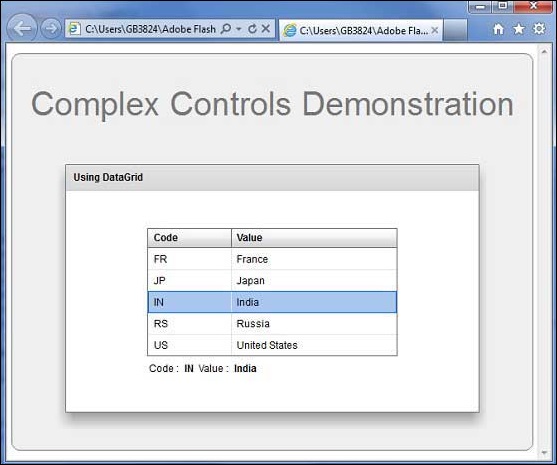
完成所有更改後,讓我們像在Flex - 建立應用程式章節中一樣,在普通模式下編譯並執行應用程式。如果應用程式一切正常,將會產生以下結果:[ 線上嘗試 ]