
- Adobe Flex 教程
- Flex - 首頁
- Flex - 概述
- Flex - 環境
- Flex - 應用程式
- Flex - 建立應用程式
- Flex - 部署應用程式
- Flex - 生命週期階段
- Flex - 使用 CSS 樣式
- Flex - 使用皮膚樣式
- Flex - 資料繫結
- Flex - 基本控制元件
- Flex - 表單控制元件
- Flex - 複雜控制元件
- Flex - 佈局面板
- Flex - 視覺效果
- Flex - 事件處理
- Flex - 自定義控制元件
- Flex - RPC 服務
- Flex - FlexUnit 整合
- Flex - 除錯應用程式
- Flex - 國際化
- Flex - 列印支援
- Adobe Flex 資源
- Flex - 快速指南
- Flex - 有用資源
- Flex - 討論
Flex - 動畫屬性效果
簡介
此動畫效果在值之間對任意一組屬性進行動畫處理。透過設定 motionPaths 屬性來指定要進行動畫處理的屬性和值。
類宣告
以下是 spark.effects.Animate 類的宣告:
public class Animate
   extends Effect
公共屬性
| 序號 | 屬性及描述 |
|---|---|
| 1 | disableLayout : Boolean 如果為 true,則效果會停用其目標父容器上的佈局,將容器的 autoLayout 屬性設定為 false,並停用目標物件上的任何佈局約束。 |
| 2 | easer : IEaser 此效果的緩動行為。 |
| 3 | interpolator : IInterpolator 此效果用來計算屬性的起始值和結束值之間值的插值器。 |
| 4 | motionPaths : Vector.<MotionPath> MotionPath 物件的向量,每個物件都包含正在進行動畫處理的屬性的名稱以及屬性在動畫期間獲取的值。 |
| 5 | repeatBehavior : String 重複效果的行為,這意味著 repeatCount 等於 0 或 > 1 的效果。 |
公共方法
| 序號 | 方法及描述 |
|---|---|
| 1 | Animate(target:Object = null) 建構函式。 |
事件
| 序號 | 事件及描述 |
|---|---|
| 1 | effectRepeat 當效果開始新的重複時分派,對於重複多次的任何效果。 |
| 2 | effectUpdate 每次效果更新目標時分派。 |
繼承的方法
此類繼承自以下類:
- mx.effects.Effect
- flash.events.EventDispatcher
- Object
Flex 動畫效果示例
讓我們按照以下步驟在 Flex 應用程式中檢查 Animate Effect 的用法,方法是建立一個測試應用程式:
| 步驟 | 描述 |
|---|---|
| 1 | 在包 com.tutorialspoint.client 下建立一個名為 HelloWorld 的專案,如Flex - 建立應用程式章節中所述。 |
| 2 | 修改 HelloWorld.mxml,如下所述。保持其餘檔案不變。 |
| 3 | 編譯並執行應用程式,以確保業務邏輯按要求工作。 |
以下是修改後的 mxml 檔案 src/com.tutorialspoint/HelloWorld.mxml 的內容。
<?xml version = "1.0" encoding = "utf-8"?>
<s:Application xmlns:fx = "http://ns.adobe.com/mxml/2009"
   xmlns:s = "library://ns.adobe.com/flex/spark"
   xmlns:mx = "library://ns.adobe.com/flex/mx
   width = "100%" height = "100%" minWidth = "500" minHeight = "500">

   <fx:Style source = "/com/tutorialspoint/client/Style.css" />
   <fx:Script>
      <![CDATA[
         private function applyAnimateProperties():void {
            animateEffect.play();
         }
      ]]>
   </fx:Script>

   <fx:Declarations>
      <s:Animate id = "animateEffect" duration = "750" target = "{mainHGroup}" >
         <s:SimpleMotionPath valueFrom = "1" valueTo = "15" property = "gap" />
         <s:SimpleMotionPath valueFrom = "0" valueTo = "-50" property = "z" />
      </s:Animate>
   </fx:Declarations>

   <s:BorderContainer width = "630" height = "480" id = "mainContainer"
      styleName = "container">
      <s:VGroup width = "100%" height = "100%" gap = "50"
         horizontalAlign = "center" verticalAlign = "middle">
         <s:Label id = "lblHeader" text = "Effects Demonstration"
            fontSize = "40" color = "0x777777" styleName = "heading" />

         <s:Panel id = "animatePanel" title = "Using Animate"
            width = "500" height = "300" >
            <s:layout>
               <s:VerticalLayout  gap = "10" verticalAlign = "middle"
                  horizontalAlign = "center" />
            </s:layout>

            <s:Button label = "Start Animation" click = "applyAnimateProperties()" />

            <s:HGroup id = "mainHGroup">
               <s:BorderContainer width = "50" height = "50"
                  borderWeight = "2" color = "0x323232" />
               <s:BorderContainer width = "50" height = "50"
                  borderWeight = "2" color = "0x323232" />
               <s:BorderContainer width = "50" height = "50"
                  borderWeight = "2" color = "0x323232" />
            </s:HGroup>
         </s:Panel>
      </s:VGroup>
   </s:BorderContainer>
</s:Application>
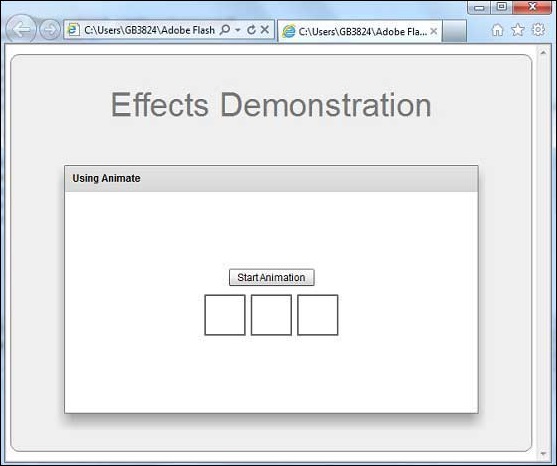
完成所有更改後,讓我們像在Flex - 建立應用程式章節中一樣,在普通模式下編譯並執行應用程式。如果應用程式一切正常,則將產生以下結果:[ 線上嘗試 ]
flex_visual_effects.htm
廣告