
- ASP.NET 教程
- ASP.NET - 首頁
- ASP.NET - 簡介
- ASP.NET - 環境
- ASP.NET - 生命週期
- ASP.NET - 第一個示例
- ASP.NET - 事件處理
- ASP.NET - 伺服器端
- ASP.NET - 伺服器控制元件
- ASP.NET - HTML 伺服器控制元件
- ASP.NET - 客戶端
- ASP.NET - 基本控制元件
- ASP.NET - 指令
- ASP.NET - 狀態管理
- ASP.NET - 驗證器
- ASP.NET - 資料庫訪問
- ASP.NET - ADO.net
- ASP.NET - 檔案上傳
- ASP.NET - 廣告輪播
- ASP.NET - 日曆控制元件
- ASP.NET - 多檢視
- ASP.NET - 面板控制元件
- ASP.NET - AJAX 控制元件
- ASP.NET - 資料來源
- ASP.NET - 資料繫結
- ASP.NET - 自定義控制元件
- ASP.NET - 個性化
- ASP.NET - 錯誤處理
- ASP.NET - 除錯
- ASP.NET - LINQ
- ASP.NET - 安全性
- ASP.NET - 資料快取
- ASP.NET - Web 服務
- ASP.NET - 多執行緒
- ASP.NET - 配置
- ASP.NET - 部署
- ASP.NET 資源
- ASP.NET - 快速指南
- ASP.NET - 有用資源
- ASP.NET - 討論
ASP.NET - Web 服務
Web 服務是一種基於 Web 的功能,它使用 Web 協議進行訪問,供 Web 應用程式使用。Web 服務開發有三個方面
- 建立 Web 服務
- 建立代理
- 使用 Web 服務
建立 Web 服務
Web 服務是一個 Web 應用程式,它本質上是一個類,包含可以被其他應用程式使用的的方法。它也遵循與 ASP.NET 網頁相同的程式碼隱藏架構,儘管它沒有使用者介面。
為了理解這個概念,讓我們建立一個 Web 服務來提供股票價格資訊。客戶端可以根據股票程式碼查詢股票名稱和價格。為了使此示例簡單易懂,值硬編碼在一個二維陣列中。此 Web 服務具有三個方法
- 一個預設的 HelloWorld 方法
- 一個 GetName 方法
- 一個 GetPrice 方法
請按照以下步驟建立 Web 服務
步驟 (1):在 Visual Studio 中選擇檔案 -> 新建 -> 網站,然後選擇 ASP.NET Web 服務。
步驟 (2):一個名為 Service.asmx 的 Web 服務檔案及其程式碼隱藏檔案 Service.cs 將在專案的 App_Code 目錄中建立。
步驟 (3):將檔名更改為 StockService.asmx 和 StockService.cs。
步驟 (4):.asmx 檔案上只有一個 WebService 指令
<%@ WebService Language="C#" CodeBehind="~/App_Code/StockService.cs" Class="StockService" %>
步驟 (5):開啟 StockService.cs 檔案,其中生成的程式碼是基本的 Hello World 服務。預設的 Web 服務程式碼隱藏檔案如下所示
using System;
using System.Collections;
using System.ComponentModel;
using System.Data;
using System.Linq;

using System.Web;
using System.Web.Services;
using System.Web.Services.Protocols;

using System.Xml.Linq;

namespace StockService
{
   // <summary>
   // Summary description for Service1
   // <summary>

   [WebService(Namespace = "http://tempuri.org/")]
   [WebServiceBinding(ConformsTo = WsiProfiles.BasicProfile1_1)]
   [ToolboxItem(false)]

   // To allow this Web Service to be called from script,
   // using ASP.NET AJAX, uncomment the following line.
   // [System.Web.Script.Services.ScriptService]

   public class Service1 : System.Web.Services.WebService
   {
      [WebMethod]

      public string HelloWorld()
      {
         return "Hello World";
      }
   }
}
步驟 (6):更改程式碼隱藏檔案以新增股票程式碼、名稱和價格的二維字串陣列,以及兩個用於獲取股票資訊的方法。
using System;
using System.Linq;

using System.Web;
using System.Web.Services;
using System.Web.Services.Protocols;

using System.Xml.Linq;

[WebService(Namespace = "http://tempuri.org/")]
[WebServiceBinding(ConformsTo = WsiProfiles.BasicProfile1_1)]

// To allow this Web Service to be called from script,
// using ASP.NET AJAX, uncomment the following line.
// [System.Web.Script.Services.ScriptService]

public class StockService : System.Web.Services.WebService
{
   public StockService () {
      //Uncomment the following if using designed components
      //InitializeComponent();
   }

   string[,] stocks =
   {
      {"RELIND", "Reliance Industries", "1060.15"},
      {"ICICI", "ICICI Bank", "911.55"},
      {"JSW", "JSW Steel", "1201.25"},
      {"WIPRO", "Wipro Limited", "1194.65"},
      {"SATYAM", "Satyam Computers", "91.10"}
   };

   [WebMethod]
   public string HelloWorld() {
      return "Hello World";
   }

   [WebMethod]
   public double GetPrice(string symbol)
   {
      //it takes the symbol as parameter and returns price
      for (int i = 0; i < stocks.GetLength(0); i++)
      {
         if (String.Compare(symbol, stocks[i, 0], true) == 0)
         return Convert.ToDouble(stocks[i, 2]);
      }

      return 0;
   }

   [WebMethod]
   public string GetName(string symbol)
   {
      // It takes the symbol as parameter and
      // returns name of the stock
      for (int i = 0; i < stocks.GetLength(0); i++)
      {
         if (String.Compare(symbol, stocks[i, 0], true) == 0)
         return stocks[i, 1];
      }

      return "Stock Not Found";
   }
}
步驟 (7):執行 Web 服務應用程式會顯示一個 Web 服務測試頁面,該頁面允許測試服務方法。
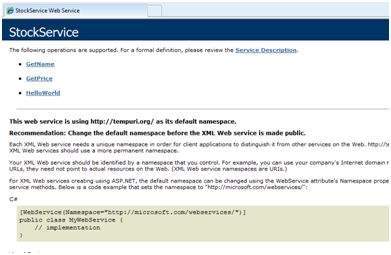
步驟 (8):單擊方法名稱,並檢查它是否正常執行。
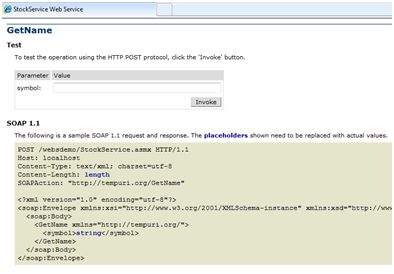
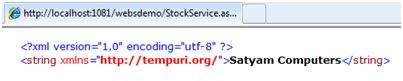
步驟 (9):為了測試 GetName 方法,提供一個硬編碼的股票程式碼,它將返回股票的名稱
使用 Web 服務
要使用 Web 服務,請在同一解決方案下建立一個網站。這可以透過在解決方案資源管理器中右鍵單擊解決方案名稱來完成。呼叫 Web 服務的網頁應具有一個標籤控制元件來顯示返回的結果,以及兩個按鈕控制元件,一個用於回發,另一個用於呼叫服務。
Web 應用程式的內容檔案如下所示
<%@ Page Language="C#" AutoEventWireup="true" CodeBehind="Default.aspx.cs" Inherits="wsclient._Default" %>

<!DOCTYPE html PUBLIC "-//W3C//DTD XHTML 1.0 Transitional//EN" "http://www.w3.org/TR/xhtml1/DTD/xhtml1-transitional.dtd">

<html xmlns="http://www.w3.org/1999/xhtml" >

   <head runat="server">
      <title>
         Untitled Page
      </title>
   </head>

   <body>

      <form id="form1" runat="server">
         <div>

            <h3>Using the Stock Service</h3>

            <br /> <br />

            <asp:Label ID="lblmessage" runat="server"></asp:Label>

            <br /> <br />

            <asp:Button ID="btnpostback" runat="server" onclick="Button1_Click" Text="Post Back" style="width:132px" />

            <asp:Button ID="btnservice" runat="server" onclick="btnservice_Click"  Text="Get Stock" style="width:99px" />

         </div>
      </form>

   </body>
</html>
Web 應用程式的程式碼隱藏檔案如下所示
using System;
using System.Collections;
using System.Configuration;
using System.Data;
using System.Linq;

using System.Web;
using System.Web.Security;
using System.Web.UI;
using System.Web.UI.HtmlControls;
using System.Web.UI.WebControls;
using System.Web.UI.WebControls.WebParts;

using System.Xml.Linq;

//this is the proxy
using localhost;

namespace wsclient
{
   public partial class _Default : System.Web.UI.Page
   {
      protected void Page_Load(object sender, EventArgs e)
      {
         if (!IsPostBack)
         {
            lblmessage.Text = "First Loading Time: " +  DateTime.Now.ToLongTimeString
         }
         else
         {
            lblmessage.Text = "PostBack at: " + DateTime.Now.ToLongTimeString();
         }
      }

      protected void btnservice_Click(object sender, EventArgs e)
      {
         StockService proxy = new StockService();
         lblmessage.Text = String.Format("Current SATYAM Price:{0}",
         proxy.GetPrice("SATYAM").ToString());
      }
   }
}
建立代理
代理是 Web 服務程式碼的替代。在使用 Web 服務之前,必須建立一個代理。代理向客戶端應用程式註冊。然後,客戶端應用程式就像使用本地方法一樣呼叫 Web 服務。
代理接收呼叫,將其包裝成正確的格式,並將其作為 SOAP 請求傳送到伺服器。SOAP 代表簡單物件訪問協議。此協議用於交換 Web 服務資料。
當伺服器將 SOAP 包返回給客戶端時,代理對其進行解碼並將其呈現給客戶端應用程式。
在使用 btnservice_Click 呼叫 Web 服務之前,應嚮應用程式新增 Web 引用。這會透明地建立一個代理類,該類由 btnservice_Click 事件使用。
protected void btnservice_Click(object sender, EventArgs e)
{
   StockService proxy = new StockService();
   lblmessage.Text = String.Format("Current SATYAM Price: {0}",
   proxy.GetPrice("SATYAM").ToString());
}
建立代理的步驟如下
步驟 (1):右鍵單擊解決方案資源管理器中的 Web 應用程式條目,然後單擊“新增 Web 引用”。
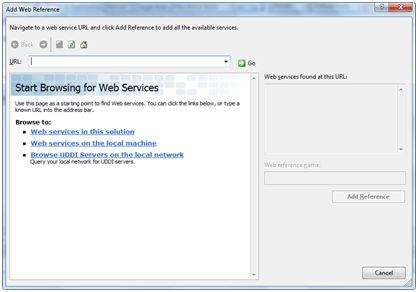
步驟 (2):選擇“此解決方案中的 Web 服務”。它將返回 StockService 引用。
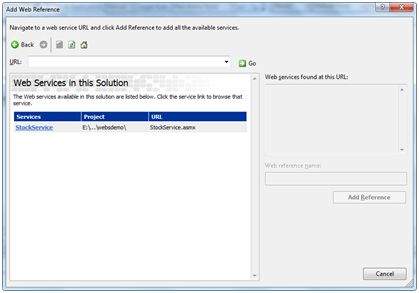
步驟 (3):單擊服務將開啟測試 Web 頁面。預設情況下,建立的代理稱為“localhost”,您可以重新命名它。單擊“新增引用”以將代理新增到客戶端應用程式。
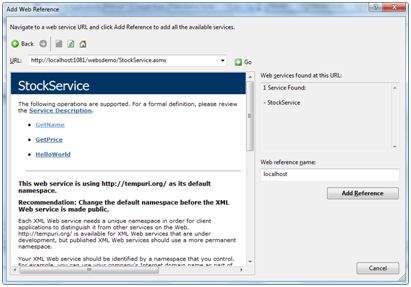
透過新增以下內容,將代理包含在程式碼隱藏檔案中
using localhost;