
- ASP.NET 教程
- ASP.NET - 首頁
- ASP.NET - 簡介
- ASP.NET - 環境
- ASP.NET - 生命週期
- ASP.NET - 第一個示例
- ASP.NET - 事件處理
- ASP.NET - 伺服器端
- ASP.NET - 伺服器控制元件
- ASP.NET - HTML 伺服器控制元件
- ASP.NET - 客戶端
- ASP.NET - 基本控制元件
- ASP.NET - 指令
- ASP.NET - 管理狀態
- ASP.NET - 驗證器
- ASP.NET - 資料庫訪問
- ASP.NET - ADO.net
- ASP.NET - 檔案上傳
- ASP.NET - 廣告輪播
- ASP.NET - 日曆控制元件
- ASP.NET - 多檢視
- ASP.NET - 面板控制元件
- ASP.NET - AJAX 控制元件
- ASP.NET - 資料來源
- ASP.NET - 資料繫結
- ASP.NET - 自定義控制元件
- ASP.NET - 個性化
- ASP.NET - 錯誤處理
- ASP.NET - 除錯
- ASP.NET - LINQ
- ASP.NET - 安全性
- ASP.NET - 資料快取
- ASP.NET - Web 服務
- ASP.NET - 多執行緒
- ASP.NET - 配置
- ASP.NET - 部署
- ASP.NET 資源
- ASP.NET - 快速指南
- ASP.NET - 有用資源
- ASP.NET - 討論
ASP.NET - 個性化
網站是為使用者反覆訪問而設計的。個性化允許網站記住使用者身份和其他資訊細節,併為每個使用者呈現個性化的環境。
ASP.NET 提供了服務,可以個性化網站以滿足特定客戶的品味和偏好。
瞭解配置檔案
ASP.NET 個性化服務基於使用者配置檔案。使用者配置檔案定義了網站需要了解的關於使用者的資訊種類。例如,姓名、年齡、地址、出生日期和電話號碼。
此資訊在應用程式的 web.config 檔案中定義,ASP.NET 執行時讀取並使用它。此工作由個性化提供程式完成。
從使用者資料獲得的使用者配置檔案儲存在 ASP.NET 建立的預設資料庫中。您可以建立自己的資料庫來儲存配置檔案。配置檔案定義儲存在配置檔案 web.config 中。
示例
讓我們建立一個示例網站,我們希望我們的應用程式記住使用者的詳細資訊,例如姓名、地址、出生日期等。在 web.config 檔案的 <system.web> 元素內新增配置檔案詳細資訊。
<configuration>
<system.web>

<profile>
   <properties>
      <add name="Name" type ="String"/>
      <add name="Birthday" type ="System.DateTime"/>

      <group name="Address">
         <add name="Street"/>
         <add name="City"/>
         <add name="State"/>
         <add name="Zipcode"/>
      </group>

   </properties>
</profile>

</system.web>
</configuration>
當配置檔案在 web.config 檔案中定義時,可以通過當前 HttpContext 中的 Profile 屬性使用該配置檔案,也可以透過頁面使用。
新增文字框以獲取使用者輸入(如配置檔案中定義的那樣),並新增一個按鈕以提交資料。
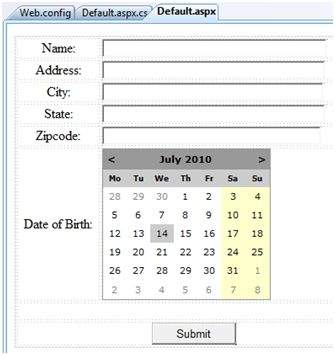
更新 Page_load 以顯示配置檔案資訊。
using System;
using System.Data;
using System.Configuration;

using System.Web;
using System.Web.Security;

using System.Web.UI;
using System.Web.UI.WebControls;
using System.Web.UI.WebControls.WebParts;
using System.Web.UI.HtmlControls;

public partial class _Default : System.Web.UI.Page
{
   protected void Page_Load(object sender, EventArgs e)
   {
      if (!this.IsPostBack)
      {
         ProfileCommon pc=this.Profile.GetProfile(Profile.UserName);

         if (pc != null)
         {
            this.txtname.Text = pc.Name;
            this.txtaddr.Text = pc.Address.Street;
            this.txtcity.Text = pc.Address.City;
            this.txtstate.Text = pc.Address.State;
            this.txtzip.Text = pc.Address.Zipcode;
            this.Calendar1.SelectedDate = pc.Birthday;
         }
      }
   }
}
為提交按鈕編寫以下處理程式,以將使用者資料儲存到配置檔案中。
protected void btnsubmit_Click(object sender, EventArgs e)
{
   ProfileCommon pc=this.Profile.GetProfile(Profile.UserName);

   if (pc != null)
   {
      pc.Name = this.txtname.Text;
      pc.Address.Street = this.txtaddr.Text;
      pc.Address.City = this.txtcity.Text;
      pc.Address.State = this.txtstate.Text;
      pc.Address.Zipcode = this.txtzip.Text;
      pc.Birthday = this.Calendar1.SelectedDate;

      pc.Save();
   }
}
當頁面第一次執行時,使用者需要輸入資訊。但是,下次使用者詳細資訊將自動載入。
<add> 元素的屬性
除了我們已使用的 name 和 type 屬性外,<add> 元素還有其他屬性。下表說明了其中一些屬性。
| 屬性 | 描述 |
|---|---|
| name | 屬性的名稱。 |
| type | 預設型別為字串,但它允許任何完全限定的類名作為資料型別。 |
| serializeAs | 序列化此值時使用的格式。 |
| readOnly | 只讀配置檔案值不能更改,預設情況下此屬性為 false。 |
| defaultValue | 如果配置檔案不存在或沒有資訊,則使用此預設值。 |
| allowAnonymous | 一個布林值,指示此屬性是否可用於匿名配置檔案。 |
| Provider | 應用於管理此屬性的配置檔案提供程式。 |
匿名個性化
匿名個性化允許使用者在識別自己之前個性化網站。例如,Amazon.com 允許使用者在登入前將商品新增到購物車中。要啟用此功能,可以將 web.config 檔案配置為…
<anonymousIdentification enabled ="true" cookieName=".ASPXANONYMOUSUSER"
   cookieTimeout="120000" cookiePath="/" cookieRequiresSSL="false"
   cookieSlidingExpiration="true" cookieprotection="Encryption"
   coolieless="UseDeviceProfile"/>
廣告