
- ASP.NET 教程
- ASP.NET - 首頁
- ASP.NET - 簡介
- ASP.NET - 環境
- ASP.NET - 生命週期
- ASP.NET - 第一個示例
- ASP.NET - 事件處理
- ASP.NET - 伺服器端
- ASP.NET - 伺服器控制元件
- ASP.NET - HTML 伺服器控制元件
- ASP.NET - 客戶端
- ASP.NET - 基本控制元件
- ASP.NET - 指令
- ASP.NET - 狀態管理
- ASP.NET - 驗證器
- ASP.NET - 資料庫訪問
- ASP.NET - ADO.NET
- ASP.NET - 檔案上傳
- ASP.NET - 廣告輪播
- ASP.NET - 日曆控制元件
- ASP.NET - 多檢視
- ASP.NET - 面板控制元件
- ASP.NET - AJAX 控制元件
- ASP.NET - 資料來源
- ASP.NET - 資料繫結
- ASP.NET - 自定義控制元件
- ASP.NET - 個性化設定
- ASP.NET - 錯誤處理
- ASP.NET - 除錯
- ASP.NET - LINQ
- ASP.NET - 安全性
- ASP.NET - 資料快取
- ASP.NET - Web 服務
- ASP.NET - 多執行緒
- ASP.NET - 配置
- ASP.NET - 部署
- ASP.NET 資源
- ASP.NET - 快速指南
- ASP.NET - 有用資源
- ASP.NET - 討論
ASP.NET - HTML 伺服器控制元件
HTML 伺服器控制元件基本上是經過增強的標準 HTML 控制元件,能夠啟用伺服器端處理。諸如標題標籤、錨標籤和輸入元素之類的 HTML 控制元件不會由伺服器處理,而是傳送到瀏覽器進行顯示。
透過新增屬性 `runat="server"` 和 `id` 屬性,可以將它們專門轉換為伺服器控制元件,以便在伺服器端進行處理。
例如,考慮 HTML 輸入控制元件
<input type="text" size="40">
透過新增 `runat` 和 `id` 屬性,可以將其轉換為伺服器控制元件
<input type="text" id="testtext" size="40" runat="server">
使用 HTML 伺服器控制元件的優勢
雖然 ASP.NET 伺服器控制元件可以執行 HTML 伺服器控制元件完成的每一項工作,但在以下情況下,後者控制元件很有用:
- 使用靜態表格進行佈局。
- 將 HTML 頁面轉換為在 ASP.NET 下執行。
下表描述了 HTML 伺服器控制元件
| 控制元件名稱 | HTML 標籤 |
|---|---|
| HtmlHead | <head>元素 |
| HtmlInputButton | <input type=button|submit|reset> |
| HtmlInputCheckbox | <input type=checkbox> |
| HtmlInputFile | <input type = file> |
| HtmlInputHidden | <input type = hidden> |
| HtmlInputImage | <input type = image> |
| HtmlInputPassword | <input type = password> |
| HtmlInputRadioButton | <input type = radio> |
| HtmlInputReset | <input type = reset> |
| HtmlInputText | <input type = text|password> |
| HtmlImage | <img> 元素 |
| HtmlLink | <link> 元素 |
| HtmlAnchor | <a> 元素 |
| HtmlButton | <button> 元素 |
| HtmlButton | <button> 元素 |
| HtmlForm | <form> 元素 |
| HtmlTable | <table> 元素 |
| HtmlTableCell | <td> 和 <th> |
| HtmlTableRow | <tr> 元素 |
| HtmlTitle | <title> 元素 |
| HtmlSelect | <select> 元素 |
| HtmlGenericControl | 所有未列出的 HTML 控制元件 |
示例
以下示例使用基本的 HTML 表格進行佈局。它使用一些框來獲取使用者的輸入,例如姓名、地址、城市、州等。它還有一個按鈕控制元件,單擊該控制元件可以將使用者資料顯示在表格的最後一行。
頁面在設計檢視中應如下所示
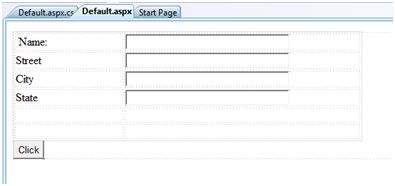
內容頁面的程式碼顯示了使用 HTML 表格元素進行佈局。
<%@ Page Language="C#" AutoEventWireup="true" CodeBehind="Default.aspx.cs" Inherits="htmlserver._Default" %>

<!DOCTYPE html PUBLIC "-//W3C//DTD XHTML 1.0 Transitional//EN" "http://www.w3.org/TR/xhtml1/DTD/xhtml1-transitional.dtd">

<html xmlns="http://www.w3.org/1999/xhtml" >

   <head runat="server">
      <title>Untitled Page</title>

      <style type="text/css">
         .style1
         {
            width: 156px;
         }
         .style2
         {
            width: 332px;
         }
      </style>

   </head>

   <body>
      <form id="form1" runat="server">
         <div>
            <table style="width: 54%;">
               <tr>
                  <td class="style1">Name:</td>
                  <td class="style2">
                     <asp:TextBox ID="txtname" runat="server"  style="width:230px">
                     </asp:TextBox>
                  </td>
               </tr>

               <tr>
                  <td class="style1">Street</td>
                  <td class="style2">
                     <asp:TextBox ID="txtstreet" runat="server"  style="width:230px">
                     </asp:TextBox>
                  </td>
               </tr>

               <tr>
                  <td class="style1">City</td>
                  <td class="style2">
                     <asp:TextBox ID="txtcity" runat="server"  style="width:230px">
                     </asp:TextBox>
                  </td>
               </tr>

               <tr>
                  <td class="style1">State</td>
                  <td class="style2">
                     <asp:TextBox ID="txtstate" runat="server" style="width:230px">
                     </asp:TextBox>
                  </td>
               </tr>

               <tr>
                  <td class="style1"> </td>
                  <td class="style2"></td>
               </tr>

               <tr>
                  <td class="style1"></td>
                  <td ID="displayrow" runat ="server" class="style2">
                  </td>
               </tr>
            </table>

         </div>
         <asp:Button ID="Button1" runat="server" onclick="Button1_Click" Text="Click" />
      </form>
   </body>
</html>
按鈕控制元件背後的程式碼
protected void Button1_Click(object sender, EventArgs e)
{
   string str = "";
   str += txtname.Text + "<br />";
   str += txtstreet.Text + "<br />";
   str += txtcity.Text + "<br />";
   str += txtstate.Text + "<br />";
   displayrow.InnerHtml = str;
}
觀察以下幾點:
頁面佈局使用了標準的 HTML 標籤。
HTML 表格的最後一行用於資料顯示。它需要伺服器端處理,因此已新增 ID 屬性和 runat 屬性。
廣告