
- ASP.NET 教程
- ASP.NET - 首頁
- ASP.NET - 簡介
- ASP.NET - 環境
- ASP.NET - 生命週期
- ASP.NET - 第一個示例
- ASP.NET - 事件處理
- ASP.NET - 伺服器端
- ASP.NET - 伺服器控制元件
- ASP.NET - HTML 伺服器控制元件
- ASP.NET - 客戶端
- ASP.NET - 基本控制元件
- ASP.NET - 指令
- ASP.NET - 狀態管理
- ASP.NET - 驗證器
- ASP.NET - 資料庫訪問
- ASP.NET - ADO.NET
- ASP.NET - 檔案上傳
- ASP.NET - 廣告輪播
- ASP.NET - 日曆控制元件
- ASP.NET - 多檢視
- ASP.NET - 面板控制元件
- ASP.NET - AJAX 控制元件
- ASP.NET - 資料來源
- ASP.NET - 資料繫結
- ASP.NET - 自定義控制元件
- ASP.NET - 個性化
- ASP.NET - 錯誤處理
- ASP.NET - 除錯
- ASP.NET - LINQ
- ASP.NET - 安全性
- ASP.NET - 資料快取
- ASP.NET - Web 服務
- ASP.NET - 多執行緒
- ASP.NET - 配置
- ASP.NET - 部署
- ASP.NET 資源
- ASP.NET - 快速指南
- ASP.NET - 有用資源
- ASP.NET - 討論
ASP.NET - 面板控制元件
面板控制元件充當頁面上其他控制元件的容器。它控制其包含控制元件的外觀和可見性。它還允許以程式設計方式生成控制元件。
面板控制元件的基本語法如下:
<asp:Panel ID= "Panel1"  runat = "server">
</asp:Panel>
面板控制元件派生自 WebControl 類。因此,它繼承了該類的所有屬性、方法和事件。它本身沒有任何方法或事件。但是,它具有以下自己的屬性:
| 屬性 | 描述 |
|---|---|
| BackImageUrl | 面板背景影像的 URL。 |
| DefaultButton | 獲取或設定面板控制元件中包含的預設按鈕的識別符號。 |
| Direction | 面板中的文字方向。 |
| GroupingText | 允許將文字分組為一個欄位。 |
| HorizontalAlign | 面板中內容的水平對齊方式。 |
| ScrollBars | 指定面板內捲軸的可見性和位置。 |
| Wrap | 允許文字換行。 |
使用面板控制元件
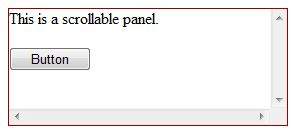
讓我們從一個具有特定高度和寬度以及邊框樣式的簡單可滾動面板開始。ScrollBars 屬性設定為兩個捲軸,因此呈現兩個捲軸。
原始檔包含面板標籤的以下程式碼:
<asp:Panel ID="Panel1" runat="server" BorderColor="#990000" BorderStyle="Solid"
   Borderstyle="width:1px" Height="116px" ScrollBars="Both" style="width:278px">

   This is a scrollable panel.
   <br />
   <br />

   <asp:Button ID="btnpanel" runat="server" Text="Button" style="width:82px" />
</asp:Panel>
面板呈現如下:
示例
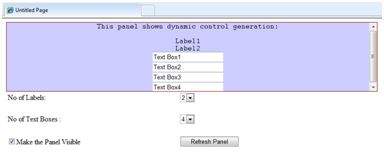
以下示例演示動態內容生成。使用者提供要在面板上生成的標籤控制元件和文字框的數量。控制元件以程式設計方式生成。
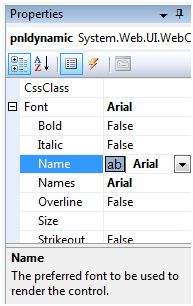
使用屬性視窗更改面板的屬性。當您在設計檢視中選擇一個控制元件時,屬性視窗會顯示該特定控制元件的屬性,並允許您進行更改而無需鍵入。
示例的原始檔如下:
<form id="form1" runat="server">
   <div>
      <asp:Panel ID="pnldynamic" runat="server" BorderColor="#990000"
         BorderStyle="Solid" Borderstyle="width:1px" Height="150px"  ScrollBars="Auto" style="width:60%" BackColor="#CCCCFF"  Font-Names="Courier" HorizontalAlign="Center">

         This panel shows dynamic control generation:
         <br />
         <br />
      </asp:Panel>
   </div>

   <table style="width: 51%;">
      <tr>
         <td class="style2">No of Labels:</td>
         <td class="style1">
            <asp:DropDownList ID="ddllabels" runat="server">
               <asp:ListItem>0</asp:ListItem>
               <asp:ListItem>1</asp:ListItem>
               <asp:ListItem>2</asp:ListItem>
               <asp:ListItem>3</asp:ListItem>
               <asp:ListItem>4</asp:ListItem>
            </asp:DropDownList>
         </td>
      </tr>

      <tr>
         <td class="style2"> </td>
         <td class="style1"> </td>
      </tr>

      <tr>
         <td class="style2">No of Text Boxes :</td>
         <td class="style1">
            <asp:DropDownList ID="ddltextbox" runat="server">
               <asp:ListItem>0</asp:ListItem>
               <asp:ListItem Value="1"></asp:ListItem>
               <asp:ListItem>2</asp:ListItem>
               <asp:ListItem>3</asp:ListItem>
               <asp:ListItem Value="4"></asp:ListItem>
            </asp:DropDownList>
         </td>
      </tr>

      <tr>
         <td class="style2"> </td>
         <td class="style1"> </td>
      </tr>

      <tr>
         <td class="style2">
            <asp:CheckBox ID="chkvisible" runat="server"
               Text="Make the Panel Visible" />
         </td>

         <td class="style1">
            <asp:Button ID="btnrefresh" runat="server" Text="Refresh Panel"
               style="width:129px" />
         </td>
      </tr>
   </table>
</form>
Page_Load 事件背後的程式碼負責動態生成控制元件。
public partial class _Default : System.Web.UI.Page
{
   protected void Page_Load(object sender, EventArgs e)
   {
      //make the panel visible
      pnldynamic.Visible = chkvisible.Checked;

      //generating the lable controls:
      int n = Int32.Parse(ddllabels.SelectedItem.Value);
      for (int i = 1; i <= n; i++)
      {
         Label lbl = new Label();
         lbl.Text = "Label" + (i).ToString();
         pnldynamic.Controls.Add(lbl);
         pnldynamic.Controls.Add(new LiteralControl("<br />"));
      }

      //generating the text box controls:

      int m = Int32.Parse(ddltextbox.SelectedItem.Value);
      for (int i = 1; i <= m; i++)
      {
         TextBox txt = new TextBox();
         txt.Text = "Text Box" + (i).ToString();
         pnldynamic.Controls.Add(txt);
         pnldynamic.Controls.Add(new LiteralControl("<br />"));
      }
   }
}
執行後,面板呈現為:
廣告