
- ASP.NET 教程
- ASP.NET - 首頁
- ASP.NET - 簡介
- ASP.NET - 環境
- ASP.NET - 生命週期
- ASP.NET - 第一個示例
- ASP.NET - 事件處理
- ASP.NET - 伺服器端
- ASP.NET - 伺服器控制元件
- ASP.NET - HTML 伺服器控制元件
- ASP.NET - 客戶端
- ASP.NET - 基本控制元件
- ASP.NET - 指令
- ASP.NET - 狀態管理
- ASP.NET - 驗證器
- ASP.NET - 資料庫訪問
- ASP.NET - ADO.NET
- ASP.NET - 檔案上傳
- ASP.NET - 廣告輪播
- ASP.NET - 日曆控制元件
- ASP.NET - 多檢視
- ASP.NET - 面板控制元件
- ASP.NET - AJAX 控制元件
- ASP.NET - 資料來源
- ASP.NET - 資料繫結
- ASP.NET - 自定義控制元件
- ASP.NET - 個性化
- ASP.NET - 錯誤處理
- ASP.NET - 除錯
- ASP.NET - LINQ
- ASP.NET - 安全性
- ASP.NET - 資料快取
- ASP.NET - Web 服務
- ASP.NET - 多執行緒
- ASP.NET - 配置
- ASP.NET - 部署
- ASP.NET 資源
- ASP.NET - 快速指南
- ASP.NET - 有用資源
- ASP.NET - 討論
ASP.NET - 配置
ASP.NET 應用程式的行為受配置檔案中不同設定的影響。
- machine.config
- web.config
machine.config 檔案包含所有支援設定的預設值和特定於計算機的值。計算機設定由系統管理員控制,應用程式通常無法訪問此檔案。
但是,應用程式可以透過在其根資料夾中建立 web.config 檔案來覆蓋預設值。web.config 檔案是 machine.config 檔案的一個子集。
如果應用程式包含子目錄,則可以為每個資料夾定義一個 web.config 檔案。每個配置檔案的作用域以分層自上而下的方式確定。
任何 web.config 檔案都可以本地擴充套件、限制或覆蓋上級定義的任何設定。
Visual Studio 為每個專案生成一個預設的 web.config 檔案。應用程式可以在沒有 web.config 檔案的情況下執行,但是,如果沒有 web.config 檔案,則無法除錯應用程式。
下圖顯示了 Web 服務教程中使用的示例的解決方案資源管理器。
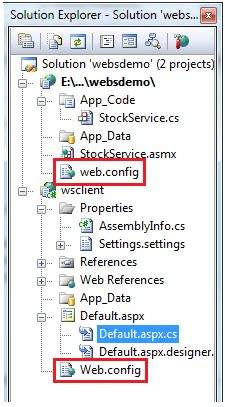
在此應用程式中,有兩個 Web 服務和呼叫 Web 服務的網站,分別有兩個 web.config 檔案。
web.config 檔案具有配置元素作為根節點。此元素內部的資訊分為兩個主要區域:配置節處理程式宣告區域和配置節設定區域。
以下程式碼片段顯示了配置檔案的基本語法。
<configuration>

   <!-- Configuration section-handler declaration area. -->
      <configSections>
         <section name="section1" type="section1Handler" />
         <section name="section2" type="section2Handler" />
      </configSections>
   <!-- Configuration section settings area. -->

   <section1>
      <s1Setting1 attribute1="attr1" />
   </section1>

   <section2>
      <s2Setting1 attribute1="attr1" />
   </section2>

   <system.web>
      <authentication mode="Windows" />
   </system.web>

</configuration>
配置節處理程式宣告
配置節處理程式包含在 <configSections> 標記內。每個配置處理程式指定檔案中包含的配置節的名稱,該節提供一些配置資料。它具有以下基本語法。
<configSections>
   <section />
   <sectionGroup />
   <remove />
   <clear/>
</configSections>
它具有以下元素:
Clear - 它刪除對繼承的節和節組的所有引用。
Remove - 它刪除對繼承的節和節組的引用。
Section - 它定義配置節處理程式和配置元素之間的關聯。
Section group - 它定義配置節處理程式和配置節之間的關聯。
應用程式設定
應用程式設定允許儲存應用程式範圍的名稱-值對以供只讀訪問。例如,您可以定義自定義應用程式設定如下所示:
<configuration>
   <appSettings>
      <add key="Application Name" value="MyApplication" />
   </appSettings>
</configuration>
例如,您還可以儲存書籍的名稱及其 ISBN 號碼。
<configuration>
   <appSettings>
      <add key="appISBN" value="0-273-68726-3" />
      <add key="appBook" value="Corporate Finance" />
   </appSettings>
</configuration>
連線字串
連線字串顯示網站可用的資料庫連線字串。例如:
<connectionStrings>
   <add name="ASPDotNetStepByStepConnectionString"
      connectionString="Provider=Microsoft.Jet.OLEDB.4.0;
      Data Source=E:\\projects\datacaching\ /
      datacaching\App_Data\ASPDotNetStepByStep.mdb"
      providerName="System.Data.OleDb" />

   <add name="booksConnectionString"
      connectionString="Provider=Microsoft.Jet.OLEDB.4.0;
      Data Source=C:\ \databinding\App_Data\books.mdb"
      providerName="System.Data.OleDb" />
</connectionStrings>
System.Web 元素
system.web 元素指定 ASP.NET 配置節的根元素,幷包含配置 ASP.NET Web 應用程式並控制應用程式行為方式的配置元素。
它包含在常用應用程式中需要調整的大多數配置元素。該元素的基本語法如下所示:
<system.web>
   <anonymousIdentification>
   <authentication>
   <authorization>
   <browserCaps>
   <caching>
   <clientTarget>
   <compilation>
   <customErrors>
   <deployment>
   <deviceFilters>
   <globalization>
   <healthMonitoring>
   <hostingEnvironment>
   <httpCookies>
   <httpHandlers>
   <httpModules>
   <httpRuntime>
   <identity>
   <machineKey>
   <membership>
   <mobileControls>
   <pages>
   <processModel>
   <profile>
   <roleManager>
   <securityPolicy>
   <sessionPageState>
   <sessionState>
   <siteMap>
   <trace>
   <trust>
   <urlMappings>
   <webControls>
   <webParts>
   <webServices>
   <xhtmlConformance>
</system.web>
下表提供了 system.web 元素的一些常用子元素的簡要說明。
匿名身份驗證
當需要授權時,這需要識別未經身份驗證的使用者。
身份驗證
它配置身份驗證支援。基本語法如下所示:
<authentication mode="[Windows|Forms|Passport|None]">
   <forms>...</forms>
   <passport/>
</authentication>
授權
它配置授權支援。基本語法如下所示:
<authorization>
   <allow .../>
   <deny .../>
</authorization>
快取
它配置快取設定。基本語法如下所示:
<caching>
   <cache>...</cache>
   <outputCache>...</outputCache>
   <outputCacheSettings>...</outputCacheSettings>
   <sqlCacheDependency>...</sqlCacheDependency>
</caching>
自定義錯誤
它定義自定義錯誤訊息。基本語法如下所示:
<customErrors defaultRedirect="url" mode="On|Off|RemoteOnly">
   <error. . ./>
</customErrors>
部署
它定義用於部署的配置設定。基本語法如下所示:
<deployment retail="true|false" />
託管環境
它定義託管環境的配置設定。基本語法如下所示:
<hostingEnvironment idleTimeout="HH:MM:SS" shadowCopyBinAssemblies="true|false"
   shutdownTimeout="number" urlMetadataSlidingExpiration="HH:MM:SS" />
標識
它配置應用程式的標識。基本語法如下所示:
<identity impersonate="true|false" userName="domain\username"
   password="<secure password>"/>
MachineKey
它配置用於加密和解密表單身份驗證 Cookie 資料的金鑰。
它還允許配置驗證金鑰,該金鑰對檢視狀態資料和表單身份驗證票證執行訊息身份驗證檢查。基本語法為:
<machineKey validationKey="AutoGenerate,IsolateApps" [String]
   decryptionKey="AutoGenerate,IsolateApps" [String]
   validation="HMACSHA256" [SHA1 | MD5 | 3DES | AES | HMACSHA256 |
   HMACSHA384 | HMACSHA512 | alg:algorithm_name]
   decryption="Auto" [Auto | DES | 3DES | AES | alg:algorithm_name]
/>
成員資格
這配置管理和驗證使用者帳戶的引數。基本語法為:
<membership defaultProvider="provider name"
   userIsOnlineTimeWindow="number of minutes" hashAlgorithmType="SHA1">
   <providers>...</providers>
</membership>
頁面
它提供特定於頁面的配置。基本語法為:
<pages asyncTimeout="number" autoEventWireup="[True|False]"
      buffer="[True|False]" clientIDMode="[AutoID|Predictable|Static]"
      compilationMode="[Always|Auto|Never]"
      controlRenderingCompatibilityVersion="[3.5|4.0]"
      enableEventValidation="[True|False]"
      enableSessionState="[True|False|ReadOnly]"
      enableViewState="[True|False]"
      enableViewStateMac="[True|False]"
      maintainScrollPositionOnPostBack="[True|False]"
      masterPageFile="file path"
      maxPageStateFieldLength="number"
      pageBaseType="typename, assembly"
      pageParserFilterType="string"
      smartNavigation="[True|False]"
      styleSheetTheme="string"
      theme="string"
      userControlBaseType="typename"
      validateRequest="[True|False]"
      viewStateEncryptionMode="[Always|Auto|Never]" >

   <controls>...</controls>
   <namespaces>...</namespaces>
   <tagMapping>...</tagMapping>
   <ignoreDeviceFilters>...</ignoreDeviceFilters>
</pages>
配置檔案
它配置使用者配置檔案引數。基本語法為:
<profile enabled="true|false" inherits="fully qualified type reference"
   automaticSaveEnabled="true|false" defaultProvider="provider name">

   <properties>...</properties>
   <providers>...</providers>

</profile>
角色管理器
它配置使用者角色的設定。基本語法為:
<roleManager cacheRolesInCookie="true|false" cookieName="name"
   cookiePath="/" cookieProtection="All|Encryption|Validation|None"
   cookieRequireSSL="true|false " cookieSlidingExpiration="true|false "
   cookieTimeout="number of minutes" createPersistentCookie="true|false"
   defaultProvider="provider name" domain="cookie domain">
   enabled="true|false"
   maxCachedResults="maximum number of role names cached"

   <providers>...</providers>
</roleManager>
安全策略
它配置安全策略。基本語法為:
<securityPolicy>
   <trustLevel />
</securityPolicy>
UrlMappings
它定義對映以隱藏原始 URL 並提供更友好的 URL。基本語法為:
<urlMappings enabled="true|false">
   <add.../>
   <clear />
   <remove.../>
</urlMappings>
WebControls
它提供客戶端指令碼的共享位置的名稱。基本語法為:
<webControls clientScriptsLocation="String" />
WebServices
這配置 Web 服務。