
- QTP 教程
- QTP - 主頁
- QTP - 簡介
- QTP - 測試自動化
- QTP - 環境設定
- QTP - 錄製和回放
- QTP - 物件儲存庫
- QTP - 操作
- QTP - 資料表
- QTP - 檢查點
- QTP - 同步
- QTP - 智慧識別
- QTP - 除錯
- QTP - 錯誤處理
- QTP - 恢復方案
- QTP - 環境變數
- QTP - 庫檔案
- QTP - 測試結果
- QTP - GUI 物件
- QTP - 虛擬物件
- QTP - 訪問資料庫
- QTP - 使用 XML
- QTP - 描述性程式設計
- QTP - 自動化物件模型
- QTP - 框架
- QTP - 設計框架
- QTP 有用資源
- QTP - 問題和答案
- QTP - 快速指南
- QTP - 有用資源
- QTP - 討論
QTP - 子物件
包含在框架或視窗中的物件(文字框、組合框、連結)稱為子物件。有時,我們會遇到這種情況,需要獲取網頁中所有連結的屬性,或獲取視窗中所有單選按鈕的值。
在這些情況下,如果我們想對子物件進行操作,我們需要使用物件描述,透過它,我們將能夠對特定視窗/頁面中的所有物件進行操作。描述性程式設計將在即將到來的章節中詳細介紹,但本章的意義在於瞭解子物件及其用法。
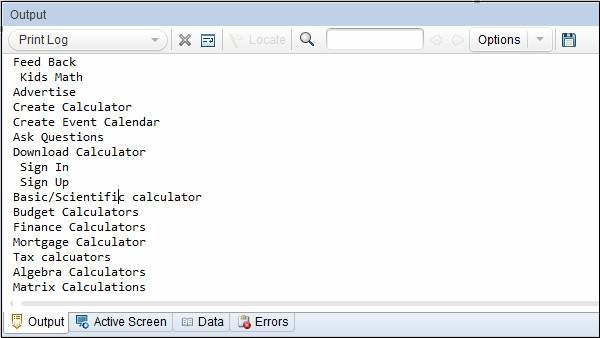
以下指令碼從網站 "www.easycalculation.com" 中獲取連結的名稱
Dim oDesc
Set oDesc = Description.Create
oDesc("micclass").value = "Link"

'Find all the Links
Set obj = Browser("Math Calculator").Page("Math Calculator").ChildObjects(oDesc)

Dim i
'obj.Count value has the number of links in the page

For i = 0 to obj.Count - 1
   'get the name of all the links in the page
   x = obj(i).GetROProperty("innerhtml")
   print x
Next
結果如下所示列印在輸出視窗中 −
qtp_object_repository.htm
廣告