
- QTP 教程
- QTP - 首頁
- QTP - 簡介
- QTP - 測試自動化
- QTP - 環境設定
- QTP - 錄製和回放
- QTP - 物件庫
- QTP - 動作
- QTP - 資料表
- QTP - 檢查點
- QTP - 同步
- QTP - 智慧識別
- QTP - 除錯
- QTP - 錯誤處理
- QTP - 恢復方案
- QTP - 環境變數
- QTP - 庫檔案
- QTP - 測試結果
- QTP - GUI 物件
- QTP - 虛擬物件
- QTP - 訪問資料庫
- QTP - XML 操作
- QTP - 描述性程式設計
- QTP - 自動化物件模型
- QTP - 框架
- QTP - 框架設計
- QTP 有用資源
- QTP - 問答
- QTP - 快速指南
- QTP - 有用資源
- QTP - 討論
QTP - 框架設計
讓我們透過一個示例應用程式來設計一個簡單的框架。我們將自動化被測應用程式的幾個場景,並編寫可重用的函式。
被測示例應用程式是“計算器”,它是Windows自帶的一個預設應用程式。現在讓我們建立框架的不同元件。在這裡,我們將開發一個混合框架並使用物件庫,因為它是一個相當簡單的應用程式。但是,此框架也可以擴充套件以支援複雜的應用程式。
框架的資料夾結構如下所示:
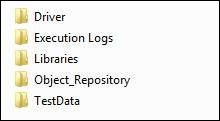
資料夾結構說明:
主驅動指令碼 - 驅動整個執行的指令碼。它執行執行所需的先決條件和初始設定。
庫檔案 - 構成函式庫的相關函式。
資料表 - 執行所需測試資料。
物件庫 - 物件及其屬性,使QTP能夠無縫識別物件。
執行日誌 - 該資料夾包含執行日誌檔案,其中包含使用者函式和函式執行歷史記錄。
主驅動指令碼
'= = = = = = = = = = = = = = = = = = = = = = = = = = = = = = = = = = = = = =
' MASTER DRIVER SCRIPT NAME    : Calculator
' DESCRIPTION                  : Drivers Script to Execute Automated Test for
   the Calculator
' AUTHOR                       : Tutorials Point
' DATE CREATED                 : 30-Dec-2013
' OBJECT REPOSITORY ASSOCIATED : Calc.tsr
' LIBRARY FILES ASSOCIATED     : calculator.qfl, Common.qfl
' MODIFICATION LOG

' ----------------------------------------------------
' First Version       Tutorials point
'= = = = = = = = = = = = = = = = = = = = = = = = = = = = = = = = = = = =
Option Explicit

Public ExecDrive

' Get the Root folder of the Test  so that we can make use of relative paths.
Dim x : x = Instr(Environment.Value("TestDir"),"Driver")-2
ExecDrive = mid(Environment.Value("TestDir"),1,x)

' Get the path of Libraries using relative to the current Drive
Dim LibPath : LibPath = ExecDrive+"\Libraries\"

' Dynamically Load the Function Libraries
LoadFunctionLibrary LibPath + "Calculator.qfl", LibPath + "common_utils.qfl"

' Capturing the Start Time
' clscommon is the class object created in common.qfl library file
clscommon.StartTime = Time()

' Launching the Application
SystemUtil.Run "C:\Windows\System32\Calc.exe" : wait (2)

' Initialize the Data Table Path
Dim FileName : FileName  = ExecDrive+"\TestData\Calculator.xls"
Dim SheetSource : SheetSource  = "Calc_test"
Dim SheetDest : SheetDest = "Global"

' Import the DataTable into the QTP Script
DataTable.ImportSheet  FileName , SheetSource , SheetDest

' Object Repository Path
Dim RepPath : RepPath = ExecDrive+"\Object_Repository\Calc.tsr"
RepositoriesCollection.RemoveAll()
RepositoriesCollection.Add(RepPath)

' To Keep a Count on iteration
Dim InttestIteration
Dim InttestRows : InttestRows = datatable.GetRowCount

'  Fetching Date-TimeStamp which will be unique for Naming the Execution Log File
clscommon.StrDateFormatted = day(date()) & "_" &  MonthName(Month(date()),true) &
 "_" & YEAR(date())& "_"&hour(now)&"_"&minute(now)

 ' Name the LogFile
clscommon.StrLogFile = ExecDrive & "\Execution Logs\" &
clscommon.StrDateFormatted & ".txt"

' Create the Execution LogFile which captures the result
clscommon.Fn_FileCreate(clscommon.StrLogFile)

' Iniitialize the Parameters and all the relevant Test Details
Call Fn_InitializeLogFile()

' Kill all the previous calculator process
Call fn_Kill_Process("calc.exe")

For InttestIteration = 1 to InttestRows
   datatable.SetCurrentRow InttestIteration
   Dim StrExecute : StrExecute = Ucase(Trim(datatable.Value("Run","Global")))
   If StrExecute = "Y" Then
      clscommon.Number1 = Trim(datatable.Value("Number_1","Global"))
      clscommon.Number2 = Trim(datatable.Value("Number_2","Global"))
      clscommon.Number3 = Trim(datatable.Value("Number_3","Global"))

      clscommon.Number4 = Trim(datatable.Value("Number_4","Global"))
      clscommon.Number5 = Trim(datatable.Value("Number_5","Global"))
      clscommon.Number6 = Trim(datatable.Value("Number_6","Global"))

      clscommon.Test_Case_ID  =
         Trim(datatable.Value("Test_Case_ID","Global"))'
            : clscommon.LogWrite "The Test Case Data is Located at :: " & tcDataPath
      clscommon.tcScenario =
         Trim(datatable.Value("Scenario","Global"))'
            : clscommon.LogWrite "The Test Case Data is Located at :: " & tcDataPath
      Dim  Expected_Val :  Expected_Val =
         Trim(datatable.Value("Expected_Val","Global"))'
            :  clscommon.LogWrite "The Test Case Data is Located at :: " & tcDataPath

      Select case clscommon.tcScenario
         Case "Add"
            clscommon.LogWrite "=== Inside the Test Set :: " &
               clscommon.tcScenario & " ==="
                  Call fnCalculate("+",Expected_Val)

         Case "Subtract"
            clscommon.LogWrite "=== Inside the Test Set :: " &
               clscommon.tcScenario & " ==="
                  Call fnCalculate("-",Expected_Val)

         Case "Multiply"
            clscommon.LogWrite "=== Inside the Test Set :: " &
               clscommon.tcScenario & " ==="
                  Call fnCalculate("*",Expected_Val)

         Case "Divide"
            clscommon.LogWrite "=== Inside the Test Set :: " &
               clscommon.tcScenario & " ==="
                  Call fnCalculate("/",Expected_Val)

         Case "Sqrt"
            clscommon.LogWrite "=== Inside the Test Set :: " &
               clscommon.tcScenario & " ==="
                  Call fnCalculate("sqt",Expected_Val)
      End Select
   End If
Next

' Calling the End Test to Add the result Footer in exec log file.
Call fn_End_test()

'  =====================  End of Master Driver Script =====================
庫檔案
計算器函式寫在單獨的函式檔案中,並儲存為 .qfl 或 .vbs 副檔名。這些函式可在操作之間重複使用。
'  Calculator. Qfl File :: Associated Function Library for Calculator Master Driver

'= = = = = = = = = = = = = = = = = = = = = = = = = = = = = = =
' FUNCTION NAME     : Fn_InitializeLogFile
' DESCRIPTION       : Function to Write the Initial Values in the Log File
' INPUT PARAMETERS  : varExecDrive,StrDB,StrUId,Strpwd,StrNewDB
' OUTPUT PARAMETERS : NIL
' RETURN VALUE      : Pass or Fail message
' DATE CREATED      : 30-Dec-2013
'= = = = = = = = = = = = = = = = = = = = = = = = = = = = = = =
Public Function Fn_InitializeLogFile()
   clscommon.LogWrite "********************************************"
   clscommon.LogWrite "Calc Automation Started"
End Function
'= = = = = = = = = = = = = = = = = = = = = = = = = = = = = = = = =
' FUNCTION NAME     : fnCalculate
' DESCRIPTION       : Function to perform Arithmetic Calculations
' INPUT PARAMETERS  : operator,Expected_Val
' OUTPUT PARAMETERS : NIL
' RETURN VALUE      : Pass or Fail message
' DATE CREATED      : 30-Dec-2013
'= = = = = = = = = = = = = = = = = = = = = = = = = = = = = = = = =
Function fnCalculate(operator,Expected_Val)
   clscommon.LogWrite "Executing the Function 'fnCalculate' "

   Window("Calculator").Activate

   If Trim(clscommon.Number1) <> ""  Then
      Window("Calculator").WinButton(clscommon.Number1).Click
   If Trim(clscommon.Number2) <> ""  Then
      Window("Calculator").WinButton(clscommon.Number2).Click
   If Trim(clscommon.Number3) <> ""  Then
      Window("Calculator").WinButton(clscommon.Number3).Click

   Window("Calculator").WinButton(operator).Click
   If Trim(clscommon.Number4) <> ""  Then
      Window("Calculator").WinButton(clscommon.Number4).Click
   If Trim(clscommon.Number5) <> ""  Then
      Window("Calculator").WinButton(clscommon.Number5).Click
   If Trim(clscommon.Number6) <> ""  Then
      Window("Calculator").WinButton(clscommon.Number6).Click

   Window("Calculator").WinButton("=").Click
   Dim ActualVal : ActualVal  =
      Window("Calculator").WinEdit("Edit").GetROProperty("text")
   clscommon.LogWrite "The Actual Value after the Math Operation is "& ActualVal

   If Trim(ActualVal) = Trim(Expected_Val) Then
      clscommon.WriteResult "Pass",  clscommon.Test_Case_ID ,
         clscommon.tcScenario , " Expected Value matches with Actual Value :: "
            & ActualVal

   Else
      clscommon.WriteResult "Fail",  clscommon.Test_Case_ID ,
         clscommon.tcScenario , " Expected Value - " & Expected_Val & " Does NOT matches
            with Actual Value :: " & ActualVal
   End If

   Window("Calculator").WinButton("C").Click

   If Err.Number <> 0  Then
      clscommon.LogWrite  "Execution Error : The Error Number is ::  " &
         Err.Number & " The Error Description is " & Err.Description
      Err.Clear
   End If

   clscommon.LogWrite "Exiting the Function 'fnCalculate' "
End Function

'= = = = = = = = = = = = = = = = = = = = = = = = = = =
' FUNCTION NAME     : fn_Kill_Process
' DESCRIPTION       : Function to Kill the process by name
' INPUT PARAMETERS  : Application name to be killed
' OUTPUT PARAMETERS : NIL
' RETURN VALUE      : NIL
' DATE CREATED      : 30-Dec-2013
'= = = = = = = = = = = = = = = = = = = = = = = = = = =
Function fn_Kill_Process(process)
   Dim strComputer ,  strProcessToKill , objWMIService , colProcessstrComputer = "."
   strProcessToKill = process

   Set objWMIService = GetObject("winmgmts:" _&
      "{impersonationLevel=impersonate}!\\" _& strComputer & "\root\cimv2")

   Set colProcess = objWMIService.ExecQuery _("Select * from Win32_Process
      Where Name = '" & strProcessToKill & "'")

   count = 0
   For Each objProcess in colProcess
      objProcess.Terminate()
      count = count + 1
   Next
End Function

'= = = = = = = = = = = = = = = = = = = = = = = = = = = = = = = = = = = = =
' FUNCTION NAME     : fn_End_test
' DESCRIPTION       : Function to finish the test Execution process
' INPUT PARAMETERS  : Application name to be killed
' OUTPUT PARAMETERS : NIL
' RETURN VALUE      : NIL
' DATE CREATED      : 20/Dec/2013
'= = = = = = = = = = = = = = = = = = = = = = = = = = = = = = = = = = = = =
Function fn_End_test()
   clscommon.LogWrite "Status Message - Executing the Function 'fn_End_test' "

   Window("Calculator").Close
   On Error Resume Next

   clscommon.StopTime = Time()
   clscommon.ElapsedTime = DateDiff("n",clscommon.StartTime,clscommon.StopTime)
   Dim Totaltests
   Totaltests = clscommon.gintPassCount+ clscommon.gintFailCount
   clscommon.LogWrite "## # # # # # # # # # # # # # # # # # # # # # # # # # # # # # # #
   clscommon.LogWrite "##  The Execution Start Time  ::  " & clscommon.StartTime
   clscommon.LogWrite "##  The Execution End Time   ::  " & clscommon.StopTime
   clscommon.LogWrite "##  The Time Elapsed ::   " & clscommon.ElapsedTime & " Minutes "
   clscommon.LogWrite "##  The OS ::  " & Environment.Value("OS")
   clscommon.LogWrite "##  The Total No of Test Cases Executed  ::  " & Totaltests
   clscommon.LogWrite "##  The No. of Test Case Passed ::  " & clscommon.gintPassCount
   clscommon.LogWrite "##  The No. of Test Case Failed ::  " & clscommon.gintFailCount
   clscommon.LogWrite "## # # # # # # # # # # # # # # # # # # # # # # # # # # # # # # #
   SystemUtil.CloseDescendentProcesses
End Function
'  ===============   End of Calculator. Qfl   ============================= '
另一個庫檔案“common_utils.qfl”包含使我們能夠將輸出寫入文字檔案的函式。
Set clscommon = New OS_clsUtils

'Creating a class file to handle global variables.
Class OS_clsUtils
   Dim StrLogFile
   Dim StrDateFormatted
   Dim Result

   Dim  Number1, Number2 , Number3
   Dim  Number4, Number5 , Number6
   Dim Test_Case_ID , tcScenario
   Dim StartTime, StopTime, ElapsedTime

   Dim gintPassCount , gintFailCount , gintWarningCount ,  gintdoneCount,
      gintinfoCount

   Function Fn_FileCreate(strFileName)
      Dim objFSO:  Set objFSO = CreateObject("Scripting.FileSystemObject")
      On Error Resume Next

      Dim objTextFile : Set objTextFile = objFSO.CreateTextFile(strFileName)
      objTextFile.Close

      Set objTextFile = Nothing
      Set objFSO = Nothing
   End Function

   Function LogWrite(sMsg)
      Const ForAppending = 8

      Dim objFSO : Set objFSO = CreateObject("scripting.FileSystemObject")

      Dim objTextFile : Set objTextFile = objFSO.OpenTextFile
         (clscommon.StrLogFile, ForAppending, True)

      objTextFile.WriteLine day(date()) & "/" &  MonthName(Month(date()),true)
         &  "/" & YEAR(date()) & " " & time & ": " & sMsg
      objTextFile.Close

      Set objTextFile = Nothing
      Set objFSO = Nothing
   End Function

   Function WriteResult(strStatus,functionName,functionDescription,Result)
      Const ForAppending = 8
      Dim objFSO : Set objFSO = CreateObject("scripting.FileSystemObject")
      Dim objTextFile : Set objTextFile = objFSO.OpenTextFile
         (clscommon.StrLogFile, ForAppending, True)

      objTextFile.WriteLine day(date()) & "/" &  MonthName(Month(date()),true)
         &  "/" & YEAR(date()) & " " & time & ": " & "
            * * * * * * Test Case Exec Details  * * * * * "

      objTextFile.WriteLine day(date()) & "/" &  MonthName(Month(date()),true)
         &  "/" & YEAR(date()) & " " & time & ": " & " Test staus :: " & strStatus
      objTextFile.WriteLine day(date()) & "/" &  MonthName(Month(date()),true)
         &  "/" & YEAR(date()) & " " & time & ": " & " Tese ID ::  " & functionName
      objTextFile.WriteLine day(date()) & "/" &  MonthName(Month(date()),true)
         &  "/" & YEAR(date()) & " " & time & ": " & " Test Description :: "
            & functionDescription
      objTextFile.WriteLine day(date()) & "/" &  MonthName(Month(date()),true)
         &  "/" & YEAR(date()) & " " & time & ": " & " Test Result Details :: " & Result
      objTextFile.WriteLine day(date()) & "/" &  MonthName(Month(date()),true)
         &  "/" & YEAR(date()) & " " & time & ": " & "
            * * * * * * * * * * * * * * * * * * * * * * * *  * * * * * * * * * * * "
      objTextFile.Close

      Set objTextFile = Nothing
      Set objFSO = Nothing

      Select Case Lcase(strStatus)
         Case "pass"
            gintPassCount = gintPassCount + 1

         Case "fail"
            gintFailCount = gintFailCount+1
      End Select
   End Function
End Class
'   =====================   End of common_Utils.qfl =====================
物件庫
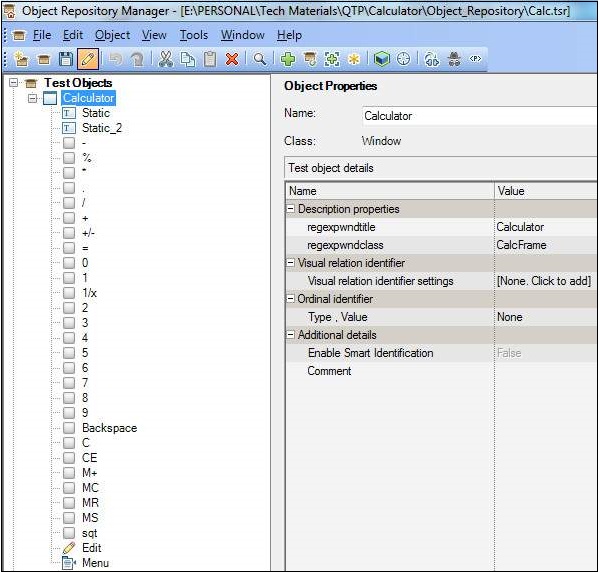
物件庫包含使用者將要操作的所有物件。下圖顯示了新增到名為 calc.tsr 的儲存庫中的所有物件的列表。
資料表
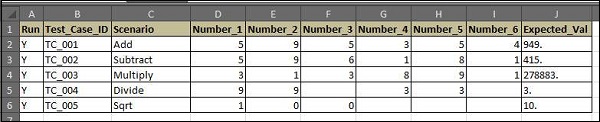
資料表包含驅動測試的關鍵字,以及QTP將對物件進行操作的測試資料。
執行日誌
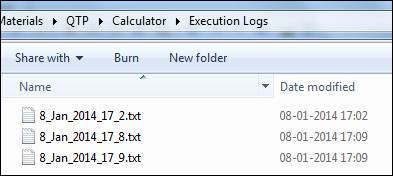
執行日誌檔案或輸出檔案包含使用者操作和函式日誌,這將使測試人員能夠除錯指令碼失敗。
8/Jan/2014 5:09:16 PM: *************************************************
8/Jan/2014 5:09:16 PM: Calc Automation Started
8/Jan/2014 5:09:16 PM: === Inside the Test Set  ::   Add  ===
8/Jan/2014 5:09:16 PM: Executing the Function 'fnCalculate'
8/Jan/2014 5:09:17 PM: The Actual Value after the Math Operation is 949.
8/Jan/2014 5:09:17 PM:  * * * * * * Test Case Exec Details  * * * * *
8/Jan/2014 5:09:17 PM: Test staus :: Pass
8/Jan/2014 5:09:17 PM: Tese ID ::  TC_001
8/Jan/2014 5:09:17 PM: Test Description :: Add
8/Jan/2014 5:09:17 PM: Test Result Details ::  Expected Value matches with Actual
   Value :: 949.
8/Jan/2014 5:09:17 PM: * * * * * * * * * * * * * * * * * * * * * * * *  * *
* * * * * * * * *

8/Jan/2014 5:09:17 PM: Exiting the Function 'fnCalculate'
8/Jan/2014 5:09:17 PM: === Inside the Test Set  ::   Subtract  ===
8/Jan/2014 5:09:17 PM: Executing the Function 'fnCalculate'
8/Jan/2014 5:09:17 PM: The Actual Value after the Math Operation is 415.
8/Jan/2014 5:09:17 PM: * * * * * * Test Case Exec Details  * * * * *
8/Jan/2014 5:09:17 PM: Test staus :: Pass
8/Jan/2014 5:09:17 PM: Tese ID ::  TC_002
8/Jan/2014 5:09:17 PM: Test Description :: Subtract
8/Jan/2014 5:09:17 PM: Test Result Details ::  Expected Value matches with Actual
   Value :: 415.
8/Jan/2014 5:09:17 PM: * * * * * * * * * * * * * * * * * * * * * * * *  * * *
* * * * * * * *

8/Jan/2014 5:09:17 PM: Exiting the Function 'fnCalculate'
8/Jan/2014 5:09:17 PM: === Inside the Test Set  ::   Multiply  ===
8/Jan/2014 5:09:17 PM: Executing the Function 'fnCalculate'
8/Jan/2014 5:09:18 PM: The Actual Value after the Math Operation is 278883.
8/Jan/2014 5:09:18 PM: * * * * * * Test Case Exec Details  * * * * *
8/Jan/2014 5:09:18 PM: Test staus :: Pass
8/Jan/2014 5:09:18 PM: Tese ID ::  TC_003
8/Jan/2014 5:09:18 PM: Test Description :: Multiply
8/Jan/2014 5:09:18 PM:  Test Result Details ::  Expected Value matches with
   Actual Value :: 278883.
8/Jan/2014 5:09:18 PM: * * * * * * * * * * * * * * * * * * * * * * * *  * * *
* * * * * * * *

8/Jan/2014 5:09:18 PM: Exiting the Function 'fnCalculate'
8/Jan/2014 5:09:18 PM: === Inside the Test Set  ::   Divide  ===
8/Jan/2014 5:09:18 PM: Executing the Function 'fnCalculate'
8/Jan/2014 5:09:19 PM: The Actual Value after the Math Operation is 3.
8/Jan/2014 5:09:19 PM: * * * * * * Test Case Exec Details  * * * * *
8/Jan/2014 5:09:19 PM: Test staus :: Pass
8/Jan/2014 5:09:19 PM: Tese ID ::  TC_004
8/Jan/2014 5:09:19 PM: Test Description :: Divide
8/Jan/2014 5:09:19 PM: Test Result Details ::  Expected Value matches with Actual
   Value :: 3.
8/Jan/2014 5:09:19 PM: * * * * * * * * * * * * * * * * * * * * * * * *  * * *
* * * * * * * *

8/Jan/2014 5:09:19 PM: Exiting the Function 'fnCalculate'
8/Jan/2014 5:09:19 PM: === Inside the Test Set  ::   Sqrt  ===
8/Jan/2014 5:09:19 PM: Executing the Function 'fnCalculate'
8/Jan/2014 5:09:20 PM: The Actual Value after the Math Operation is 10.
8/Jan/2014 5:09:20 PM: * * * * * * Test Case Exec Details  * * * * *
8/Jan/2014 5:09:20 PM: Test staus :: Pass
8/Jan/2014 5:09:20 PM: Tese ID ::  TC_005
8/Jan/2014 5:09:20 PM: Test Description :: Sqrt
8/Jan/2014 5:09:20 PM: Test Result Details ::  Expected Value matches with Actual
   Value :: 10.
8/Jan/2014 5:09:20 PM: * * * * * * * * * * * * * * * * * * * * * * * *  * * * *
* * * * * * *

8/Jan/2014 5:09:20 PM: Exiting the Function 'fnCalculate'
8/Jan/2014 5:09:20 PM: Status Message - Executing the Function 'fn_Finish_test'
8/Jan/2014 5:09:20 PM: ## # # # # # # # # # # # # # # # # # # # # # # # # #
# # # # # #
8/Jan/2014 5:09:20 PM: ##  The Execution Start Time  ::  5:09:14 PM
8/Jan/2014 5:09:20 PM: ##  The Execution End Time   ::  5:09:20 PM
8/Jan/2014 5:09:20 PM: ##  The Time Elapsed ::   0 Minutes
8/Jan/2014 5:09:20 PM: ##  The OS ::  Microsoft Windows Vista Server
8/Jan/2014 5:09:20 PM: ##  The Total No of Test Cases Executed  ::  25
8/Jan/2014 5:09:20 PM: ##  The No. of Test Case Passed ::  25
8/Jan/2014 5:09:20 PM: ##  The No. of Test Case Failed ::
8/Jan/2014 5:09:20 PM: ## # # # # # # # # # # # # # # # # # # # # # # # # #
# # # # # #
廣告