
- QTP 教程
- QTP - 首頁
- QTP - 介紹
- QTP - 測試自動化
- QTP - 環境設定
- QTP - 記錄和回放
- QTP - 物件儲存庫
- QTP - 操作
- QTP - 資料表
- QTP - 檢查點
- QTP - 同步
- QTP - 智慧識別
- QTP - 除錯
- QTP - 錯誤處理
- QTP - 恢復場景
- QTP - 環境變數
- QTP - 庫檔案
- QTP - 測試結果
- QTP - GUI 物件
- QTP - 虛擬物件
- QTP - 訪問資料庫
- QTP - 使用 XML
- QTP - 描述性程式設計
- QTP - 自動化物件模型
- QTP - 框架
- QTP - 設計框架
- QTP 有用資源
- QTP - 問答
- QTP - 快速指南
- QTP - 有用資源
- QTP - 討論
QTP - 呼叫新操作
插入新操作呼叫
測試人員可以透過執行以下步驟在指令碼的任何點插入新動作 -
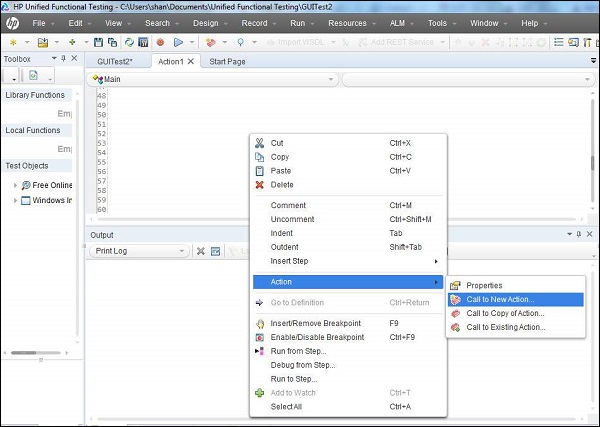
步驟 1 - 右鍵單擊指令碼區域並選擇“新操作呼叫”。
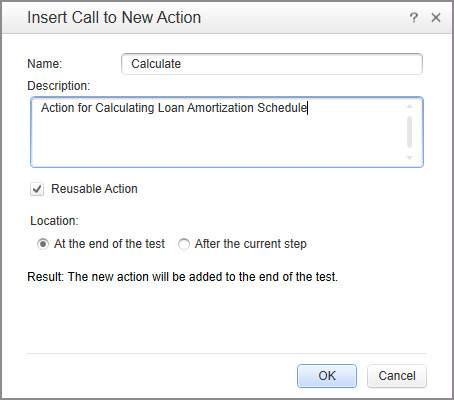
步驟 2 - 在“插入新操作呼叫”視窗中,提供測試名稱、描述,並指定它是否為可重複使用操作。最重要的是,選擇要插入操作的位置。
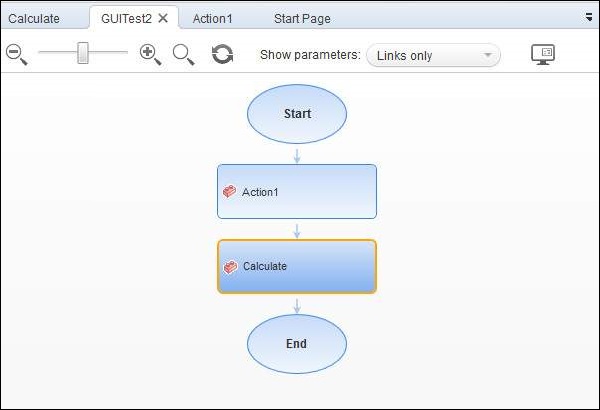
步驟 3 - 您可以以圖形方式在測試名稱選項卡中檢視更改,如下所示 -
您還可以在指令碼中的任何點使用 QTP 命令呼叫動作。
RunAction "Calculate", oneIteration 'Executes Calculate Action for one iteration.
可以透過引數呼叫動作,如下所示 -
'Input to the action
num1 = 5
num2 = 10
Dim value1

'Run the action with parameters
OutputValue = RunAction("Calculate", oneIteration, num1, num2, value1)

'Display the output
print OutputValue
qtp_actions.htm
廣告