
 資料結構
資料結構 網路
網路 關係型資料庫管理系統
 作業系統
作業系統 Java
Java MS Excel
 iOS
iOS HTML
HTML CSS
CSS Android
 Python
 C 程式設計
 C++
C++ C#
C# MongoDB
 MySQL
MySQL Javascript
 PHP
PHP 物理學
物理學 化學
化學 生物學
生物學 數學
數學 英語
英語 經濟學
經濟學 心理學
心理學 社會學
社會學 時尚研究
時尚研究 法律研究
法律研究如何使用 Bokeh 顯示具有不同圖例的字形曲線?
Bokeh 是一個有助於資料視覺化的 Python 包。它是一個開源專案。Bokeh 使用 HTML 和 JavaScript 渲染其繪圖。這表明它在處理基於 Web 的儀表板時非常有用。
Bokeh 將資料來源轉換為 JSON 檔案。此檔案用作 BokehJS 的輸入,BokehJS 是一個 JavaScript 庫。此 BokehJS 使用 TypeScript 編寫,有助於在現代瀏覽器上渲染視覺化效果。
Matplotlib 和 Seaborn 生成靜態繪圖,而 Bokeh 生成互動式繪圖。這意味著當用戶與這些繪圖互動時,它們會相應地發生變化。
繪圖可以嵌入為 Flask 或 Django 啟用的 Web 應用程式的輸出。Jupyter notebook 也可以用來渲染這些繪圖。
Bokeh 的依賴項 -
Numpy
Pillow
Jinja2
Packaging
Pyyaml
Six
Tornado
Python−dateutil
在 Windows 命令提示符下安裝 Bokeh
pip3 install bokeh
在 Anaconda 提示符下安裝 Bokeh
conda install bokeh
以下是一個示例 -
示例
from bokeh.plotting import figure, output_file, show
import numpy as np
import math
x = np.arange(0, math.pi*3.5, 0.09)
fig = figure()
fig.line(x, np.sin(x),line_width = 2, line_color = 'navy', legend = 'sine')
fig.circle(x,np.cos(x), line_width = 2, line_color = 'orange', legend = 'cosine')
fig.square(x,np.tan(x),line_width = 2, line_color = 'cyan', legend = 'tan')
show(fig)
輸出
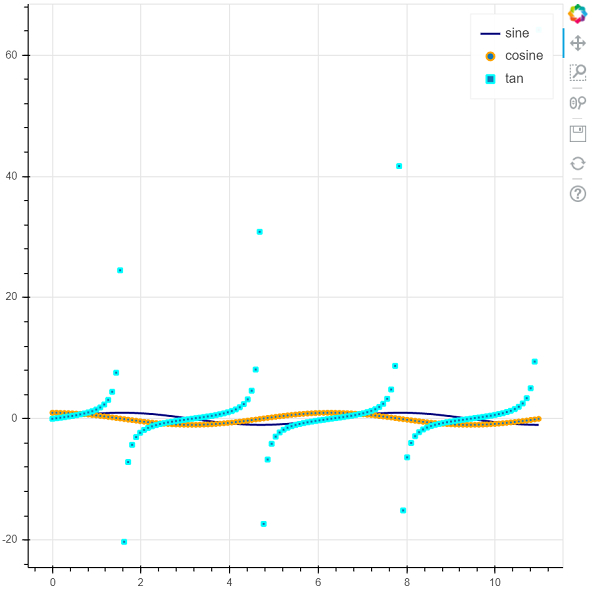
解釋
匯入併為所需的包設定別名。
呼叫 figure 函式。
NumPy 中的 'arange' 函式用於生成資料。
呼叫 'output_file' 函式以指定將生成的 html 檔案的名稱。
呼叫 Bokeh 中的 'line'、'circle' 和 'square' 函式以及資料。
使用 'show' 函式顯示繪圖。

更新於: 2021-01-19
63 次檢視

廣告