- Grav 外掛
- Grav - 外掛基礎
- Grav - 外掛教程
- Grav - 事件鉤子
- Grav 管理面板
- Grav - 管理員簡介
- Grav - 管理員儀表盤
- Grav - 配置系統
- Grav - 站點配置
- Grav - 管理面板頁面
- Grav - 頁面編輯器選項
- Grav - 頁面編輯器高階
- Grav 高階
- Grav - 藍圖
- Grav - 效能和快取
- Grav - 除錯和日誌記錄
- Grav - CLI
- Grav - GPM
- Grav - 開發
- Grav - 生命週期
- Grav - YAML 語法
- Grav - 表單
- Grav 託管
- Grav - 虛擬主機
- Grav 故障排除
- Grav - 伺服器錯誤
- Grav - 許可權
- Grav 有用資源
- Grav - 面試問題
- Grav - 快速指南
- Grav - 有用資源
- Grav - 討論
Grav - 主題基礎
主題控制 Grav 站點的外觀。Grav 中的主題使用強大的 Twig 模板引擎 構建。
內容頁面和 Twig 模板
您建立的頁面透過名稱或為頁面設定模板標題變數來引用特定的模板檔案。建議使用頁面名稱進行更簡單的維護。
安裝 Grav 基礎包後,您將在 user/pages/01.home 資料夾中找到 **defauld.md** 檔案。該檔名,即 **default**,告訴 Grav 此頁面應使用位於 **themes/<mytheme>/templates** 資料夾中的 twig 模板 **default.html.twig** 進行渲染。
例如,如果您有一個名為 **contact.md** 的檔案,它將使用 twig 模板 **themes/<mytheme>/templates/contact.html.twig** 進行渲染。
主題組織
在以下部分,我們將討論主題組織,即其定義、配置等。
定義和配置
主題資訊將在 **user/themes/antimatter/blueprints.yaml** 檔案中定義,並可選地提供用於管理面板的表單定義。您將在 **Antimatter 主題** 的 **user/themes/antimatter/blueprints.yaml** 檔案中看到以下內容。
name: Antimatter
version: 1.6.0
description: "Antimatter is the default theme included with **Grav**"
icon: empire
author:
   name: Team Grav
   email: devs@getgrav.org
   url: http://getgrav.org
homepage: https://github.com/getgrav/grav-theme-antimatter
demo: http://demo.getgrav.org/blog-skeleton
keywords: antimatter, theme, core, modern, fast, responsive, html5, css3
bugs: https://github.com/getgrav/grav-theme-antimatter/issues
license: MIT

form:
   validation: loose
   fields:
      dropdown.enabled:
         type: toggle
         label: Dropdown in navbar
         highlight: 1
         default: 1
         options:
            1: Enabled
            0: Disabled
         validate:
            type: bool
為了使用主題配置選項,您需要在名為 **user/themes/<mytheme>/<mytheme>.yaml** 的檔案中提供預設設定。
示例
enable: true
主題和外掛事件
主題透過外掛架構與 Grav 互動的能力是 Grav 的另一個強大功能。要實現這一點,只需建立 **user/themes/<mytheme>/<mytheme>.php**(例如,預設 Antimatter 主題的 **antimatter.php**)檔案並使用以下格式。
<?php
namespace Grav\Theme;

use Grav\Common\Theme;

class MyTheme extends Theme {
   public static function getSubscribedEvents() {
      return [
         'onThemeInitialized' => ['onThemeInitialized', 0]
      ];
   }
   public function onThemeInitialized() {
      if ($this->isAdmin()) {
         $this->active = false;
         return;
      }

      $this->enable([
         'onTwigSiteVariables' => ['onTwigSiteVariables', 0]
      ]);
   }
   public function onTwigSiteVariables() {
      $this->grav['assets']
         ->addCss('plugin://css/mytheme-core.css')
         ->addCss('plugin://css/mytheme-custom.css');

      $this->grav['assets']
         ->add('jquery', 101)
         ->addJs('theme://js/jquery.myscript.min.js');
   }
}
模板
Grav 主題的結構沒有固定的規則,只是每個頁面型別的內容必須在 templates/ 資料夾中具有關聯的 twig 模板。
由於頁面內容和 twig 模板之間存在這種緊密耦合,因此最好根據 下載頁面 中提供的 Skeleton 包建立通用主題。
假設您希望在主題中支援模組化模板,您必須建立 **modular/** 資料夾並將 twig 模板檔案儲存在其中。如果要支援表單,則應建立 **form/** 資料夾並在其中儲存表單模板。
藍圖
要為每個模板檔案的選項和配置定義表單,使用 **blueprints/** 資料夾。這些無法透過 **管理員面板** 編輯,並且是可選使用的。沒有 **blueprints** 資料夾,主題也能完全正常工作。
SCSS/LESS/CSS
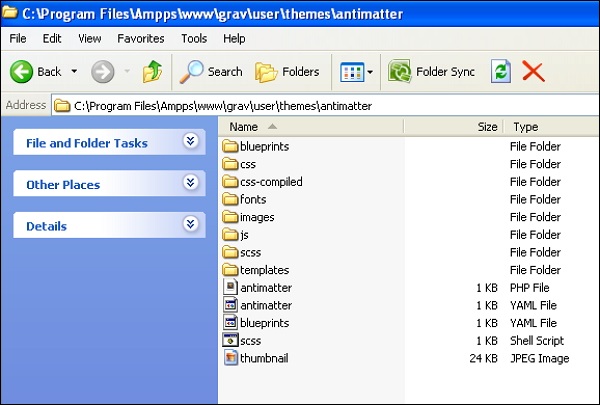
如果要使用 SASS 或 LESS 開發站點,則必須在 **user/themes/<mytheme>/scss/** 或 **less/** 中建立子資料夾(如果要使用 LESS)以及一個 css/ 資料夾。
對於從 SASS 或 LESS 編譯生成的自動生成的檔案,使用 **css-compiled/** 資料夾。在 Antimatter 主題中,使用 SASS 的 **scss** 變體。
請按照以下步驟在您的機器上安裝 SASS。
在主題的根目錄下,鍵入以下命令以執行 scss shell 指令碼。
$ ./scss.sh
- 鍵入以下命令直接執行它。
$ scss --sourcemap --watch scss:css-compiled
**css-compiled/** 將包含所有已編譯的 scss 檔案,並在您的主題中生成 css 檔案。
其他資料夾
建議在您的 **user/themes/<mytheme>/** 資料夾中為主題中使用的任何影像、字型和 JavaScript 檔案建立單獨的 **images/**、**fonts/** 和 **js/** 資料夾。
主題示例
我們迄今為止討論過的 **Antimatter** 主題的整體資料夾結構如下所示。