
- Electron 教程
- Electron - 首頁
- Electron - 概述
- Electron - 安裝
- Electron 的工作原理?
- Electron - Hello World
- Electron - 構建 UI
- Electron - 檔案處理
- Electron - 原生 Node 庫
- 程序間通訊 (IPC)
- Electron - 系統對話方塊
- Electron - 選單
- Electron - 系統托盤
- Electron - 通知
- Electron - Webview
- Electron - 音訊和影片捕獲
- Electron - 定義快捷鍵
- Electron - 環境變數
- Electron - 除錯
- Electron - 打包應用
- Electron - 資源
- Electron 有用資源
- Electron - 快速指南
- Electron - 有用資源
- Electron - 討論
Electron - 原生 Node 庫
我們在上一章中使用了 Node 模組 fs。現在我們將瞭解一些其他可以與 Electron 一起使用的 Node 模組。
OS 模組
使用 OS 模組,我們可以獲取有關應用程式執行所在系統的許多資訊。以下是一些在建立應用程式時有幫助的方法。這些方法幫助我們根據應用程式執行的作業系統定製應用程式。
| 序號 | 函式和描述 |
|---|---|
| 1 | os.userInfo([options]) os.userInfo() 方法返回有關當前有效使用者的資訊。即使沒有明確請求資訊,此資訊也可用於為使用者個性化應用程式。 |
| 2 | os.platform() os.platform() 方法返回一個字串,用於標識作業系統平臺。這可以用於根據使用者作業系統定製應用程式。 |
| 3 | os.homedir() os.homedir() 方法返回當前使用者的 home 目錄(作為字串)。通常,所有使用者的配置都位於使用者的 home 目錄中。因此,這可以用於應用程式的相同目的。 |
| 4 | os.arch() os.arch() 方法返回一個字串,用於標識作業系統的 CPU 架構。這可以在執行奇特架構時用於使您的應用程式適應該系統。 |
| 5 | os.EOL 一個字串常量,定義作業系統特定的行尾標記。在主機作業系統上的檔案中結束行時,應使用此標記。 |
使用相同的 main.js 檔案和以下 HTML 檔案,我們可以在螢幕上列印這些屬性:
<html>
   <head>
      <title>OS Module</title>
   </head>

   <body>
      <script>
         let os = require('os')
         document.write('User Info: ' + JSON.stringify(os.userInfo()) + '<br>' +
            'Platform: ' + os.platform() + '<br>' +
            'User home directory: ' +  os.homedir() + '<br>' +
            'OS Architecture: ' + os.arch() + '<br>')
      </script>
   </body>
</html>
現在使用以下命令執行應用程式:
$ electron ./main.js
上述命令將生成以下輸出:
User Info: {"uid":1000,"gid":1000,"username":"ayushgp","homedir":"/home/ayushgp",
   "shell":"/usr/bin/zsh"}
Platform: linux
User home directory: /home/ayushgp
OS Architecture: x64
Net 模組
Net 模組用於應用程式中的網路相關工作。我們可以使用此模組建立伺服器和套接字連線。通常,建議使用 npm 的包裝器模組而不是 net 模組來執行網路相關任務。
下表列出了該模組中最有用的方法:
| 序號 | 函式和描述 |
|---|---|
| 1 | net.createServer([options][, connectionListener]) 建立一個新的 TCP 伺服器。connectionListener 引數自動設定為 'connection' 事件的偵聽器。 |
| 2 | net.createConnection(options[, connectionListener]) 一個工廠方法,它返回一個新的 'net.Socket' 並連線到指定的地址和埠。 |
| 3 | net.Server.listen(port[, host][, backlog][, callback]) 開始在指定的埠和主機上接受連線。如果省略主機,則伺服器將接受定向到任何 IPv4 地址的連線。 |
| 4 | net.Server.close([callback]) 當所有連線都結束並且伺服器發出 'close' 事件時最終關閉。 |
| 5 | net.Socket.connect(port[, host][, connectListener]) 為給定的套接字開啟連線。如果給出埠和主機,則套接字將作為 TCP 套接字開啟。 |
net 模組還附帶一些其他方法。要獲取更全面的列表,請參閱此處。
現在,讓我們建立一個使用 net 模組建立到伺服器的連線的 Electron 應用程式。我們需要建立一個新檔案,server.js:
var net = require('net');
var server = net.createServer(function(connection) {
   console.log('Client Connected');

   connection.on('end', function() {
      console.log('client disconnected');
   });

   connection.write('Hello World!\r\n');
   connection.pipe(connection);
});

server.listen(8080, function() {
   console.log('Server running on https://:8080');
});
使用相同的 main.js 檔案,將 HTML 檔案替換為以下內容:
<html>
   <head>
      <title>net Module</title>
   </head>

   <body>
      <script>
         var net = require('net');
         var client = net.connect({port: 8080}, function() {
            console.log('Connection established!');
         });

         client.on('data', function(data) {
            document.write(data.toString());
            client.end();
         });

         client.on('end', function() {
            console.log('Disconnected :(');
         });
      </script>
   </body>
</html>
使用以下命令執行伺服器:
$ node server.js
使用以下命令執行應用程式:
$ electron ./main.js
上述命令將生成以下輸出:
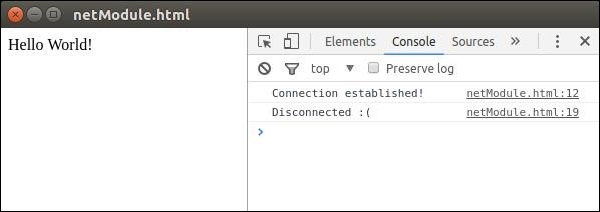
觀察到我們自動連線到伺服器並自動斷開連線。
我們還有一些其他 Node 模組可以直接在 Electron 的前端使用。這些模組的使用取決於您使用它們的場景。