
- Electron 教程
- Electron - 首頁
- Electron - 概覽
- Electron - 安裝
- Electron 如何運作?
- Electron - Hello World
- Electron - 構建 UI
- Electron - 檔案處理
- Electron - 原生 Node 類庫
- 程序間通訊(IPC)
- Electron - 系統對話方塊
- Electron - 選單
- Electron - 系統托盤
- Electron - 通知
- Electron - Webview
- Electron - 音訊和影片捕獲
- Electron - 定義快捷鍵
- Electron - 環境變數
- Electron - 除錯
- Electron - 打包應用
- Electron - 資源
- Electron 有用資源
- Electron - 快速指南
- Electron - 有用資源
- Electron - 討論
Electron - 選單
桌面應用帶有兩種型別的選單 – 應用程式選單(在頂部欄)和 上下文選單(右鍵選單)。本章我們將學習如何建立這兩個選單。
我們將使用兩個模組 – Menu 和 MenuItem 模組。注意,Menu 和 MenuItem 模組僅在主程序中可用。要在渲染器程序中使用這些模組,你需要 remote 模組。當我們建立一個上下文選單時會用到它。
現在,讓我們為 Electron 主程序建立一個新的 main.js 檔案 −
const {app, BrowserWindow, Menu, MenuItem} = require('electron')
const url = require('url')
const path = require('path')

let win

function createWindow() {
   win = new BrowserWindow({width: 800, height: 600})
   win.loadURL(url.format ({
      pathname: path.join(__dirname, 'index.html'),
      protocol: 'file:',
      slashes: true
   }))
}

const template = [
   {
      label: 'Edit',
      submenu: [
         {
            role: 'undo'
         },
         {
            role: 'redo'
         },
         {
            type: 'separator'
         },
         {
            role: 'cut'
         },
         {
            role: 'copy'
         },
         {
            role: 'paste'
         }
      ]
   },

   {
      label: 'View',
      submenu: [
         {
            role: 'reload'
         },
         {
            role: 'toggledevtools'
         },
         {
            type: 'separator'
         },
         {
            role: 'resetzoom'
         },
         {
            role: 'zoomin'
         },
         {
            role: 'zoomout'
         },
         {
            type: 'separator'
         },
         {
            role: 'togglefullscreen'
         }
      ]
   },

   {
      role: 'window',
      submenu: [
         {
            role: 'minimize'
         },
         {
            role: 'close'
         }
      ]
   },

   {
      role: 'help',
      submenu: [
         {
            label: 'Learn More'
         }
      ]
   }
]

const menu = Menu.buildFromTemplate(template)
Menu.setApplicationMenu(menu)
app.on('ready', createWindow)
我們在這裡從模板構建選單。這意味著,我們將選單作為 JSON 提供給函式,函式會處理剩下的工作。現在,我們必須將這個選單設定為應用程式選單。
現在,建立一個名為 index.html 的空 HTML 檔案,並使用以下命令執行此應用程式 −
$ electron ./main.js
在應用程式選單的正常位置,你將看到一個基於上述模板的選單。
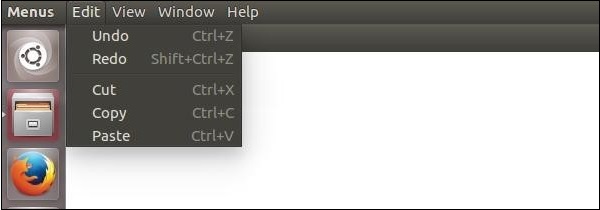
我們從主程序建立了這個選單。現在,讓我們為我們的應用建立一個上下文選單。我們可以在 HTML 檔案中執行此操作 −
<!DOCTYPE html>
<html>
   <head>
      <meta charset = "UTF-8">
      <title>Menus</title>
   </head>

   <body>
      <script type = "text/javascript">
         const {remote} = require('electron')
         const {Menu, MenuItem} = remote

         const menu = new Menu()

         // Build menu one item at a time, unlike
         menu.append(new MenuItem ({
            label: 'MenuItem1',
            click() {
               console.log('item 1 clicked')
            }
         }))

         menu.append(new MenuItem({type: 'separator'}))
         menu.append(new MenuItem({label: 'MenuItem2', type: 'checkbox', checked: true}))
         menu.append(new MenuItem ({
            label: 'MenuItem3',
            click() {
               console.log('item 3 clicked')
            }
         }))

         // Prevent default action of right click in chromium. Replace with our menu.
         window.addEventListener('contextmenu', (e) => {
            e.preventDefault()
            menu.popup(remote.getCurrentWindow())
         }, false)
      </script>
   </body>
</html>
我們使用 remote 模組匯入了 Menu 和 MenuItem 模組;然後,我們建立了一個選單,並將我們的選單項一個個附加到它。此外,我們阻止了 Chromium 中右鍵的預設動作,並用自己的選單替換了它。
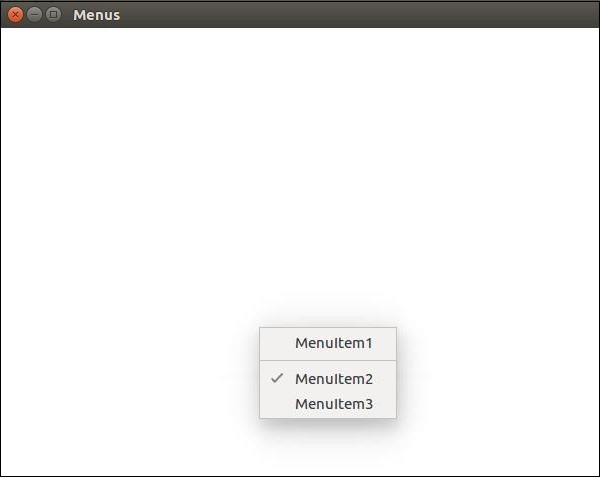
在 Electron 中建立選單是一項非常簡單的任務。現在,你可以將事件處理程式附加到這些項,並根據需要處理事件。
廣告