
- DocumentDB 教程
- DocumentDB - 首頁
- DocumentDB - 簡介
- DocumentDB - 優勢
- DocumentDB - 環境設定
- DocumentDB - 建立賬戶
- DocumentDB - 連線賬戶
- DocumentDB - 建立資料庫
- DocumentDB - 列出資料庫
- DocumentDB - 刪除資料庫
- DocumentDB - 建立集合
- DocumentDB - 刪除集合
- DocumentDB - 插入文件
- DocumentDB - 查詢文件
- DocumentDB - 更新文件
- DocumentDB - 刪除文件
- DocumentDB - 資料建模
- DocumentDB - 資料型別
- DocumentDB - 限制記錄
- DocumentDB - 排序記錄
- DocumentDB - 索引記錄
- DocumentDB - 地理空間資料
- DocumentDB - 分割槽
- DocumentDB - 資料遷移
- DocumentDB - 訪問控制
- DocumentDB - 資料視覺化
- DocumentDB 有用資源
- DocumentDB - 快速指南
- DocumentDB - 有用資源
- DocumentDB - 討論
DocumentDB - 刪除集合
您可以透過門戶以及使用 .Net SDK 的程式碼來刪除集合或多個集合。
步驟 1 − 前往 Azure 門戶上的 DocumentDB 帳戶。出於演示目的,我已經添加了另外兩個集合,如下面的螢幕截圖所示。

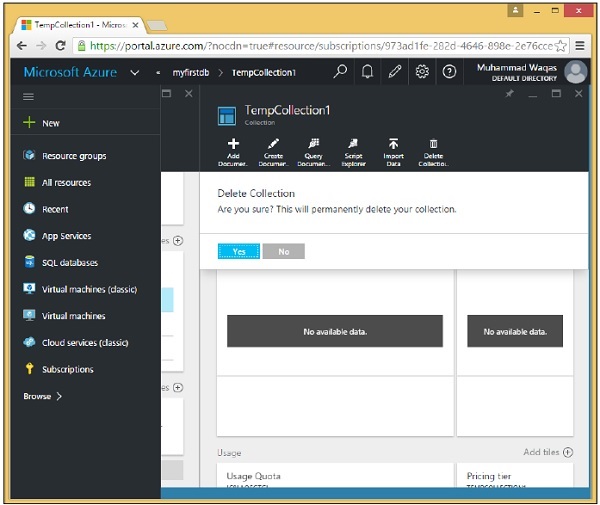
步驟 2 − 要刪除任何集合,您需要點選該集合。讓我們選擇 TempCollection1。您將看到以下頁面,選擇“刪除集合”選項。

步驟 3 − 它將顯示確認訊息。現在點選“是”按鈕。
您將看到 TempCollection1 不再在您的儀表板上可用。

您也可以使用 .Net SDK 從程式碼中刪除集合。為此,以下是步驟。
步驟 1 − 讓我們透過指定要刪除的集合的 ID 來刪除集合。
這是透過 Id 查詢以獲取刪除資源所需 selfLinks 的常用模式。
private async static Task DeleteCollection(DocumentClient client, string collectionId) {
   Console.WriteLine();
   Console.WriteLine("**** Delete Collection {0} in {1} ****", collectionId, database.Id);

   var query = new SqlQuerySpec {
      QueryText = "SELECT * FROM c WHERE c.id = @id",
         Parameters = new SqlParameterCollection {
         new SqlParameter {
            Name = "@id", Value = collectionId
         }
      }
   };

   DocumentCollection collection = client.CreateDocumentCollectionQuery(database.SelfLink,
      query).AsEnumerable().First();

   await client.DeleteDocumentCollectionAsync(collection.SelfLink);
   Console.WriteLine("Deleted collection {0} from database {1}", collectionId,
      database.Id);
}
在這裡,我們看到了構建引數化查詢的首選方法。我們沒有硬編碼 collectionId,因此此方法可用於刪除任何集合。我們正在按 Id 查詢特定集合,其中 Id 引數在此分配給此 SqlQuerySpec 的引數屬性的 SqlParameterCollection 中定義。
然後,SDK 會完成構建 DocumentDB 的最終查詢字串的工作,其中包含在其中的 collectionId。
步驟 2 − 執行查詢,然後使用其 SelfLink 從 CreateDocumentClient 任務中刪除集合。
private static async Task CreateDocumentClient() {
   // Create a new instance of the DocumentClient

   using (var client = new DocumentClient(new Uri(EndpointUrl), AuthorizationKey)) {
      database = client.CreateDatabaseQuery("SELECT * FROM c WHERE c.id =
         'myfirstdb'").AsEnumerable().First();
      await DeleteCollection(client, "TempCollection");
   }
}
以下是 Program.cs 檔案的完整實現。
using System;
using System.Collections.Generic;
using System.Linq;
using System.Text;
using System.Threading.Tasks;

using Microsoft.Azure.Documents;
using Microsoft.Azure.Documents.Client;
using Microsoft.Azure.Documents.Linq;

using Newtonsoft.Json;

namespace DocumentDBDemo {

   class Program {

      private const string EndpointUrl = "https://azuredocdbdemo.documents.azure.com:443/";

      private const string AuthorizationKey = "BBhjI0gxdVPdDbS4diTjdloJq7Fp4L5RO/
         StTt6UtEufDM78qM2CtBZWbyVwFPSJIm8AcfDu2O+AfV T+TYUnBQ==";

      private static Database database;

      static void Main(string[] args) {
         try {
            CreateDocumentClient().Wait();
         } catch (Exception e) {
            Exception baseException = e.GetBaseException();
            Console.WriteLine("Error: {0}, Message: {1}", e.Message, baseException.Message);
         }
         Console.ReadKey();
      }

      private static async Task CreateDocumentClient() {
         // Create a new instance of the DocumentClient
         using (var client = new DocumentClient(new Uri(EndpointUrl), AuthorizationKey)) {
            database = client.CreateDatabaseQuery("SELECT * FROM c WHERE c.id =
               'myfirstdb'").AsEnumerable().First();
            await DeleteCollection(client, "TempCollection");

            //await CreateCollection(client, "MyCollection1");
            //await CreateCollection(client, "MyCollection2", "S2");
            ////await CreateDatabase(client);
            //GetDatabases(client);
            //await DeleteDatabase(client);
            //GetDatabases(client);
         }
      }

      private async static Task CreateCollection(DocumentClient client,
         string collectionId, string offerType = "S1") {

         Console.WriteLine();
         Console.WriteLine("**** Create Collection {0} in {1} ****", collectionId,
            database.Id);

         var collectionDefinition = new DocumentCollection { Id = collectionId };
         var options = new RequestOptions { OfferType = offerType };
         var result = await client.CreateDocumentCollectionAsync(database.SelfLink,
            collectionDefinition, options);

         var collection = result.Resource;

         Console.WriteLine("Created new collection");
         ViewCollection(collection);
      }

      private static void ViewCollection(DocumentCollection collection) {
         Console.WriteLine("Collection ID: {0} ", collection.Id);
         Console.WriteLine("Resource ID: {0} ", collection.ResourceId);
         Console.WriteLine("Self Link: {0} ", collection.SelfLink);
         Console.WriteLine("Documents Link: {0} ", collection.DocumentsLink);
         Console.WriteLine("UDFs Link: {0} ", collection.UserDefinedFunctionsLink);
         Console.WriteLine("StoredProcs Link: {0} ", collection.StoredProceduresLink);
         Console.WriteLine("Triggers Link: {0} ", collection.TriggersLink);
         Console.WriteLine("Timestamp: {0} ", collection.Timestamp);
      }

      private async static Task DeleteCollection(DocumentClient client,
         string collectionId) {

         Console.WriteLine();
         Console.WriteLine("**** Delete Collection {0} in {1} ****", collectionId,
            database.Id);

         var query = new SqlQuerySpec {
            QueryText = "SELECT * FROM c WHERE c.id = @id", Parameters = new
               SqlParameterCollection {
               new SqlParameter {
                  Name = "@id", Value = collectionId
               }
            }
         };

         DocumentCollection collection = client.CreateDocumentCollectionQuery
            (database.SelfLink, query).AsEnumerable().First();

         await client.DeleteDocumentCollectionAsync(collection.SelfLink);
         Console.WriteLine("Deleted collection {0} from database {1}", collectionId,
            database.Id);
      }

   }
}
編譯並執行上述程式碼後,您將收到以下輸出。
**** Delete Collection TempCollection in myfirstdb ****
Deleted collection TempCollection from database myfirstdb
廣告