
- Cypress 教程
- Cypress - 主頁
- Cypress - 介紹
- Cypress - 架構和環境設定
- Cypress - 測試執行器
- Cypress - 構建第一個測試
- Cypress - 支援的瀏覽器
- Cypress - 基本命令
- Cypress - 變數
- Cypress - 別名
- Cypress - 定位器
- Cypress - 斷言
- Cypress - 文字驗證
- Cypress - 非同步行為
- Cypress - 使用 XHR
- Cypress - jQuery
- Cypress - 複選框
- Cypress - 選項卡
- Cypress - 下拉選單
- Cypress - 提醒
- Cypress - 子視窗
- Cypress - 隱藏元素
- Cypress - 框架
- Cypress - 網頁表格
- Cypress - 滑鼠操作
- Cypress - Cookie
- Cypress - 獲取和寫入
- Cypress - 檔案上傳
- Cypress - 資料驅動測試
- Cypress - 提示彈出視窗
- Cypress - 儀表盤
- Cypress - 螢幕截圖和影片
- Cypress - 除錯
- Cypress - 自定義命令
- Cypress - 固定裝置
- Cypress - 環境變數
- Cypress - 掛鉤
- Cypress - JSON 檔案配置
- Cypress - 報告
- Cypress - 外掛
- Cypress - GitHub
- Cypress 實用資源
- Cypress - 快速指南
- Cypress - 實用資源
- Cypress - 討論
Cypress - 文字驗證
可以使用 text 方法獲取網路元素的文字。還可以新增斷言來驗證文字內容。
使用 text() 實現
以下是關於驗證的 text() 命令實現 −
// test suite
describe('Tutorialspoint', function () {
   // it function to identify test
   it('Scenario 1', function (){
      // test step to launch a URL
      cy.visit("https://#")
      // identify element
      cy.get('h1#headingText').find('span').then(function(e){
         //method text to obtain text content
         const t = e.text()
         expect(t).to.contains('Sign')
      })
   })
})
執行結果
輸出如下 −
.jpg)
輸出日誌顯示使用 text 方法獲取的文字為登入。
使用文字斷言實現
我們還可以使用以下命令實現網頁元素文字斷言 −
// test suite
describe('Tutorialspoint', function () {
   // it function to identify test
   it('Scenario 1', function (){
      // test step to launch a URL
      cy.visit("https://#")
      // verify text with have.text
      cy.get('h1#headingText').find('span').should('have.text','Sign in')
   })
})
執行結果
輸出如下 −
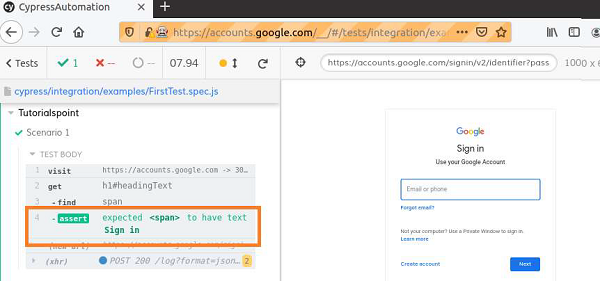
輸出日誌顯示使用 should 斷言完成文字驗證。
廣告