
- Cypress 教程
- Cypress - 首頁
- Cypress - 簡介
- Cypress - 架構和環境設定
- Cypress - 測試執行器
- Cypress - 構建第一個測試
- Cypress - 支援的瀏覽器
- Cypress - 基本命令
- Cypress - 變數
- Cypress - 別名
- Cypress - 定位器
- Cypress - 斷言
- Cypress - 文字驗證
- Cypress - 非同步行為
- Cypress - 使用 XHR
- Cypress - jQuery
- Cypress - 複選框
- Cypress - 標籤頁
- Cypress - 下拉列表
- Cypress - 警報
- Cypress - 子視窗
- Cypress - 隱藏元素
- Cypress - 框架
- Cypress - 網頁表格
- Cypress - 滑鼠操作
- Cypress - Cookie
- Cypress - 獲取和釋出
- Cypress - 檔案上傳
- Cypress - 資料驅動測試
- Cypress - 提示彈出視窗
- Cypress - 儀表盤
- Cypress - 螢幕截圖和影片
- Cypress - 除錯
- Cypress - 自定義命令
- Cypress - 固定裝置
- Cypress - 環境變數
- Cypress - 鉤子
- Cypress - JSON 檔案配置
- Cypress - 報告
- Cypress - 外掛
- Cypress - GitHub
- Cypress 有用資源
- Cypress - 快速指南
- Cypress - 有用資源
- Cypress - 討論
Cypress - 警報
Cypress 預設情況下可以處理警報。彈出視窗可以是警報或確認彈出視窗。Cypress 的設計方式使其始終單擊彈出視窗上的“確定”按鈕。此外,Cypress 能夠觸發瀏覽器事件。
警報由window:alert 事件觸發。預設情況下,Cypress 會處理此事件,並且警報上的“確定”按鈕會被單擊,在執行期間不可見。
但是,執行日誌將顯示警報的存在。
警報實現
下面給出 Cypress 中警報的實現:
describe('Tutorialspoint Test', function () {
   // test case
   it('Scenario 1', function (){
      // launch url
      cy.visit("https://register.rediff.com/register/register.php");
      // click submit
      cy.get('input[type="submit"]').click();
   });
});
執行結果
輸出如下:
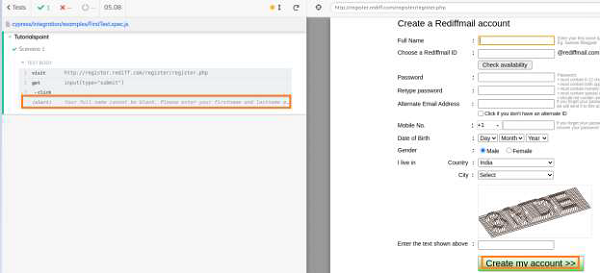
警報訊息顯示在 Cypress 執行日誌中。
Cypress 能夠透過利用 on 方法觸發 window:alert 事件。然後,我們可以驗證警報文字。
但是,此事件將在後端發生,並且在執行期間不可見。
警報文字驗證實現
下面給出了 Cypress 中警報文字驗證的實現:
describe('Tutorialspoint Test', function () {
   // test case
   it('Scenario 1', function (){
      // launch url
      cy.visit("https://register.rediff.com/register/register.php");
      // click submit
      cy.get('input[type="submit"]').click();
      // fire event with method on
      cy.on('window:alert',(t)=>{
         //assertions
         expect(t).to.contains('Your full name');
      })
   });
});
執行結果
輸出如下:
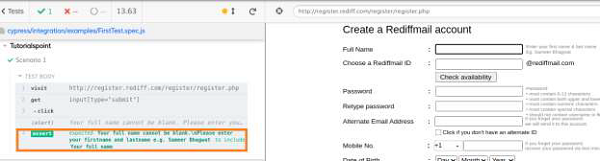
輸出日誌顯示了警報文字的成功驗證,該文字由 Cypress 觸發警報事件產生。
對於確認彈出視窗,將觸發瀏覽器事件 window:confirm。與警報彈出視窗一樣,Cypress 可以使用 on 方法觸發此事件,並預設單擊“確定”按鈕。
示例
讓我們看一下下面的示例。在這裡,單擊“單擊以獲取 JS 確認”按鈕時,會顯示一個確認彈出視窗。

以下確認彈出視窗帶有確定和取消按鈕。
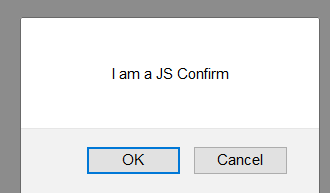
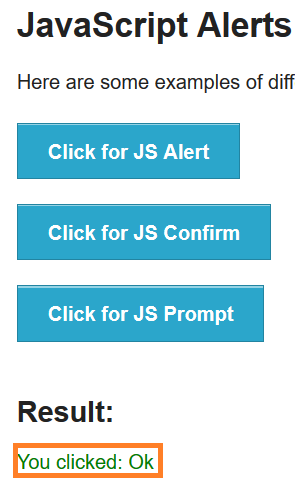
單擊“確定”按鈕後,將顯示以下內容:
You clicked: Ok
將顯示如下所示的影像:
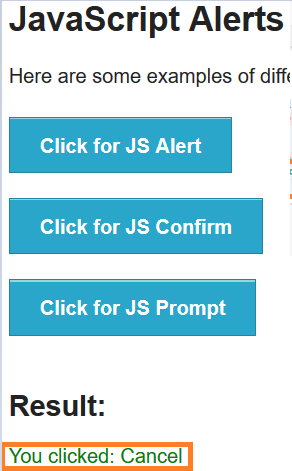
單擊取消按鈕後,將在結果下方顯示以下內容:
You clicked: Cancel
將顯示如下所示的影像:
確認驗證實現
下面給出了 Cypress 中警報確認驗證的實現:
describe('Tutorialspoint Test', function () {
   // test case
   it("Scenario 1", function () {
      //URL launched
      cy.visit("https://the-internet.herokuapp.com/javascript_alerts")
      //fire confirm browser event and accept
      cy.get(':nth-child(2) > button').click()
      cy.on("window:confirm", (t) => {
         //verify text on pop-up
         expect(t).to.equal("I am a JS Confirm");
      });
   });
});
執行結果
輸出如下:
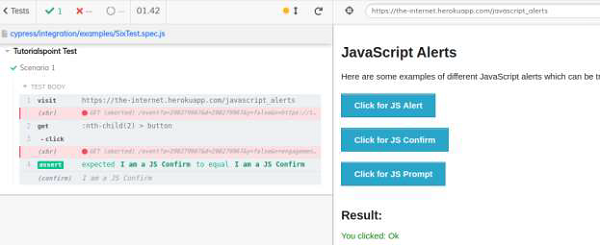
確認驗證實現
下面給出了 Cypress 中警報確認驗證的實現:
describe('Tutorialspoint Test', function () {
   // test case
   it("Scenario 1", function () {
      //URL launched
      cy.visit("https://the-internet.herokuapp.com/javascript_alerts")
      //fire confirm browser event and accept
      cy.get(':nth-child(2) > button').click()
      cy.on("window:confirm", (t) => {
         //verify text on pop-up
         expect(t).to.equal("I am a JS Confirm");
      });
   });
});
執行結果
輸出如下:
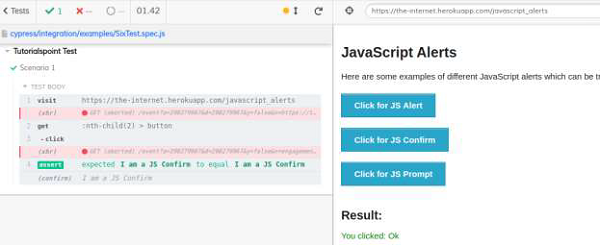
輸出日誌顯示了確認文字的成功驗證,該文字由 Cypress 觸發 confirm 事件產生。
取消點選實現
在 Cypress 中確認彈出視窗上取消點選的實現如下:
describe('Tutorialspoint Test', function () {
   // test case
   it("Scenario 1", function () {
      // URL launched
      cy.visit("https://the-internet.herokuapp.com/javascript_alerts")
      //fire confirm browser event
      cy.on("window:confirm", (s) => {
         return false;
      });
      // click on Click for JS Confirm button
      cy.get(':nth-child(2) > button').click()
      // verify application message on Cancel button click
      cy.get('#result').should('have.text', 'You clicked: Cancel')
   });
});
執行結果
輸出如下:
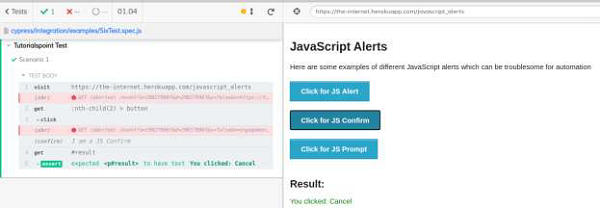
輸出日誌顯示了文字您點選:取消的成功驗證,該文字是在確認彈出視窗上單擊“取消”按鈕時產生的。