
- Cypress 教程
- Cypress - 首頁
- Cypress - 簡介
- Cypress - 架構和環境設定
- Cypress - 測試執行器
- Cypress - 構建第一個測試
- Cypress - 支援的瀏覽器
- Cypress - 基本命令
- Cypress - 變數
- Cypress - 別名
- Cypress - 定位器
- Cypress - 斷言
- Cypress - 文字驗證
- Cypress - 非同步行為
- Cypress - 處理XHR
- Cypress - jQuery
- Cypress - 複選框
- Cypress - 標籤頁
- Cypress - 下拉選單
- Cypress - 警報
- Cypress - 子視窗
- Cypress - 隱藏元素
- Cypress - 框架
- Cypress - 網頁表格
- Cypress - 滑鼠操作
- Cypress - Cookie
- Cypress - 獲取和傳送請求
- Cypress - 檔案上傳
- Cypress - 資料驅動測試
- Cypress - 提示彈出視窗
- Cypress - 儀表盤
- Cypress - 截圖和影片
- Cypress - 除錯
- Cypress - 自定義命令
- Cypress - Fixture
- Cypress - 環境變數
- Cypress - Hook
- Cypress - JSON 檔案配置
- Cypress - 報告
- Cypress - 外掛
- Cypress - GitHub
- Cypress 有用資源
- Cypress - 快速指南
- Cypress - 有用資源
- Cypress - 討論
Cypress - 環境變數
我們可以定義環境變數,這些變數可以全域性宣告用於測試自動化框架,並且所有測試用例都可以訪問它。這種型別的自定義環境變數可以儲存在我們專案中的 cypress.json 檔案中。
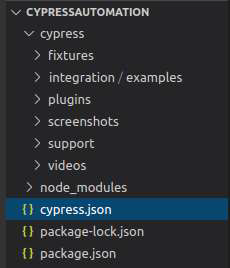
由於 Cypress 的預設配置中沒有公開自定義變數,因此我們必須在 cypress.json 檔案中將鍵指定為“evn”,然後設定值。
此外,要在實際測試中訪問此變數,我們必須使用 Cypress.env 並傳遞在 json 檔案中宣告的值。
cypress.json 中的實現
cypress.json 格式中環境變數命令的實現如下:
{
   "projectId": "fvbpxy",
   "env" :
   {
      "url" : "https://www.google.com/"
   }
}
實際測試的實現
Cypress 中環境變數實際測試的實現如下:
describe('Tutorialspoint Test', function () {
   // test case
   it('Scenario 1', function (){
      // launch application from environment variable
      cy.visit(Cypress.env('url'))
      cy.getCookies()
      cy.setCookie('cookie1', 'value1')
   });
});
執行結果
輸出如下:
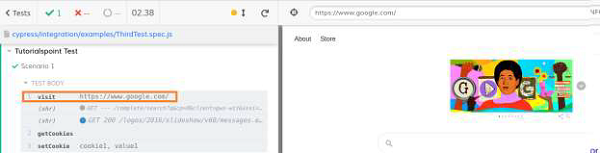
輸出日誌顯示了啟動的 URL,該 URL 已從 cypress.json 檔案中設定為自定義環境變數。
配置環境變數
我們可以使用 --env 標誌從命令列配置或修改環境值。
要以 headed 模式執行特定檔案(例如:Test1.js)並使用 URL:https://#,命令應如下所示
./node_modules/.bin/cypress run --spec cypress/integration/examples/Test1.js --
env url=https://# –headed
如果我們在 cypress.json 檔案中為環境變數 url 設定了一個值,該值與從命令列設定的值不同,則 Cypress 將優先考慮從命令列設定的值。
廣告