
- Cypress 教程
- Cypress - 首頁
- Cypress - 簡介
- Cypress - 架構和環境設定
- Cypress - 測試執行器
- Cypress - 建立第一個測試
- Cypress - 支援的瀏覽器
- Cypress - 基本命令
- Cypress - 變數
- Cypress - 別名
- Cypress - 定位器
- Cypress - 斷言
- Cypress - 文字驗證
- Cypress - 非同步行為
- Cypress - 使用 XHR
- Cypress - jQuery
- Cypress - 複選框
- Cypress - 標籤頁
- Cypress - 下拉選單
- Cypress - 警報
- Cypress - 子視窗
- Cypress - 隱藏元素
- Cypress - 框架
- Cypress - 網頁表格
- Cypress - 滑鼠操作
- Cypress - Cookie
- Cypress - GET 和 POST 請求
- Cypress - 檔案上傳
- Cypress - 資料驅動測試
- Cypress - 提示彈出視窗
- Cypress - 儀表盤
- Cypress - 截圖和影片
- Cypress - 除錯
- Cypress - 自定義命令
- Cypress - Fixtures (夾具)
- Cypress - 環境變數
- Cypress - Hook (鉤子)
- Cypress - JSON 檔案配置
- Cypress - 報告
- Cypress - 外掛
- Cypress - GitHub
- Cypress 有用資源
- Cypress - 快速指南
- Cypress - 有用資源
- Cypress - 討論
Cypress - 資料驅動測試
Cypress 的資料驅動測試是藉助 Fixtures 實現的。Cypress Fixtures 用於維護和儲存自動化測試資料。
Fixtures 位於 Cypress 專案的 fixtures 資料夾中(例如 example.json 檔案)。基本上,它幫助我們從外部檔案獲取資料輸入。
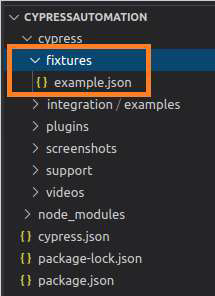
Cypress fixtures 資料夾可以包含 JavaScript 物件表示法 (JSON) 或其他格式的檔案,資料以“鍵值對”的形式維護。
所有測試資料都可以被多個測試使用。所有 Fixture 資料都必須在 before hook 塊中宣告。
語法
Cypress 資料驅動測試的語法如下:
cy.fixture(path of test data)
cy.fixture(path of test data, encoding type)
cy.fixture(path of test data, opts)
cy.fixture(path of test data, encoding type, options)
這裡,
測試資料路徑 是 fixtures 資料夾中測試資料檔案的路徑。
編碼型別 - 編碼型別 (utf-8、asci 等) 用於讀取檔案。
Opts - 修改響應超時時間。預設值為 30000ms。在 cy.fixture() 之前等待時間會丟擲異常。
example.json 中的實現
以下是使用 Cypress 中 example.json 的資料驅動測試的實現:
{
   "email": "abctest@gmail.com",
   "password": "Test@123"
}
實際測試的實現
Cypress 中實際資料驅動測試的實現如下:
describe('Tutorialspoint Test', function () {
   //part of before hook
   before(function(){
      //access fixture data
      cy.fixture('example').then(function(signInData){
         this.signInData = signInData
      })
   })
   // test case
   it('Test Case1', function (){
      // launch URL
      cy.visit("https://www.linkedin.com/")
      //data driven from fixture
      cy.get('#session_key ')
      .type(this.signInData.email)
      cy.get('# session_password').type(this.signInData.password)
   });
});
執行結果
輸出如下:
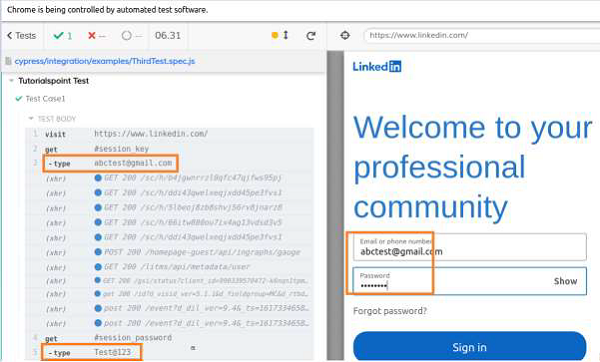
輸出日誌顯示值 abctest@gmail.com 和 Test@123 分別被饋送到電子郵件和密碼欄位。這些資料已從 fixtures 傳遞到測試中。
廣告